
Since I first got my S21 FE, the native clock has always ran fast. At the beginning it was only 6-7 minutes, but it's steadily became faster and faster. As you can see from the screenshot, it's now 9-10 minutes ahead of standard EST.
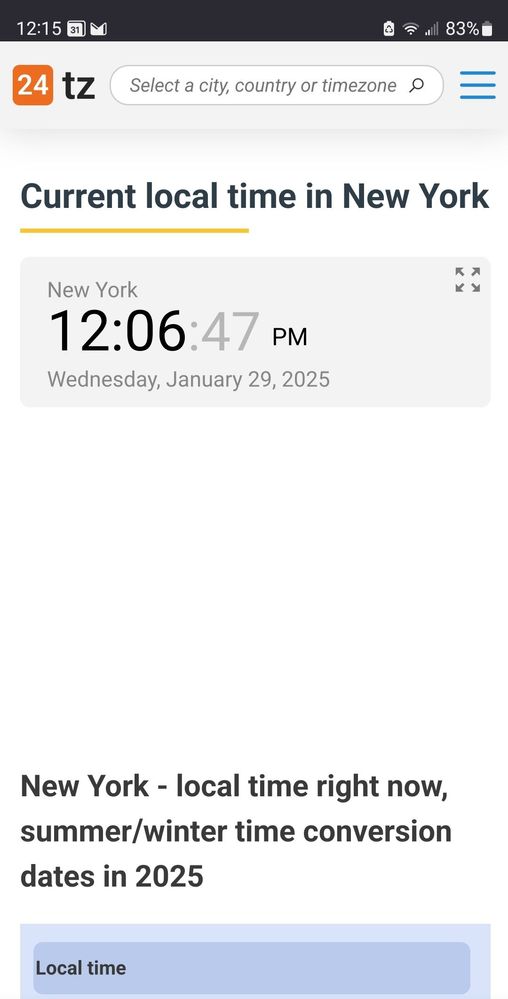
Is there a way to fix/reset this?
Selected Answer
LongHiker
Galactic Samsung Care Ambassador
01-29-2025 06:07 PM
in
@SamWitwicky217 Go to phone settings -> General management -> Date and time. Make sure that Automatic date and time is enabled.
0 likes
Oxford
Honored Contributor
01-29-2025 05:39 PM
in
0 likes
SamWitwicky217
Cosmic Ray
01-29-2025 06:01 PM
in
0 likes
LongHiker
Galactic Samsung Care Ambassador
01-29-2025 06:07 PM
in
@SamWitwicky217 Go to phone settings -> General management -> Date and time. Make sure that Automatic date and time is enabled.
SamWitwicky217
Cosmic Ray
01-29-2025 06:13 PM
in
I had looked in the Clock app settings, but didn't check there. The clock being ahead wasn't as much of a problem as it not being consistent.