
My tv has been working completely fine but now all the sudden I turn it on this morning and it looks like this.. the one darkened patch HELP?View Post
2K
1
0
Two weeks pass after warranty and television screen goes black. I know the TV is electronically awake when turned on because I can hear the "menu sound" when I press the menu button. The sound from the tv is sent to an external sound system, and stops when I turn the TV off. Remember, I can see nothView Post
3K
2
2
I have a new Samsung S95D OLED TV connected via an HDMI 2.1 cable to a Samsung Q900A soundbar. Both connections are using the HDMI eARC port. Anynet+ is enabled. This setup works as expected. I'm trying to disable the TV's Anynet feature to troubleshoot a problem. When I disable Anynet it switches tView Post
4K
1
3
My 65 inch TV sparked fire as my kids were in the same room(now no, it didn't burn down my home but geeze) I can't believe how much trouble I'm having with customer service. The TV wasn't even on nor was it on for the past week but the first customer service rep offered to extend my warranty she eveView Post
3K
1
4
While watching TV last night, it made a very loud POP and sparks shot out the lower left. There is a crack in the lower left and a piece fell off when I touched it. The clear plastic piece along the bottom has damage all the way across. It still works! However I think it is a fire hazard. I see otheView Post
3K
1
1
Sunday evening fox tv programming in California is offered with audio description broadcast. Symbol “AD” shows up at the beginning of each program. My Samsung TV has Video Description turned off as default but the broadcast continues to describe what is happening on the screen in addition to the undView Post
6K
1
2
I have done a lot of research trying to figure this out and can't find a solution. I primarily use the xfinity stream app. On some channels where they're is no HD channel it's a small picture. I try to go into picture settings and the picture size settings is greyed out. Anyone know how to stretch tView Post
5K
2
0
The projector remote’s light blink for certain times. When I press any two button’s it’s shows unavailable. Only I can do switch on and off the projector.View Post
5K
1
0
My 65 inch TV caught on fire while it was turned off and the whole screen completely fell off.......... My 3 year warranty is about to expire And customer service is acting like this is an everyday thing that's not a big deal! Has this happened to others???View Post
3K
1
1
We have been struggling with Samsung plus tv . This is horrible and totally inappropriate. We cannot get out of “I survived “ and it’s sexual and scary and horrific for young kids to watch . We have tried all the help suggestions and when trying to exit or change the app or channel this horrible shoView Post
4K
2
4
Hi samsung, it's me again...... why do you not list the tv storage size in the tv specs? Could.it be because you add so little & are trying to deceive people? Inquiring minds would like to know.View Post
2K
1
3
My Samsung QN90BD 65" Tv Switches to Samsung TV Plus when changing OTA channels I have tried previous fixes resetting remote, changing settings in menu with no help Thank you in advanceView Post
3K
1
1
Samsung has only six categories for over 1200 apps. Searching only lets you look by name. And keywords are useless. Plus, many apps show up under “free” but only later are you told they are free previews. Is there a better search or list either in the Smart Hub or online? What if you want to find frView Post
3K
3
2
Just purchased a new SS TV the u8000 65" series. I am very disappointed in the picture quality, it often looks like a paint by numbers picture. A purple jacket is just solid purple, teeth are solid white, skin tones are blotchy. Not as good as my old 30" Fire TV. I have been trying to make adjustmenView Post
3K
2
0
I have seen a few issues with Samsung TV's less than 5 years old having similar issues. Can anyone help me? My TV is 2.5 yrs old and wont switch on, when I try to turn it on I get a blue screen temporarily and then goes back to a black screen. Under the Samsung logo in the bottom middle of the TV a View Post
6K
4
1
I just set up my new Samsung QN90C and was able to connect and watch my Roku Ultra, but I need to use the Roku remote to control it the Samsung Smart Remote cannot. Is it possible to control a Roku with the Smart Remote? Any help would be appreciated. RayView Post
24K
2
0
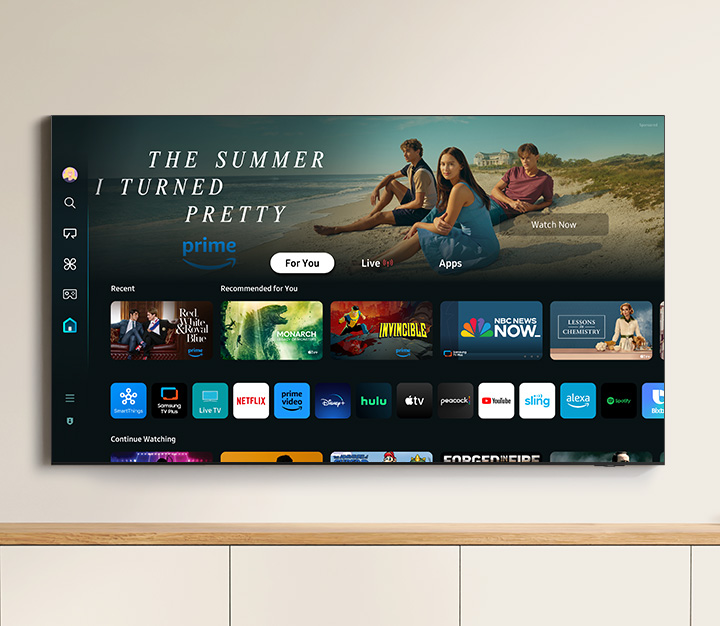
I downloaded the MAX app, but now I can't figure out how to add it to my home screen with the rest of my main apps. I went back to the app store to try through there, but it just opens the MAX app, I can't read the app info or Uninstall or see if the "add to home screen" option is there. I use MAX aView Post
274K
2
22
Hi there, I'm new to this forum, but I'm in desperate need of answers. Basically, my friend and I opened up a 65-inch Samsung TV and replaced the LEDs. However, during the process, the bezel at the bottom got cracked because it was extremely thin. Since then, I've searched everywhere for a replacemeView Post
4K
1
2
New 55" Samsung Smart TV CU8100 doesn't have "Samsung TV Plus" app, so I tried to install "Samsung TV Plus" app going through \settings\Broadcast. Unfortunately, Broadcast option is not available, i.e. in grey color (Inactive mode). Please help me, how can I make "Broadcast" option active, and instaView Post
2K
1
3