Model MU-PA1T0B
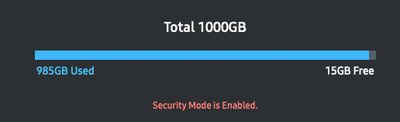
I have a Portable SSD T5 1 TB. It has reached 985GB full, so I decided to delete a bunch of files that I didn't need. After deleting the unnecessary files, I decided to eject the ssd drive, unplug it, plug it back and what i see is still the same storage capacity with it being 985GB full (15GB left). I feel like this is a common issue with people or is it just me? Let me know if you can help!
Opens in new window
PDF Download
Word Download
Excel Download
PowerPoint Download
Document Download
Opens in new window
PDF Download
Word Download
Excel Download
PowerPoint Download
Document Download
Opens in new window
PDF Download
Word Download
Excel Download
PowerPoint Download
Document Download
Opens in new window
PDF Download
Word Download
Excel Download
PowerPoint Download
Document Download
Opens in new window
PDF Download
Word Download
Excel Download
PowerPoint Download
Document Download

Selected Answer
LongHiker
Galactic Samsung Care Ambassador
01-8-2023 10:11 PM
in
@misternewtech After deleting the files, did you empty the computer trash while the drive was connected?
misternewtech
Asteroid
01-9-2023 12:49 AM
in
this solved it brother thanks for your help
0 likes
CptnChinchilla
Cosmic Ray
01-8-2023 11:29 PM
in
0 likes
misternewtech
Asteroid
01-9-2023 12:49 AM
in
this solved it brother!! thank you