
Original topic:
Feature Request: Pinned notifications
(Post creation time:
02-11-2025 09:11 PM
)
7593 Views
M
marleylynn
Asteroid
I'd like to be able to pin any notification to the top of the notifications list. For example, I'd like to pin my weather app notification so it's at the top of the long list of notifications every time I pull them down. Some people may want to pin a music app, a banking app, a home security app or family location app notifications to be pinned so they are always on top. It'd be nice to have the option. Seems like an easy fix.
This post has been closed.
Selected Answer
Samsung_Moderator
Community Manager
02-12-2025 07:25 PM
in
Hello,
Thank you for your interest in sharing your ideas with Samsung. Welcome to the Samsung Community. We appreciate your feedback and will tag it on the forum so that it will appear with other feedback, ideas, and requests. This will allow your post to be more easily found in the event that Samsung product groups are seeking outside feedback/requests/ideas regarding our products.
0 likes
Dan2023
Honored Contributor
02-11-2025 09:22 PM
in
Even if I hit clear, they remain. I have to swipe them to have them removed.
I honestly thought it was the same for everyone.
Dan2023
Honored Contributor
02-12-2025 02:33 AM
in
https://play.google.com/store/apps/details?id=com.apalon.weatherradar.free
0 likes
Dan2023
Honored Contributor
02-12-2025 02:35 AM
in
Samsung_Moderator
Community Manager
02-12-2025 07:25 PM
in
Hello,
Thank you for your interest in sharing your ideas with Samsung. Welcome to the Samsung Community. We appreciate your feedback and will tag it on the forum so that it will appear with other feedback, ideas, and requests. This will allow your post to be more easily found in the event that Samsung product groups are seeking outside feedback/requests/ideas regarding our products.
gussalvtv
Cosmic Ray
02-11-2025 09:35 PM
in
marleylynn
Asteroid
02-11-2025 09:49 PM
in
gussalvtv
Cosmic Ray
02-11-2025 09:53 PM
in
0 likes
realaud
Honored Contributor
02-11-2025 10:23 PM
in
You can't pin notifications, because once you dismiss a notification it goes away. Even if you could pin the notification for the weather, when a new notification comes in, it will not be in the pinned location. Can't you just look out the window for the weather? Or look at your widget? The only weather notifications I need are hurricane and tornado warnings. Why do I need ordinary weather notifications cluttering up my notification area?
marleylynn
Asteroid
02-11-2025 10:49 PM
in
0 likes
realaud
Honored Contributor
02-11-2025 10:58 PM
in
I don't think it takes an inordinate amount of time to scroll through and read notifications, no matter how many there are. I also do not understand how obsessed you have to be with the weather that the widget being on your lock screen or home page is insufficient. I dismiss all notifications as soon as I read them - no sense in having my notification area full of clutter. I also use the weather app, Transparent Clock and Weather, which keeps a permanent large widget in my notification shade. You might want to consider switching.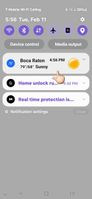
marleylynn
Asteroid
02-11-2025 11:23 PM
in
0 likes
realaud
Honored Contributor
02-12-2025 12:10 AM
in
0 likes
realaud
Honored Contributor
02-12-2025 12:51 AM
in
If you download Good Lock and the Lock Star module. You can turn on the AOD and add the weather widget to the AOD, that way you don't even have to unlock your phone to glance at the weather.
0 likes