
Original topic:
Samsung Washer - Residue (All Types)
(Post creation time:
09-8-2020 02:00 PM
)
276684 Views
U
user3Gs0X9mNnc
Constellation
This morning was the final straw. Model # WA45H7000AW/A2 has had these flakes and sludge looking things ending up on my clothes and in the tub for about 3 years now. I thought it was an old piece of paper that got stuck somewhere and has been coming off in pieces over time. This morning my clothes were cover more than ever before so I did some research and found out this is an ongoing issue and that it's MOLD. Not only have we been in a pandemic but I find out that I've been washing and wearing clothes that have been covered in mold for 3 years!!! This is completely unacceptable SAMSUNG!!!!!
Selected Answer
SamsungKim1
Supernova
09-8-2020 02:42 PM
in
Hey everyone,
To keep your washer tub clean, use the SELF CLEAN cycle at least once a month or every 20 cycles.
Perform the recommended procedures below when using the SELF CLEAN cycle. On 2011–2013 models, the SELF CLEAN cycle is labeled “Pure Cycle.”
Note:
Caution:
If you have additional questions you can go here: https://www.samsung.com/us/support/troubleshooting/TSG01108629/
Or reach out to me or another Moderator in a direct message or call in directly at 1-800-726-7864!
speedy747
Constellation
04-5-2021 05:03 AM
in
0 likes
usermvNJbiPg9T
Constellation
04-20-2021 10:01 PM
in
I’ve had this happen to me prior. I washed a load of whites and a few of my clothes came out with stains and a dark, sludge like substance. Including a brand new shirt that was ruined due to the staining. I had to pre treat everything with stain remover and wash by hand. I ran the self clean cycle which helped for a few washes. It continued to happen here and there. I always wash with HE detergent. I have really severe allergies so I use a small amount of free and clear detergent and no fabric softener. I run self clean cycles every 2 weeks.
Today was by far the worst experience I’ve had with this sludge / debris like substance. I washed my bedding and everything was covered in chunks of it. I decided to do a whole other cycle and rewash, but it was still just as bad. I took everything out. Wiped out the chunks of residue. Did a self clean cycle. There was still residue. I did another self clean cycle, but when I opened the washer up, I found more residue and giants chunks of sludge. I’m about to do my third self clean cycle and waste more water. I don’t know what else to do at this point. I’m so incredibly frustrated. My white sheets are full of dark stains. I’ve already ruined so many clothes. What else!
VanWinkle
Constellation
04-20-2021 11:35 PM
in
If I had to guess the machine has a leak and needs examination and repair, or replacement. Hope this helps.
0 likes
userH38UFNIK9h
Constellation
11-24-2020 06:56 PM
in
Hi,
I've bought my washer at Best buy april/20, from the beginning i've noticed that after a cycle mold was building up on the detergent drawer and also above the drawer (see photos). I tried the clean cycle and it doesn't help this issue. So, after EVERY cycle i have to take out the drawer, clean it with a soft brush and let it dry outside so it doens't get too disgusting but even so it seems not to help prevent the mold to build up. I'm 100% sure this is not supposed to happen on a such new appliance.
userKs7z3hquV3
Constellation
11-29-2020 08:05 PM
in
Check that your drain hose does not go down more than five inches, per manual. Mine is fine now, was almost 17 inches down from installers.
useriGYSmQb6qk
Asteroid
12-8-2020 10:07 PM
in
I've ran the self clean option 6 times (3 with a washing machine cleaner and three without)and I'm still getting brown flakes in the bottom of my washer. I've watched videos on how to clean under the agitator but I cannot get the bolt off. I've seen many posts and many replies but nothing that says the solution works consistently. I really don't want to be calling a repairman right before the holidays just remove a bolt and he tell me to clean out the machine.
Anonymous User
Astronaut
12-10-2020 12:22 AM
in
@useriGYSmQb6qk I am sorry to hear about this. Please send the full model and serial numbers to this PM Link.
0 likes
usernaLy8BGkwq
Asteroid
02-17-2021 07:35 PM
in
You’ve likely found a fix for this but if not try turning the bold clockwise. It’s opposite the usual “ righty tighty”. It says open with and arrow to the right but if your washer is anything like ours it was so covered in gunk we couldn’t see the arrow. Disgusting!
0 likes
userhShBEDhe7J
Asteroid
12-31-2020 01:27 PM
in
I purchased my washer in June of 2016. I have followed the the user manual instructions and used the self clean cycle regularly. This past week I did a load of laundry and found brown "flecks" or dirt on my clothing and on the inside of the tub, I wiped the dirt/mold out and ran another self clean cycle. Again, more dirt/mold. I ran probably 17 self clean cycles. EVERYTIME finding more dirt in the tub if my washer. I called Samsung customer service and was told by the representative to do an over night self clean cycle using affresh or oxi clean. He told me to start the self clean cycle and then hit the delay end button five times. The result, more mold left in my tub. I tried another self clean cycle using oxi clean again. More mold.
I called Samsung customer service again. The person I spoke with said I would need a service call and provided me with the name and phone number of a company in my area. When I called this recommended company and explained the issue I am having, their exact words were "there is nothing we can do to help you."
After doing so research on line I have discovered that this seems to be a common issue for people. I was able to take the agitator out of my washer easily and was completely disgusted by what I found. I have began trying to clean the agitator and the inside of the drum, but I feel completely defeated. You can see on one of the pictures that I have started to get the underside of the agitator clean, but if you look closely the white is "darker" in some areas. That is not a shadow. That is mold on the INSIDE of the agitator. As I run water through the holes, little flecks keep coming out.
I am completely embarrassed, disappointed, and disgusted. My family has been wearing clothes washed in mold for who knows how long now. This is completely unacceptable.
Samsung please do better.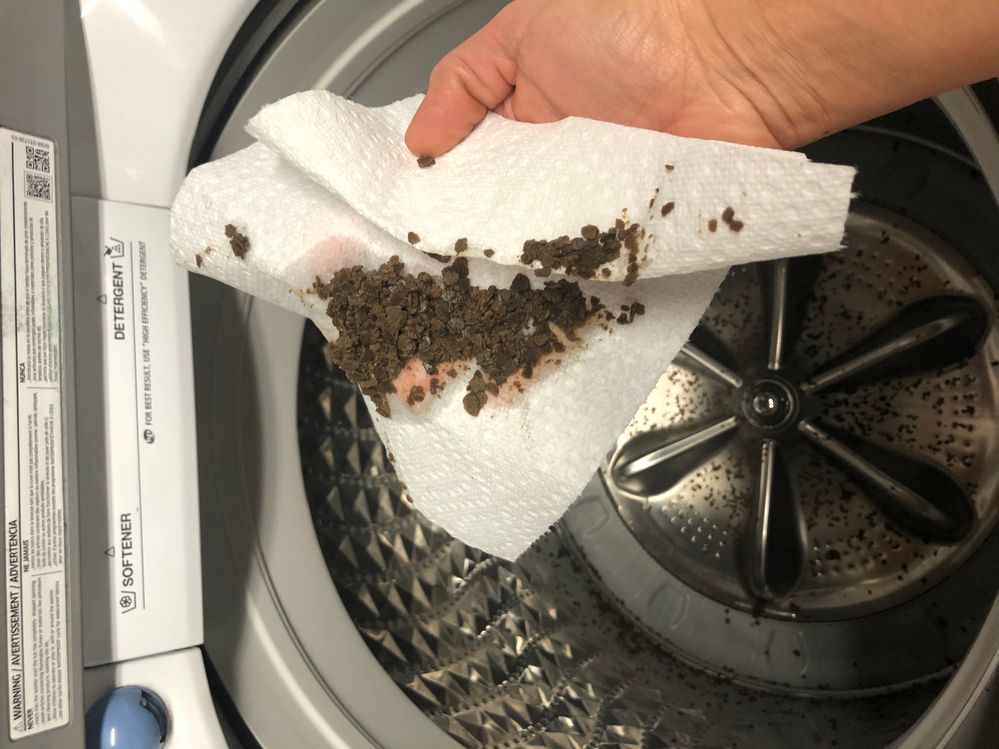
usernaLy8BGkwq
Asteroid
02-17-2021 08:02 PM
in
I have the exact same issue. I spent 5 hours on the phone with Samsung last week and they refused to even acknowledge it was an issue!! They said they hadn’t received any reports of mold on these washers! Boldface lie. Horrifying how negligent they are being. This is a clear health and safety issue!
userhShBEDhe7J
Asteroid
12-31-2020 04:58 PM
in
I purchased my washer in June 2016. Model number WA45H7000AW/A2. I have followed the instructions in my user manual and run the self clean cycle regularly.
A few days ago I did a load of laundry and notice that there was dirt on my clothes and dirt left in the tub of the washer. I cleaned out the dirt and immediately ran a self clean cycle. I was left with more dirt in the tub of the washer. I continued to run self clean cycles (17 of them) every time I would wipe out the dirt that was left in the tub.
I called Samsung customer service and was told by the person that I spoke to that I needed to do an overnight self clean cycle. He told me to use affresh or oxi clean in the tub to set the self clean cycle and press the delay end five times, so that the self clean cycle would run over night for five hours. He said that this should fix my problem.
After using the oxi clean as suggested by the Samsung representative I had even more dirt/mold in the tub of my washer than I had any other time before. I wiped it all out and ran another self clean cycle using oxi clean. I was still left with mold in the tub.
I called Samsung customer service again and was told by the representative that I needed a service call. I was provided with the name and number of a company in my area. When I called the recommend company and explained the issue I am having, their exact words were "there is nothing we can do to help you."
I have now taken the agitator out of my washer to try and clean the mold myself, since this service company is not able to help me. If you look closely you can see that I have started to get the underside of the agitator clean. However, if you look you can see that some parts of the white are darker than others. That is mold on the INSIDE of the agitator. I keep spraying water into it and pieces of mold, keep coming out.
My question is how do I get the mold out from the INSIDE of the agitator?
Samsung, can you help me please?!
Anonymous User
Astronaut
12-31-2020 06:17 PM
in
I am sorry to hear about this. Please send the serial number to this PM Link, and I will look in to this.
0 likes
usernaLy8BGkwq
Asteroid
02-17-2021 07:41 PM
in
I have the same exact issue. Has a fix been found?
0 likes
userhShBEDhe7J
Asteroid
12-31-2020 05:10 PM
in
I have the exact same washer model as you and I am having the exact same issue!!! Have you tried taking the agitator out to see what it looks like on the underside? Oh my goodness, it is gross. There is actually mold on the INSIDE of the agitator. I'm waiting to hear back from Samsung on an adequate way to address this issue. Just in case you haven't looked at the inside of yours, here are pictures of mine. I am so embarrassed, disgusted, and disappointed that I have been washing my families clothes in this machine.
toledorick
Constellation
03-17-2021 09:25 PM
in
I have the a Samsung Washer (WA48H7400AW/A2) top loader and for the past months, no matter what I have tried, even doing the self clean every day, the washer leaves all the dirt on the bottom of the tumbler and side walls. So when I take the clothes out, they are all cover in dirt. How can this be clean? or is there an issues with my washer?
Also, lately, the softener tray, its always full of water. But not the detergent tray.
I attached a photo of the dirt at the bottom of the tumbler.
Please Samsung do not remove this post. You removed it already and said that this problem was solved here (https://us.community.samsung.com/t5/Washers-and-Dryers/Samsung-Washer-Residue-All-Types/m-p/1416525) which it did not have a solution to its problem and is not the same as mine. I do not have mold in my machine. What I have is literally dirt that does not drain out from the washer but it stays after every wash and it sticks to the clothes after been wash. On top of that, I had use the self cleaning multiple times a day, in a week and all to still have dirt in the washer. Nothing has remove the dirt besides my literally using a vacuum every time after a wash. I attached the photo the dirt can be seeing by someone who may have a solution. As you can see, is not mold but dirt and lots of it. Also there is dirt on the side walls of the machine evertime.
MsBri1
Samsung Moderator
03-17-2021 11:49 PM
in
The troubleshooting steps in that post would be able to help you with this, however, if you are still experiencing dirt inside the unit after completing those steps you may want to check your drain hose. Make sure the hose is not inserted more than 6 inches. If you haven't already run the Spin-only cycle. Pour liquid chlorine bleach into the detergent compartment and fill it to the max line. Do NOT use the bleach compartment. Allow the washing machine to dry. Leave the lid or door open to let the washing machine dry. Also, leave the detergent drawer open to help it dry as well. After, completing this service is required.
Here are a few service options and ways you can request service:
- If your unit was recently purchased, you can check with your retailer on their return/exchange process.
- If you have an extended warranty you can reach out to them to have service set up.
-You can contact our phone support line at 1-800-Samsung or visit our Facebook and Twitter Support Pages for service.
Facebook Messenger: http://m.me/samsungsupport
Twitter: https://twitter.com/messages/compose?recipient_id=18768513
-Or you can use the following link below to request service.
https://www.samsung.com/us/support/service/
SamsungLarry
Community Manager
03-18-2021 12:09 PM
in
An Accepted Solution has been marked and provided for this thread. The thread will now be locked for further replies. in hopes to keep the integrity of the thread from steering in a non-technical manner. If you have a separate concern, feel free to post again or send one of our moderators a private message with more details. Please note duplicate posts on similar subjects starting 2/1/21, will be removed to keep our community organized and make it easier for our users to find resolutions and needed content. Remember that if you do make a post, please include as many details about your symptoms as possible. Also, make sure that your title is a good summary of the overall situation that's occurring with your product. Thank you for being part of the community!
0 likes