Have you verified all updates in play and the galaxy store were completed as well? I highly recommend running diagnostics as well as that will be able to trace whats going on as you will need those trace logs to send to the backend team for further assistance if troubleshooting doesn't correct this issue. Make sure you have your vault and passes backup and you have your emergency backup code written down.
Yes, I restarted the phone multiple times. I also tried running the diagnostic on it with no luck. It wants me to go turn on the fingerprint biometric so it can run the test and when I go to do that I get the same alert saying it's not responding. But it won't flag it during the diagnostic
Thank you for the update and for sharing the screenshot.
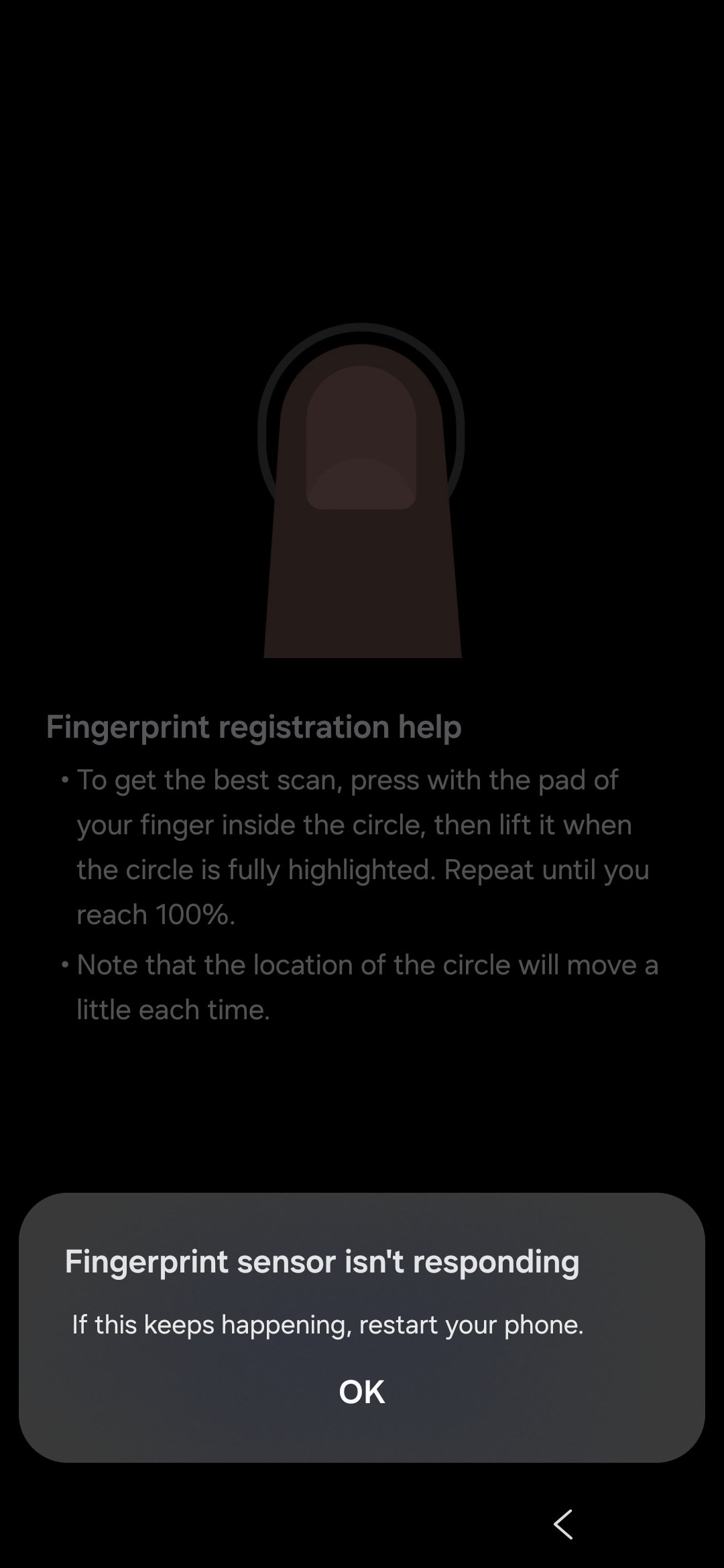
The screenshot is helpful because it shows the phone is able to reach the fingerprint registration screen, but the process immediately fails with a "Fingerprint sensor isn't responding" message. Since you've already restarted the device multiple times and the Samsung Members diagnostic can't complete because biometrics won't activate, we'd like to focus on a couple of things that haven't been ruled out yet.
Please check the following:
Make sure all available updates have been installed through Settings > Software update, Galaxy Store, and Google Play Store.
If you're using a screen protector, temporarily remove it or test without it if possible.
Start the phone in Safe Mode and see if the fingerprint sensor behaves any differently there.
We'd also like to know:
Which Galaxy model are you using?
Did the issue begin immediately after a specific update?
Are you able to access the fingerprint settings menu consistently, or does it sometimes fail to load as well?
Since the sensor is not responding even during enrollment, and the diagnostic cannot properly test it, we'd also recommend submitting an Error Report through Samsung Members > Support > Error reports. Include the screenshot and select the option to send system log data.
Let us know whether the behavior changes in Safe Mode and which Galaxy model you're using. That will help us determine the next step. Thank you for being a member of the Samsung Community.

lemonbean-Gdevz
Supernova
Friday
in
Have you verified all updates in play and the galaxy store were completed as well? I highly recommend running diagnostics as well as that will be able to trace whats going on as you will need those trace logs to send to the backend team for further assistance if troubleshooting doesn't correct this issue.
Make sure you have your vault and passes backup and you have your emergency backup code written down.
LongHiker
Galactic Samsung Care Ambassador
Friday
in
@userM4buEtrn8D I assume that you have restarted your phone? Sometimes the simplest solutions work.
If the issue persists, go to the Samsung Members app -> Support and run the diagnostics.
0 likes
userM4buEtrn8D
Constellation
Friday
in
Yes, I restarted the phone multiple times. I also tried running the diagnostic on it with no luck. It wants me to go turn on the fingerprint biometric so it can run the test and when I go to do that I get the same alert saying it's not responding. But it won't flag it during the diagnostic
0 likes
SamsungMcJoey
Cosmic Ray
Yesterday
in
Hi @userM4buEtrn8D,
Thank you for the update and for sharing the screenshot.
The screenshot is helpful because it shows the phone is able to reach the fingerprint registration screen, but the process immediately fails with a "Fingerprint sensor isn't responding" message. Since you've already restarted the device multiple times and the Samsung Members diagnostic can't complete because biometrics won't activate, we'd like to focus on a couple of things that haven't been ruled out yet.
Please check the following:
We'd also like to know:
Since the sensor is not responding even during enrollment, and the diagnostic cannot properly test it, we'd also recommend submitting an Error Report through Samsung Members > Support > Error reports. Include the screenshot and select the option to send system log data.
Let us know whether the behavior changes in Safe Mode and which Galaxy model you're using. That will help us determine the next step. Thank you for being a member of the Samsung Community.
0 likes