
Original topic:

Visible visual voicemail not working

(Post creation time:  

2 years ago

)

23027 Views

E

emcentee

Asteroid

last edited


2 years ago


in

 
I've done all the steps... Force quit, clear cache, make sure all permissions are ok, reset network, even did visible chat where the chatbot reprovsioned voice mail. 
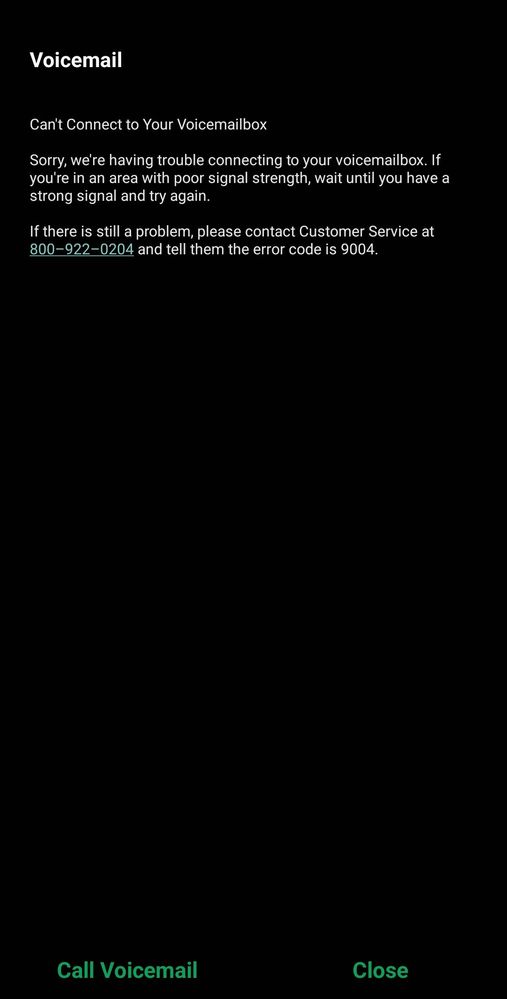
The agent told me visible didn't support vvm, but I've used it for years on several Samsung phones. 

I started having issues where a vague "something went wrong"message and to contact customer service if it keeps happening. 

I was on the one UI 7 beta on my s24u and figured it just was something with that. Switched to s25u this week and it's still broken. 

I did get this message once. Anyone have similar issues? Visible is blaming Samsung....


image


    •  

      Selected Answer

      M

      meself

      Honored Contributor

      2 years ago


      in

       
      Seen 2 things mentioned check mobile data is on and wifi calling
      E

      emcentee

      Asteroid

      2 years ago


      in

       
      This seems like it might have worked! I did one more thing, you can set what network each app has access to and for voicemail I picked mobile preferred after I toggled mobile data off and then on, and for the first time in days the voicemail app opened properly. I'll test it tomorrow and confirm it's still working. Thank you for your suggestion!
      E

      emcentee

      Asteroid

      2 years ago


      in

       
      Seems to work, thanks again!

      0 likes

    • G

      GaryB82

      Galactic Samsung Care Ambassador

      2 years ago


      in


      Sorry but since Voicemail is a Carrier provided service they are the ones that have to fix it 

    • T

      Tank99

      Constellation

      2 years ago


      in

       
      Make sure you're not on VPN. I had this problem for months until I realized it.
    • R

      Robin621k

      Honored Contributor

      2 years ago


      in

       
      I had the same problem on Verizon.

      I did a wipe cache partition and it is working now.Wipe Cache Partition.
      Turn off phone.
      While powered down, press power key and volume up button simultaneously until the phone vibrates. Let go of buttons. You will now be in the bootloader. Using Volume buttons for scrolling, power button for Yes.
      Scroll down to Wipe Cache Partition. Press power, scroll to Yes, press power. Reboot press power key.
    • K

      kimberleigh

      Red Giant

      2 years ago


      in

       
      You could always open up your phone app. Hold down the #1 key until "voicemail" pops up. Just a suggestion.
    • R

      2 years ago


      in

       
      Might be a carrier issue, i have mine activated and i have Xfinity Mobile

      0 likes

    • D

      Deshie

      Constellation

      2 years ago


      in

       
      The solution is to turn off wifi and click the button. Guaranteed it works.

      0 likes