
Original topic:
S25 Ultra screen rotation issues
(Post creation time:
6 months ago
)
3878 Views
M
Mikey146
Asteroid
Hello everyone. Just wanted to see if anyone else is having the issue of their screen not rotating. Its not working on any application. The screen auto rotate is on, restarted my phone, turned off the phone, booted the phone in safe mode...no luck. I didnt do a factory reset yet because I really don't want to set up my phone again. Most recent update was was done 14 May 2026.
Thanks
This post has been closed.
Selected Answer
SamsungMod
Community Manager
6 months ago
in
Hello Mikey146, I understand this is frustrating. Have you made sure all of your apps are also up-to-date after the most recent update? Have you tried to uninstall/reinstall the apps (referring to the apps that have the capabilities to do so)?
If none of the steps worked, the next recommended step is to perform a Factory Reset on the device. I know this is not the ideal step you would like to do, but by doing this will reset back to its factory settings. Make sure you fully back up your device to a cloud, so there won't be any data lost. Follow this article here: https://www.samsung.com/us/support/answer/ANS10002030/
You can also, submit an Error Report via the Samsung Members app. Take a look at this article: https://www.samsung.com/us/support/troubleshoot/TSG10003603/
Please let me know if the Factory Reset helped any! 🙂
0 likes
LongHiker
Galactic Samsung Care Ambassador
6 months ago
in
@Mikey146 No problem here on my S25 Ultra. There is a screen rotation in the Home screen settings which only affects the home screen. The other setting is in the Quick panel. Open the Quick panel and make sure that you have this icon. If you don't see this, Auto rotate is not enabled for all apps.
If you don't see that, look for this icon in the quick panel.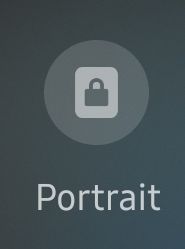
Click it and it will enable Auto rotate and change to the Auto rotate icon shown earlier in this post.
0 likes
Mikey146
Asteroid
6 months ago
in
0 likes
Mujibar
Honored Contributor
6 months ago
in
0 likes
Mikey146
Asteroid
6 months ago
in
0 likes
SamsungMod
Community Manager
6 months ago
in
Hello Mikey146, I understand this is frustrating. Have you made sure all of your apps are also up-to-date after the most recent update? Have you tried to uninstall/reinstall the apps (referring to the apps that have the capabilities to do so)?
If none of the steps worked, the next recommended step is to perform a Factory Reset on the device. I know this is not the ideal step you would like to do, but by doing this will reset back to its factory settings. Make sure you fully back up your device to a cloud, so there won't be any data lost. Follow this article here: https://www.samsung.com/us/support/answer/ANS10002030/
You can also, submit an Error Report via the Samsung Members app. Take a look at this article: https://www.samsung.com/us/support/troubleshoot/TSG10003603/
Please let me know if the Factory Reset helped any! 🙂
0 likes
Mikey146
Asteroid
6 months ago
in
user1iHTXgrwNb
Constellation
6 months ago
in
Did a factory reset and I am having this issue also.
0 likes
Dimler
Constellation
5 months ago
in
I have the same issue on my S25 Base, auto rotate just stopped working and nothing is fixing it, diagnostics shows that the sensors are fine, additionally, I checked the values for the Accelerometer and the Gyro, both are changing while moving the phone around, but the only way i can rotate my screen rn is going in youtube, go full screen on a video and while in full screen, exit YT, and then my home screen glitches in full landscape mode that I cannot get out of... I hope that it will fix itself, since I also don't want to go to factory reset...
0 likes
Mikey146
Asteroid
5 months ago
in
0 likes
userXalppcnAAx
Constellation
5 months ago
in
0 likes
WalterSan
Constellation
2 months ago
in
I'm sharing my solution, which was the least required, thanks to AI.
After giving her some context and trying a few things, she finally told me that the sensor was stuck and that I should tap it. The screenshot is in Spanish because I'm from Mexico.
0 likes