All community
Sign In/Register
/
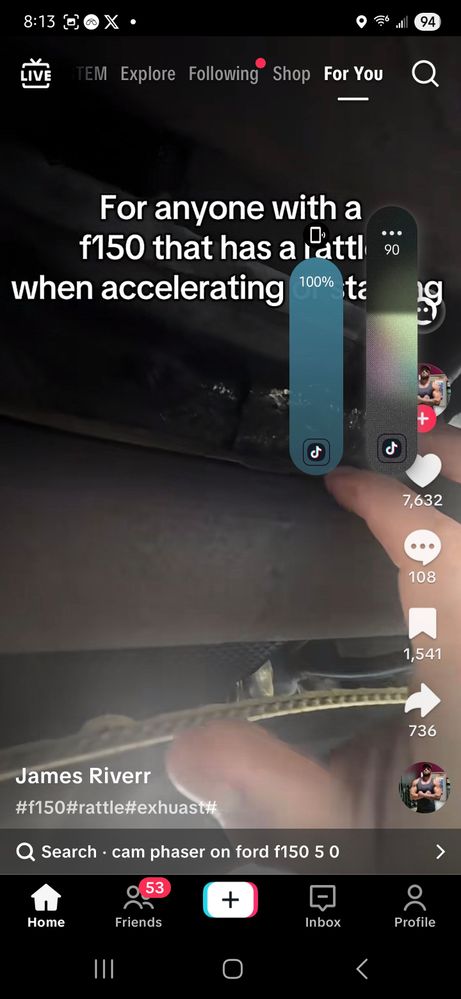
Double volume bars
(Post creation time:
11 months ago
)
2044 Views
Kevin327
Cosmic Ray
last edited
in
0 people had this problem.
Me too
0 likes
8 Comments
Selected Answer
LongHiker
Galactic Samsung Care Ambassador
@Kevin327 Click the Dual app volume button to turn it off.
This comment was created from this
@Kevin327 This is a setting in Sound Assistant.
Load 1 older reply
1 like

Selected Answer
LongHiker
Galactic Samsung Care Ambassador
11 months ago
in
@Kevin327 Click the Dual app volume button to turn it off.
0 likes
Kevin327
Cosmic Ray
11 months ago
in
0 likes
Kevin327
Cosmic Ray
11 months ago
in
0 likes
LongHiker
Galactic Samsung Care Ambassador
11 months ago
in
@Kevin327 This is a setting in Sound Assistant.
0 likes
LongHiker
Galactic Samsung Care Ambassador
11 months ago
in
@Kevin327 Click the Dual app volume button to turn it off.
0 likes
Kevin327
Cosmic Ray
11 months ago
in
LongHiker
Galactic Samsung Care Ambassador
11 months ago
in
0 likes