
Original topic:
Turning off auto updates?..
(Post creation time:
10-29-2024 06:29 PM
)
45596 Views
P
pamelabaxter
Asteroid
Can I turn off auto updates for system software on my phone. Not for my apps, I know I can choose how those are updated but is there a way to turn auto updates off for the phone itself? I wear medical equipment (Dexcom G7 and tandem t-slim insulin pump) that uses bluetooth via my phone to stay connected to each other. Dexcom currently does not have software compatible with Android 15. I'm really hoping that by the time we receive the 15 update, Dexcom will get their software compatibility issues fixed, but if not, I am going to experience a lot of issues when my phone forces me to update to 15. Turning off auto updates is the only way to guarantee the phone doesn't force me to update but I do not see anyway to do that.
This post has been closed.
Selected Answer
JollyCello
Galaxy
10-29-2024 07:20 PM
in
@pamelabaxter You can turn off Auto Updates in DEVELOPER OPTIONS. To turn on DEVELOPER Options, go to settings, about phone, software, build number, tap it 7 times, you need to put in your pin, once it is turned on go back to the main settings page, scroll all the when down,you will now see DEVELOPER OPTIONS. Type in the search box, auto update, tap on the one that says DEVELOPER OPTIONS, toggle it off.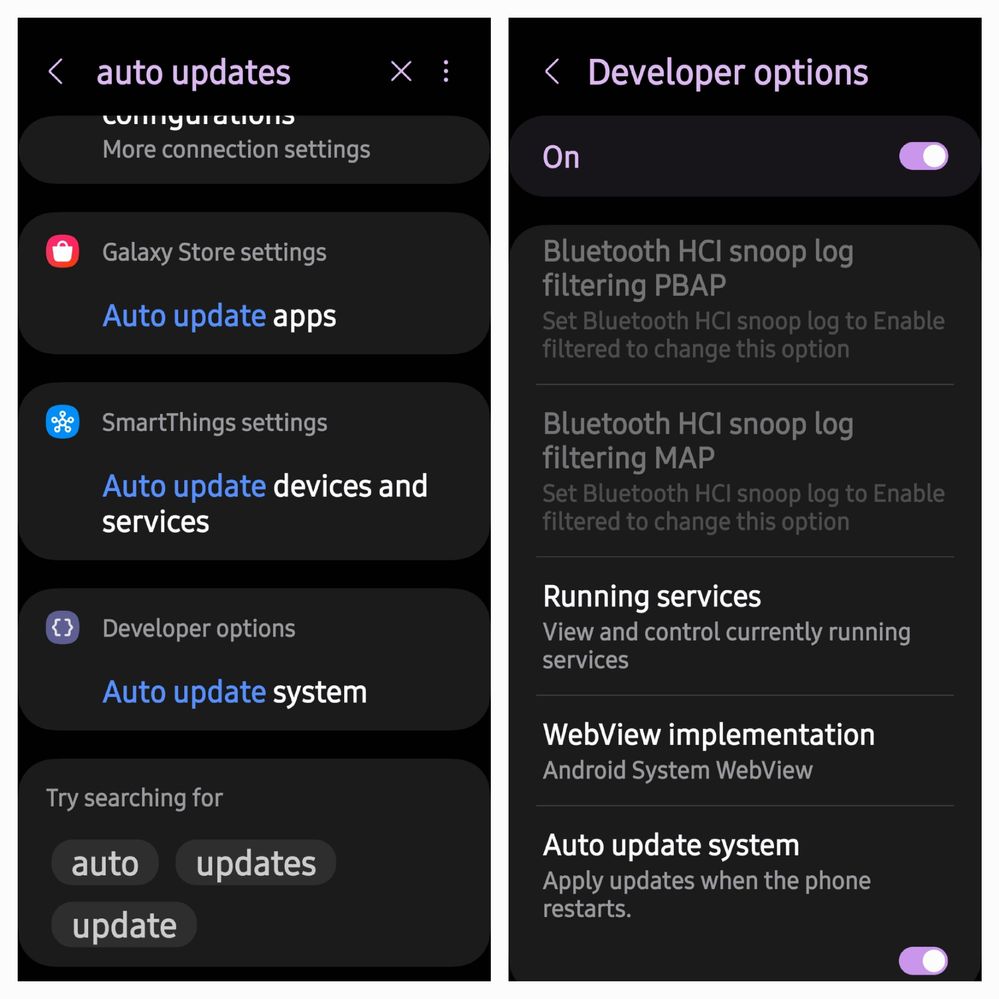
pamelabaxter
Asteroid
10-29-2024 08:33 PM
in
0 likes
realaud
Honored Contributor
10-29-2024 08:37 PM
in
You can just manually check for updates at any time by going to the settings/software update. Or, you can turn auto updates back on.
JollyCello
Galaxy
10-30-2024 03:45 AM
in
@pamelabaxter You are welcome!