After trying many things to try to fix my missing home screen, trying to move apps back to the home screen, I stumbled on the Homepage News app which was one of the apps on the screen and discovered that it was set as a default app which I do not want so I removed it as a default app ad like magic, my n9rmal home screen reappeared!!! Yay!!
I installed a new app this morning, and immediately my Home Screen setup disappeared. I held down on the new app, and it gave a choice to go back to my Android setup. I clicked on that, and my prior Home Screen re-appeared :).
My sister's phone had lost her "Home Screen" option under Settings. After a lot of Googling, I looked under Settings, Apps, One UI Home and under Home Screen there was some web page, so I clicked it back to One UI Home and everything was back. Her Home Screen option was back under Settings and she had a Home Screen.
I think I've found a solution for a problem I was having with my Samsung S20 FE. My navigation buttons (recent apps and home button) would disappear, leaving only the back button. This issue would only occur when I accessed the Secure Folder or Galaxy Store. As soon as I entered those apps, the home and recent apps buttons would vanish.
I tried switching to gesture mode and changing the navigation button layout in settings, but nothing worked except for a reset. After some investigation, I realized this issue started happening after I installed Airdroid, a remote desktop app for controlling other Android devices.
The fix was simple: I uninstalled Airdroid and removed the add-ons by going to Settings > Accessibility > Installed apps, then removing the add-ons.
Now, I can access the Galaxy Store and Secure Folder without the navigation buttons disappearing.
Hope this helps someone else experiencing the same issue!

Selected Answer
Milene12
Constellation
3 years ago
in
After trying many things to try to fix my missing home screen, trying to move apps back to the home screen, I stumbled on the Homepage News app which was one of the apps on the screen and discovered that it was set as a default app which I do not want so I removed it as a default app ad like magic, my n9rmal home screen reappeared!!! Yay!!
userJfGwhpN7Wq
Constellation
2 years ago
in
I installed a new app this morning, and immediately my Home Screen setup disappeared. I held down on the new app, and it gave a choice to go back to my Android setup. I clicked on that, and my prior Home Screen re-appeared :).
270
Red Giant
3 years ago
in
DebbieLR
Constellation
3 years ago
in
0 likes
Milene12
Constellation
3 years ago
in
Similar thing just happened to me this morning. Trying to restore my home screen, so far without much luck.
0 likes
user9R8M1YwXXn
Constellation
2 years ago
in
Userwlr0346
Asteroid
2 years ago
in
Userwlr0346
Asteroid
2 years ago
in
userpXWnYioPiF
Constellation
2 years ago
in
HI Everyone, 2025
I think I've found a solution for a problem I was having with my Samsung S20 FE. My navigation buttons (recent apps and home button) would disappear, leaving only the back button. This issue would only occur when I accessed the Secure Folder or Galaxy Store. As soon as I entered those apps, the home and recent apps buttons would vanish.
I tried switching to gesture mode and changing the navigation button layout in settings, but nothing worked except for a reset. After some investigation, I realized this issue started happening after I installed Airdroid, a remote desktop app for controlling other Android devices.
The fix was simple: I uninstalled Airdroid and removed the add-ons by going to Settings > Accessibility > Installed apps, then removing the add-ons.
Now, I can access the Galaxy Store and Secure Folder without the navigation buttons disappearing.
Hope this helps someone else experiencing the same issue!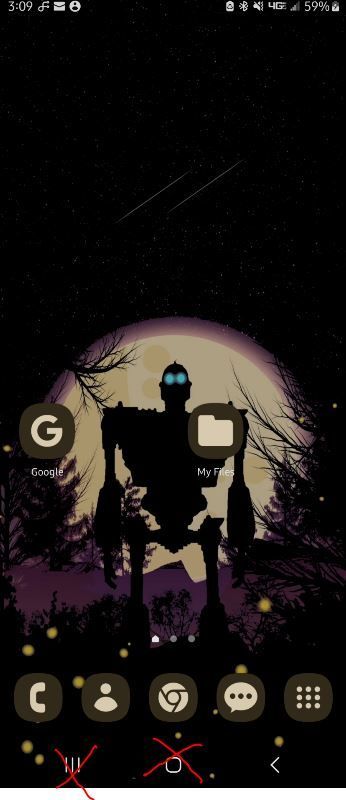
0 likes