
This Icon appeared on my phone approx a month ago. It is a shade lighter than the rest (inactive?) but is the first one listed. I have held the icon to see if it would give info or send me to where it is with no luck. None of my other phones have it on theirs.
It is an AT&T Business service and a Galaxy S21 Ultra 5G phone (unlocked)
Anyone know what this icon is and why?
I have asked on fb and other forums and I have received a ton of guesses but no one has it on their phones or truly know what it is
Thanks in advance
Mike
Selected Answer
Ytori
Nebula
08-7-2024 05:38 PM
in
Looks exactly like an old icon I had to easily check heart rate.
Open your camera and look for any health options, also check the icon again after you have the camera open.
I don't think the S21 had the heart rate sensor in them, but I know Google health would still register your heart rate by covering the bottom camera with your finger.
GaryB82
Galactic Samsung Care Ambassador
08-7-2024 03:52 PM
in
Irishman_Darts
Asteroid
08-7-2024 04:01 PM
in
I've tried that too. The icon isn't listed there either. I looked (attached and scrolled through the pages and it's not shown. This is why it is driving me crazy 🙂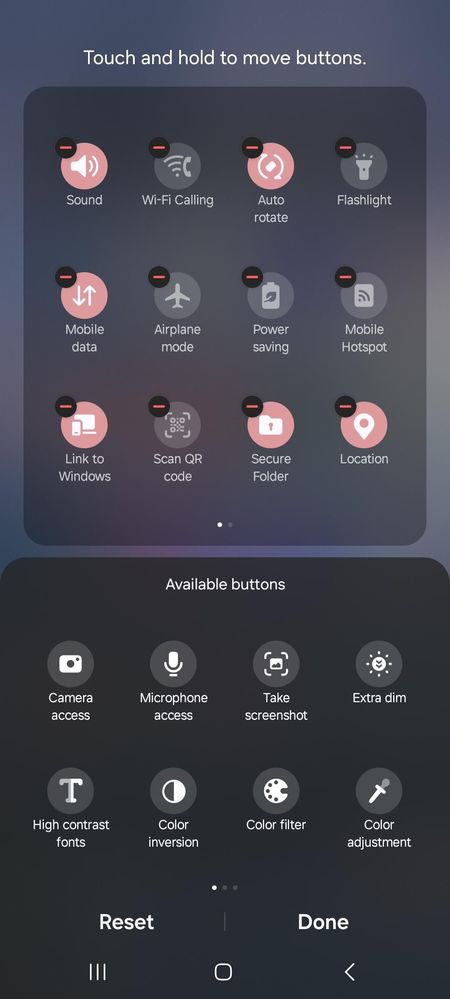
0 likes
GaryB82
Galactic Samsung Care Ambassador
08-7-2024 05:40 PM
in
see if removing sound from the list makes that icon disappear since its showing up in the location of Sound has me thinking it has something to do with vibration
0 likes
LongHiker
Galactic Samsung Care Ambassador
08-7-2024 04:16 PM
in
Irishman_Darts
Asteroid
08-7-2024 04:24 PM
in
Close but a little different and I have no info of that on my phone via search and word search. Thx
0 likes
Robin621k
Honored Contributor
08-7-2024 04:37 PM
in
In your screenshots, I don't see your Wifi quick button. Could this be your wifi?
Irishman_Darts
Asteroid
08-7-2024 05:10 PM
in
I am using a ZyXel router. My WIFI Quick button is there on top next to my Bluetooth icon when I pull the screen down a little more however that does look like the icon but I can't get any info on it to prove it is or isn't that. I have not had an update on my router for months.
0 likes
realaud
Honored Contributor
08-7-2024 04:40 PM
in
Did it appear after you installed a new app or had an update to an old one?
0 likes
Robin621k
Honored Contributor
08-7-2024 05:25 PM
in
If you do, the app installed the button on your quick panel.
0 likes
Irishman_Darts
Asteroid
08-7-2024 05:28 PM
in
I do not have the app on my phone. I only connect to the router via WiFi. Nothing is to be installed on the phone to use the WiFi. Same as if you would auto connect to a friends or saved other WiFi connection
0 likes
Robin621k
Honored Contributor
08-7-2024 05:32 PM
in
I would contact ZyZel customer support and ask them.
0 likes
Irishman_Darts
Asteroid
08-7-2024 06:26 PM
in
Thanks, I don't have a fitbit or any of those BUT I did just reset my camera settings and that at least changes the color of the icon from red to black (off) so that is something. Thanks for your help. Now I have a new avenue to hunt
0 likes
justtryingtohelp
Sun
08-7-2024 06:46 PM
in
0 likes
Saiko_Bichitaru
Comet
08-8-2024 12:47 PM
in
0 likes