
Original topic:

Navigation Bar Covers Content

(Post creation time:  

11-7-2025 12:04 PM

)

4557 Views

R

last edited


11-7-2025 12:04 PM


in

 
In the tool for checking for updates to the Google Play system, the phone navigation bar is converting the bottom edge of the screen including most of the operations button at the bottom. Is there a way to force this to display properly? I'm using an S22 with One UI 8 and Nova Launcher Prime (but also seeing this outside of Nova). 
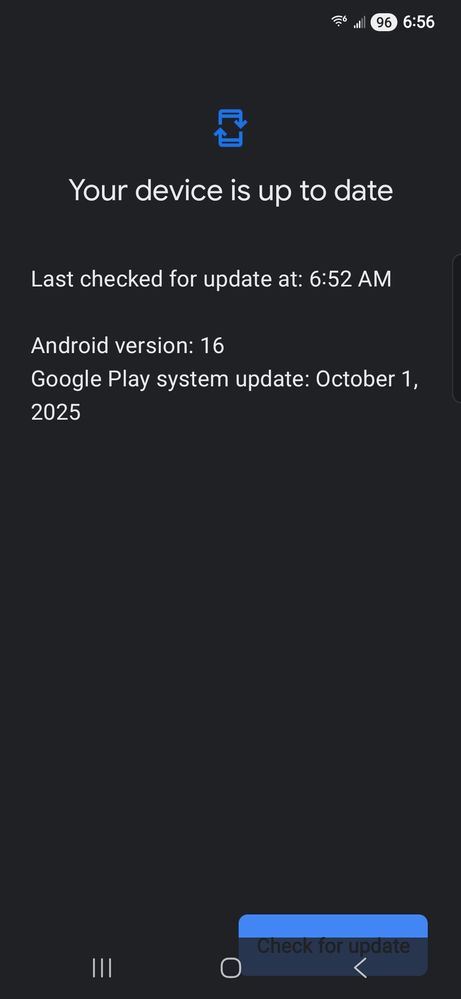
Thanks


image


    •  

      Selected Answer

      L

      LongHiker

      Galactic Samsung Care Ambassador

      11-7-2025 05:10 PM


      in


      @requa Feel free to report this to Samsung. When I did, I was told that this page is provided by Google Play Store and they said that it has been reported to Google. 

      R

      11-7-2025 05:29 PM


      in

       
      Done

      0 likes

    • A

      atxzo

      Galaxy

      11-7-2025 12:40 PM


      in

       
      The only fix I know is the install the goodlock module navstar so that you can toggle the "show and hide button" setting for the navigation bar. I usually just get my finger really close to the top of the buttons that get hidden, to click them.
      R

      11-7-2025 12:56 PM


      in

       
      Thanks for the suggestion. I guess I've been doing the same as you by trying to tap the to edge of the button when needed. It's more of a minor annoyance and aesthetic issue than anything. I don't recall seeing this before One UI 8 but I could have just overlooked it.

      0 likes

    • A

      atxzo

      Galaxy

      11-7-2025 12:59 PM


      in

       
      I'm with you. It is a new issue with this update. It's always funny to me that I have to do these little work arounds to use such an expensive product. One other option might be to open the app in "pop-up" mode so that it moves it entirely away from the nav bar. I use pop-up a lot since I use a flip 7. Best of luck to you!

      0 likes

    • M

      meself

      Honored Contributor

      11-7-2025 04:56 PM


      in

       
      On 25 plus have noticed this for several weeks my guess a bug in last update

      0 likes

    • F

      Fazer1000

      Constellation

      12-11-2025 07:08 PM


      in

       
      atxzo
      many thanks for the following suggestion, it worked, though flipping pages is presently a chore but hey-ho.
      Galaxy
      Options
      Galaxy S22
       
      The only fix I know is the install the goodlock module navstar so that you can toggle the "show and hide button" setting for the navigation bar. I usually just get my finger really close to the top of the buttons that get hidden, to click them.

      0 likes

    • R

      01-13-2026 11:11 PM


      in

       
      This issue appears to be fixed now despite still being on the October patch for Google Play system.

      0 likes

    • U

      08-12-2026 03:51 PM


      in

       
      It's not fixed for me, it does this on every single app I use!

      0 likes