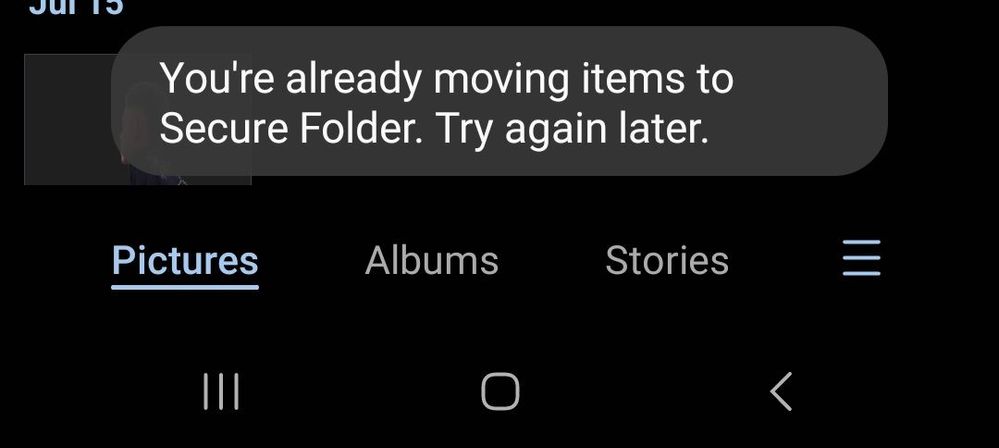
Paano po mafix to, everytime mag move ako sa secure folder/gallery ganto nalabas, naka open na ang secure folder... bali ang ginagawa ako ay mag restart ako ng phone para maka move lang ulit ng file.
Thanks for sharing your experience with your beloved Samsung Galaxy device having moving Secure Folder file issues. I feel and understand why you are worried for a device that you've take care so much. If my device is facing similar experience, I will be bothered too.
Before you try out the below recommendations as to your solution, be sure to check if your device's software are updated with the latest version. Please check how to update your mobile device's software in the following order.
Step 1. Go to Settings > Software update.
Step 2. Tap on Download and install.
Step 3. Follow the on-screen instructions.
Please try to add files while in secure folder than to move files from normal folder to secure folder.
You can open secure folder, there should be 3 dots at the upper right corner, click it and the option shown (Add files) should appear.
I hope it helps you out.
If not, you may submit an error report through the Samsung Members app as follows:
Step 1.Launch the Samsung Members app, and then tap the Support icon for more options.
Step 2. Scroll and select Error reports.
Step 3. Choose a category of your concern. Select"Application".
Step 4.Choose the frequency of the issue you are experiencing. Enter issue details or attach a video or screenshot. Then press Send icons to complete the report.

TeamGalaxyRene
Moderator
Tuesday, July 18th, 2023 10:36 AM
in
Hello there! bonrosales,
We are more than glad to assist you here!
Thanks for sharing your experience with your beloved Samsung Galaxy device having moving Secure Folder file issues. I feel and understand why you are worried for a device that you've take care so much. If my device is facing similar experience, I will be bothered too.
Before you try out the below recommendations as to your solution, be sure to check if your device's software are updated with the latest version. Please check how to update your mobile device's software in the following order.
Step 1. Go to Settings > Software update.
Step 2. Tap on Download and install.
Step 3. Follow the on-screen instructions.
Please try to add files while in secure folder than to move files from normal folder to secure folder.
You can open secure folder, there should be 3 dots at the upper right corner, click it and the option shown (Add files) should appear.
I hope it helps you out.
If not, you may submit an error report through the Samsung Members app as follows:
Step 1. Launch the Samsung Members app, and then tap the Support icon for more options.
Step 2. Scroll and select Error reports.
Step 3. Choose a category of your concern. Select "Application".
Step 4.Choose the frequency of the issue you are experiencing. Enter issue details or attach a video or screenshot. Then press Send icons to complete the report.
https://www.samsung.com/ph/support/mobile-devices/how-to-submit-an-error-on-samsung-members/
Should you need further assistance and guidance, you may contact us via our online Samsung Customer Care support channels below.
https://samsung-livechat.sprinklr.com/seao/ph/index.html
0 likes
summeRamirez
★
Tuesday, July 18th, 2023 10:55 AM
in
0 likes