
title:

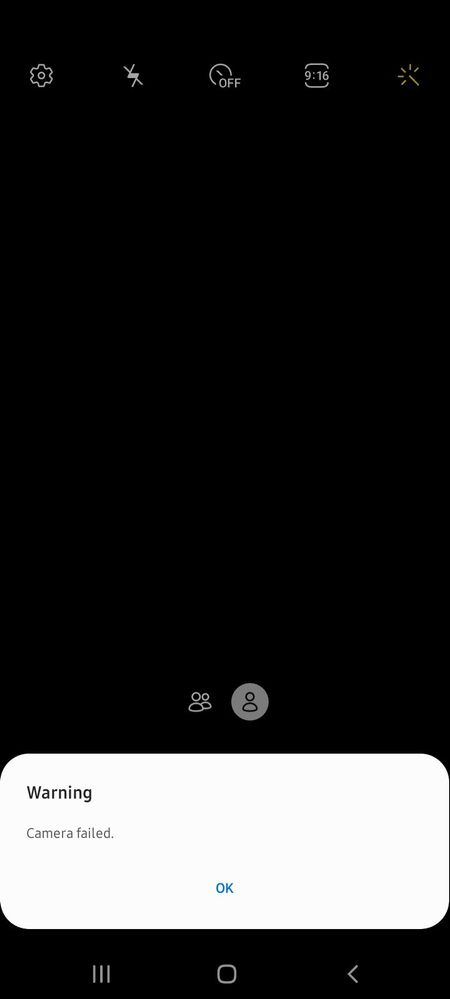
Galaxy A12 front Camera Failed

(Post creation time:  

Thursday, September 16th, 2021 12:08 PM

)

3116 Views

K

KaheLilac

Active Level 1

last edited


Thursday, September 16th, 2021 12:08 PM


in

 
I have noticed that since nag 2nd software update itong Galaxy A12 ko, every time I switched to front cam laging, "Warning Camera Failed" ang nakikita ko. Does anyone experienced or know this case? Sending HELLLLPPP.🥺 
image


#GalaxyA12
#FrontCam
#CameraFailed
    • M

      manzocy

      Active Level 7

      Thursday, September 16th, 2021 02:09 PM


      in

       
      Try to clear cache partition.
      K

      KaheLilac

      Active Level 1

      Saturday, September 18th, 2021 08:04 AM


      in

       
      Hi, I'll try this! Thank you. I'll try to update if this gonna work.

      0 likes

    • S

      SamsungRightCare

      Community Manager

      Friday, September 17th, 2021 02:45 AM


      in


      Hello there! As per your concern, you may try to 'Soft Reset' your device. 

      1. To reboot your device, press and hold the power button and the volume down button on the side of your device until the screen turns off.
      2. Your device will automatically reboot.
      3. If you are asked to enter your PIN, enter your PIN code and tap OK.
      4. Swipe up to unlock your device.

      Hope to have helped you. Be sure to click " ✓ Accept as Solution" when you find an answer that works for you.  Stay safe and have a nice day ahead!

      K

      KaheLilac

      Active Level 1

      Saturday, September 18th, 2021 08:24 AM


      in

       
      Thanks! I'll try this when the first suggestion won't work.

      0 likes

    Related Content

    Camera Failed error

    Camera Failed

    Camera Failed

    Camera Failed - Selfie Mode

    camera failed