
I want to change the default function of the Function keys(F1 to F12) from function keys to media/control keys.
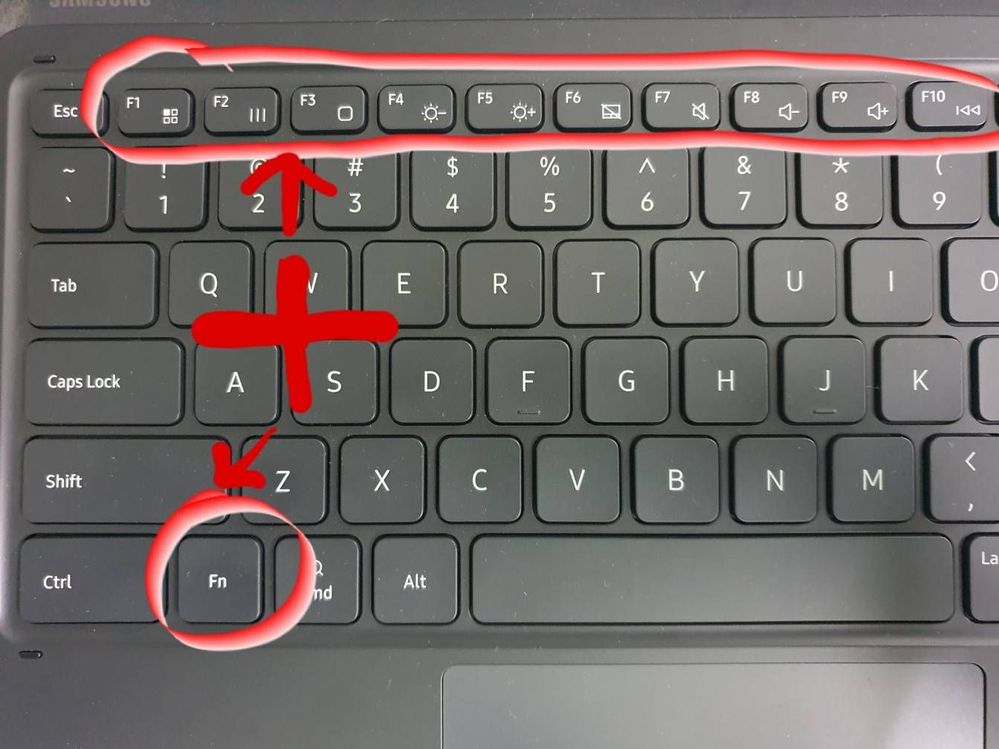
Currently user have to presss and hold th 'Fn key' in combination to use the media function of the keys.
Almost no one ever use the Fn key, whereas the media keys are easily one of the most needed keys so why have samsung defaulted the key function to function keys.
Please give us a setting to change the function as it is present in most of the windows laptops since a 7-8 years.
cs-member13
Expert Level 4
11-27-2020 03:24 PM
in
Dear Samsung Member,
Greetings from Samsung Customer Support!
We have noted down the feedback regarding this and providing a continues great experience to our customer is our first priority. We would take this feedback for further improvements in our upcoming software launches.
Thank you for writing to Samsung.
Warm Regards,
Samsung Customer Support
totte
Beginner Level 3
05-26-2021 07:47 PM
in
Dear Samsung support,
Any update on this - it has been 5 months now..?
Best Regards
Totte
0 likes
kapilmalik
Active Level 7
12-1-2020 03:24 AM
in
TinyentePugot
Beginner Level 2
05-5-2021 02:51 AM
in
whatever happen to this request?
ur2kill
Active Level 3
05-5-2021 12:19 PM
in
0 likes
Comfunc
Beginner Level 3
05-9-2021 01:21 PM
in
I support this request. We should be able to set the Function keys to default to the Fn value or the Media value.
totte
Beginner Level 3
05-26-2021 07:46 PM
in
Samsung, pleeeease address this issue URGENTLY. It makes no sense whatsoever to not be able to lock the Fn key. It is beyond me how anyone could have come up with the idea that the unknown function of the function keys would be more frequently used than controling volume, playback and brightness!!
I recently coverted from iOS to Android and one of the reasons was that Apple refuse to have function keys on their keyboards. Now my disappoint is complete - having to press two keys every single time which was also the situation on Apple - arrghhh.
ShaneH
Beginner Level 2
06-6-2021 08:53 PM
in
Hey there! I noticed you only posted your comment a couple weeks ago, so I hope you see this. I was just as frustrated as you about not being able to remap the function keys, so I worked out a solution. I posted another comment in this thread with full details on how to get it working. Hope it may be able to help you out!
That is one good thing about Android over Apple, you can just about always use creativity to make things work the way you want them too!
Kelesin
Beginner Level 4
02-2-2022 10:33 AM
in
This is the problem of Samsung, not Android OS. Compare keyboards for Lenovo or Huawei tablets - volume or brightness buttons work perfectly. I am disappointed as well. I used to work or play with Huawei MediaPad M5 with book cover keyboard. No problem at all. I wanted to upgrade the tablet and I have bought galaxy tab s7 plus. Well, the quality of display is realy better, the sound - just a little bit better. And no problems with the keyboard. Even CapsLock button is marked by an illuminated LED when "on".
So "the best Android Tablet - galaxy tab s7plus" is not so perfect. :(
0 likes
ShaneH
Beginner Level 2
06-6-2021 08:20 PM
in
I came upon this thread early in my search for making the media/control shortcuts the default over the seldomly used function keys. It confirmed that Samsung (as of yet) doesn't have a native way of doing so. Like everyone else in this thread, I saw this feature as essential to get full enjoyment from the Tab S7+. I kept on digging.
I eventually came across a user on Reddit with a solution to this problem. They recommended using the (completely free) Key Mapper app from the Google play store. This app is incredible. It allows us to remap the Function keys directly to actions, and so, so much more. It can be a little tricky to set up, but the app walks you through most of it and it has some great documenation and guides on its website. Here is the link to the app in the playstore:
https://play.google.com/store/apps/details?id=io.github.sds100.keymapper
This is an open source app, meaning the code is available for anyone to review. I gave it a look over, it does exactly what it says and does not collect any of your personal data. If you are worried about security I would implore that you review it as well.
Instead of just leaving this link and calling it a day, I want write a little about how you should go about using this to remap your keyboards function keys. The app is a bit confusing at first, and this feels like my chance to give back to everyone who stumbles across this thread in their search.
1. Download the app and set up permissions
The app will walk you through the permissions it needs. The most important of which are Accessibility and Turning Off Battery Optimizer (for this app only). There are a couple of others that will alert you when assigning new key functions.
2. Setting up the key functions
You will need to assign each key Fn key manually one by one. This is a little tedious, but there are only 12 Fn keys so it could be worse.
DO NOT REPLACE THE FN KEYSTROKES WITH OTHER KEY PRESSES. Can't stress this enough, and it is the reason I'm writing this. To do this you need to replace your normal pop-up keyboard (I use Swiftkey, you probably use the built in Samsung keyboard). If you enable their keyboard to allow for key remapping to other keystrokes (Fn + F4 to decrease brightness), you will not be able to use your shortcuts in Dex mode. Dex mode is far to useful with the keyboard to do this, so instead:
3. Record your trigger (ex: F3), add an action, go to the "Other" catagory, and select the quick action for that key (F3 would be volume down)
Make sure when recording your triggers only press one function key at a time (ie: F1, F2, F3). You have to do each key individually. Only press the function key when doing this, do not press Fn + F3.
Every Fn quick action on the keyboard is represented inside the other category. The only one missing is disable touch pad on F6. You can still always press Fn + F6 to access it, so I made that key launch Spotify instead.
4. Once you get confident, get creative! I made F1 open my text messages and remapped the screenshot key to the back arrow. This app is really robust in its features.
5. If you get stuck or want deeper explanations of things there is a link to their website and their Discord within the app. The owner seems really active on both and happy to help people out.
Really hope at least one person finds this helpful! I know I'm much happier with my tablet after customizing those keys :)
erflesby
Active Level 1
02-24-2022 12:05 PM
in
OK so this got my hopes up, but in the google play store it says this app is not compatible with my device. I'm using a tab S7+. How did you install it?
0 likes
Mafo74
Beginner Level 3
09-8-2022 03:57 PM
in
Thank you so much, that had been driving mad for ages, now I have it working for volume and screen brightnees but may add further functionality later on as oer your examples. Good work! :)
0 likes
dkeppler
Beginner Level 4
11-19-2022 06:56 AM
in
It has been nearly two years I've been struggling with this, and your comment was absolutely so helpful. Thank you for taking the time to write it out. LEGEND!
0 likes
dkeppler
Beginner Level 4
06-9-2021 10:57 AM
in
Yep, I'm with you guys on this too. I think it's ridiculous. It's a first world problem, but still so easily fixed. Just hurry up with it Samsung.
darkfidget
Beginner Level 4
06-20-2021 01:09 AM
in
after years of lurking these forumns, I finally signed in just to bump this post a lil lol
I guarantee most people use the shortcuts WAY more than the function keys. I get that they want to pose the s7+ as a full laptop replacement, but dang, an android tablet doesn't have nearly as much use for function keys as it does for things like media keys and NAVIGATION SHORTCUTS
youknowwhothisis19
Beginner Level 3
10-19-2021 10:48 PM
in
Really, Samsung? Get it together and fix the keyboard. Release an update and give the people what they want.
Thank you