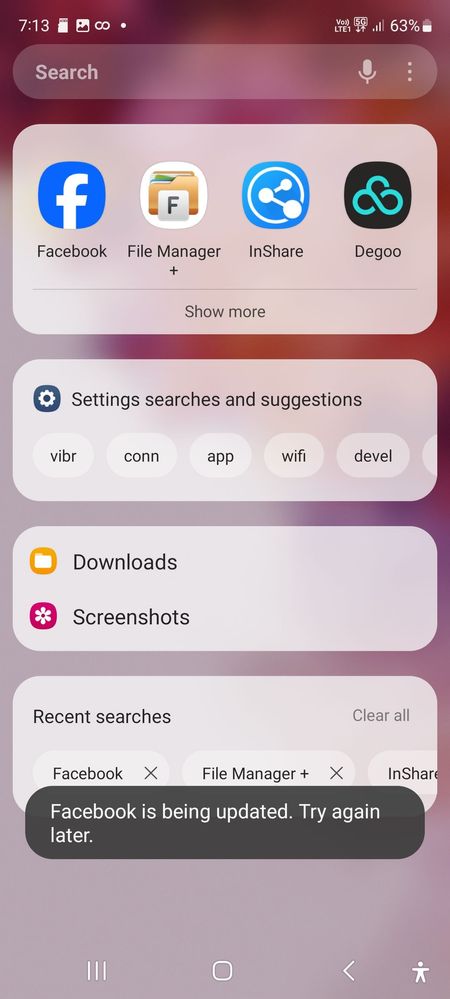
Kindly clear catche and clear data of this app and uninstall this then reinstall again and try to it's. If you like please accept as a solution it's help to others users also, click on 3dots in my reply section and click on accept solution. Thanks.
As per your concern, we would request you to kindly perform the following steps:
Check app Cache: Settings> Device care> Storage> Clean now. Note: To delete files or uninstall apps that you do not use anymore, select a category under USER DATA. Then, tick items to select and tap DELETE or UNINSTALL.
Clear cache memory of a particular application: Settings> Apps> Now pick the app that you like to clear off the cache memory> Storage> Clear Cache.
Uninstall and reinstall the app: 1-Please ensure a stable Wi-Fi connection to your mobile. Downloading via mobile networks may result in additional charges. 2-Please ensure enough storage space in your device. 3-Please ensure your device has sufficient battery for updating software.
Uninstall an App: From your Home screen, swipe up to open the App drawer. Find the app you want to remove, and then touch and hold the app's icon until a popup menu appears. Tap Uninstall, and then tap OK to confirm.
Some preinstalled apps cannot be uninstalled. Tap App info, tap More options, and then tap Uninstall updates. Or, tap Disable if you do not plan on using the app.
Reinstall the App: Galaxy Store apps: Open the Galaxy Store, and then tap Menu (the three horizontal lines) in the upper right corner. Tap My Apps; from the Apps tab, find the missing app and tap the Download icon.
Play Store apps: Open the Play Store, and tap your profile picture. Tap My apps & games, and then tap Library. Find the app you want, and then tap Install.
Keep your apps updated: Developers often release updates to improve their app's performance and compatibility. It is highly recommended to keep the apps on your device up to date.
Galaxy Store apps: Open Galaxy Store, tap the Menu (the three horizontal lines), in the upper left corner, and then tap Updates. From here, you can either tap the circling arrow next to individual apps to update one at a time or tap Update All to install all available updates.
Play Store apps: Open the Play Store, tap, and then tap your profile picture. Tap My apps & games. From here, you can either tap Update next to individual apps or tap Update All to install all available updates.
Update device software (If available): Settings > Software update > Download and install > Checking for software update > Software update available > Download > Downloading updates > Install now.
In case the issue still occurs please visit the service center for a physical inspection of your device. You can locate your nearest service center with this given link: https://www.samsung.com/in/support/service-center/

Anonymous User
Beginner Level 1
02-18-2024 02:49 PM
in
0 likes
jayamfame
Active Level 7
02-18-2024 02:51 PM
in
0 likes
Anand_Avn
Active Level 10
02-18-2024 03:54 PM
in
umesh30
Expert Level 2
02-18-2024 04:24 PM
in
Try to clear the cache of these apps...
0 likes
goodthings
Expert Level 5
02-18-2024 04:56 PM
in
0 likes
jayamfame
Active Level 7
02-18-2024 05:09 PM
in
0 likes
cs_member10
Moderator
02-21-2024 03:33 AM
in
Dear Samsung Member,
Greetings from Samsung Customer Support!
As per your concern, we would request you to kindly perform the following steps:
Check app Cache: Settings> Device care> Storage> Clean now.
Note: To delete files or uninstall apps that you do not use anymore, select a category under USER DATA. Then, tick items to select and tap DELETE or UNINSTALL.
Clear cache memory of a particular application: Settings> Apps> Now pick the app that you like to clear off the cache memory> Storage> Clear Cache.
You can check the device in safe mode and for the same mode you can tap on the given link. https://www.samsung.com/in/support/mobile-devices/safe-mode-on-samsung-phones/
Uninstall and reinstall the app:
1-Please ensure a stable Wi-Fi connection to your mobile. Downloading via mobile networks may result in additional charges.
2-Please ensure enough storage space in your device.
3-Please ensure your device has sufficient battery for updating software.
Uninstall an App: From your Home screen, swipe up to open the App drawer. Find the app you want to remove, and then touch and hold the app's icon until a popup menu appears. Tap Uninstall, and then tap OK to confirm.
Some preinstalled apps cannot be uninstalled. Tap App info, tap More options, and then tap Uninstall updates. Or, tap Disable if you do not plan on using the app.
Reinstall the App: Galaxy Store apps: Open the Galaxy Store, and then tap Menu (the three horizontal lines) in the upper right corner. Tap My Apps; from the Apps tab, find the missing app and tap the Download icon.
Play Store apps: Open the Play Store, and tap your profile picture. Tap My apps & games, and then tap Library. Find the app you want, and then tap Install.
Keep your apps updated: Developers often release updates to improve their app's performance and compatibility. It is highly recommended to keep the apps on your device up to date.
Galaxy Store apps: Open Galaxy Store, tap the Menu (the three horizontal lines), in the upper left corner, and then tap Updates. From here, you can either tap the circling arrow next to individual apps to update one at a time or tap Update All to install all available updates.
Play Store apps: Open the Play Store, tap, and then tap your profile picture. Tap My apps & games. From here, you can either tap Update next to individual apps or tap Update All to install all available updates.
Update device software (If available): Settings > Software update > Download and install > Checking for software update > Software update available > Download > Downloading updates > Install now.
You can reset your device by following the steps from the below link.
https://www.samsung.com/in/support/mobile-devices/samsung-galaxy-mobile-how-to-perform-a-factory-reset/
In case the issue still occurs please visit the service center for a physical inspection of your device. You can locate your nearest service center with this given link: https://www.samsung.com/in/support/service-center/
Warm Regards,
Samsung Customer Support
0 likes