
see this guys the icon allignment is not proper
what to do...???
it's very irritating to see such things in a 50k flagship
I hope Samsung will see this post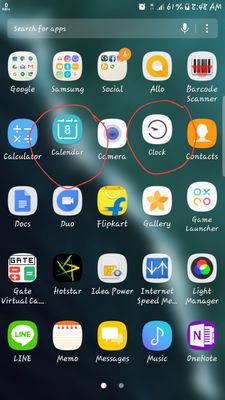
what to do...???
it's very irritating to see such things in a 50k flagship
I hope Samsung will see this post
Kaash
Active Level 7
08-8-2017 03:45 AM
in
0 likes
ashishsingh
Active Level 8
08-8-2017 05:07 AM
in
0 likes
Prince
Active Level 7
08-8-2017 05:43 AM
in
GeekGuy
Active Level 7
08-8-2017 09:31 AM
in
man, i hate to say this, but I have seen you always complaining about your S7 Edge previously being so laggy and problematic all the time and of course the fact that you have mentioned it thoroughly that's it's flagship and expensive.
the problem you don't see? you have some really shity apps which tend to slow down your phone and are risky as well for sharing your private datas with others.
Don't take me wrong and I mean no offence but before you always complain, see that you might as well be wrong.
I am using the same phone and I am bad ass user then when it comes to usability and to make out the best of the phone, it heats for sure, but NEVER LAGS.
All the best👍
GeekGuy
Active Level 7
08-10-2017 06:55 PM
in
have also asked some guys with this issue. it's strange but we are looking
0 likes
S7EdgeOne
Active Level 5
08-12-2017 11:51 AM
in
even after formatting my phone that problem is still there
0 likes
GeekGuy
Active Level 7
08-12-2017 12:01 PM
in
It's really strange. None has the problem except you.
0 likes
admin_
Expert Level 5
08-9-2017 01:10 AM
in
0 likes
GeekGuy
Active Level 7
08-9-2017 05:34 AM
in
well anyway, try clearing out your cache data of touchwiz home and reboot without getting back on home screen
0 likes