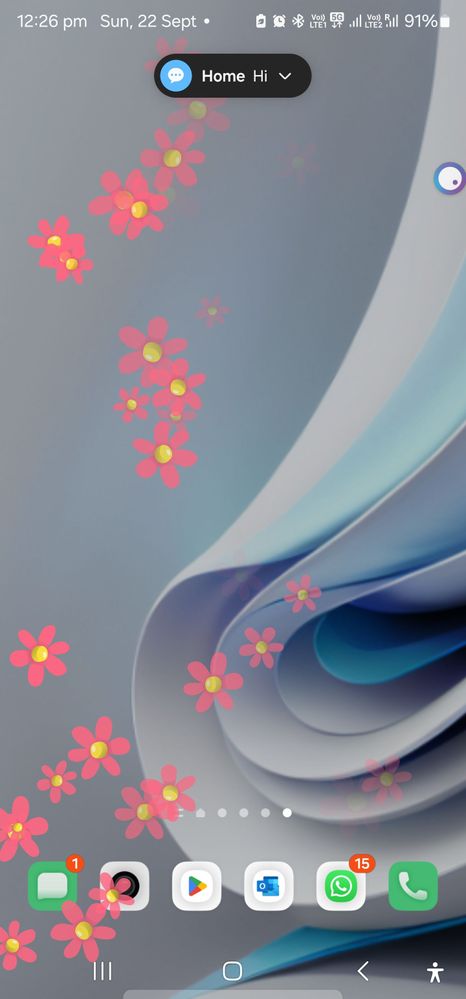
Yes, go to goodlock then edge lighting then turn it off. Turn this off, it will off. Or of you want different pattern or items you can adjust by clicking "set custom style ".
To disable flower notifications on the lock screen of a Samsung Galaxy S24, follow these steps:
*Method 1: Through Settings*
1. Go to *Settings* 2. Scroll down and select *Lock screen* 3. Tap on *Notifications* 4. Toggle off *Flowers* or *Notification icons* (depending on your device software) 5. Confirm by tapping *Save* or *Apply*
*Method 2: Through Notification Settings*
1. Go to *Settings* 2. Select *Notifications* 3. Tap on *Advanced* 4. Scroll down to *Lock screen notifications* 5. Toggle off *Flowers* or *Show notifications on lock screen* 6. Confirm by tapping *Save* or *Apply*
*Method 3: Through Lock Screen Settings (for One UI 5.0 and later)*
1. Go to *Settings* 2. Select *Lock screen* 3. Tap on *Face recognition* or *Biometric* settings 4. Toggle off *Show notifications when locked* 5. Confirm by tapping *Save* or *Apply*
*Additional Steps (for some carrier-locked devices)*
1. Go to *Settings* 2. Select *Connections* 3. Tap on *More connection settings* 4. Select *Lock screen notifications* 5. Toggle off *Flowers* or *Show notifications on lock screen*
*Alternative Solution*
If the above methods don't work, try:
1. Long-press on the flower notification on the lock screen 2. Tap on the *i* icon (information) 3. Toggle off *Show notifications*
*Note:*
- Make sure your device is running the latest software. - Some carrier-locked devices may have different settings or restrictions.

Jebunnesa_Rimi
Active Level 7
2 years ago
in
KumarRajuCh
Active Level 1
2 years ago
in
Jebunnesa_Rimi
Active Level 7
2 years ago
in
Wodehouse
Expert Level 5
2 years ago
in
To disable flower notifications on the lock screen of a Samsung Galaxy S24, follow these steps:
*Method 1: Through Settings*
1. Go to *Settings*
2. Scroll down and select *Lock screen*
3. Tap on *Notifications*
4. Toggle off *Flowers* or *Notification icons* (depending on your device software)
5. Confirm by tapping *Save* or *Apply*
*Method 2: Through Notification Settings*
1. Go to *Settings*
2. Select *Notifications*
3. Tap on *Advanced*
4. Scroll down to *Lock screen notifications*
5. Toggle off *Flowers* or *Show notifications on lock screen*
6. Confirm by tapping *Save* or *Apply*
*Method 3: Through Lock Screen Settings (for One UI 5.0 and later)*
1. Go to *Settings*
2. Select *Lock screen*
3. Tap on *Face recognition* or *Biometric* settings
4. Toggle off *Show notifications when locked*
5. Confirm by tapping *Save* or *Apply*
*Additional Steps (for some carrier-locked devices)*
1. Go to *Settings*
2. Select *Connections*
3. Tap on *More connection settings*
4. Select *Lock screen notifications*
5. Toggle off *Flowers* or *Show notifications on lock screen*
*Alternative Solution*
If the above methods don't work, try:
1. Long-press on the flower notification on the lock screen
2. Tap on the *i* icon (information)
3. Toggle off *Show notifications*
*Note:*
- Make sure your device is running the latest software.
- Some carrier-locked devices may have different settings or restrictions.
0 likes