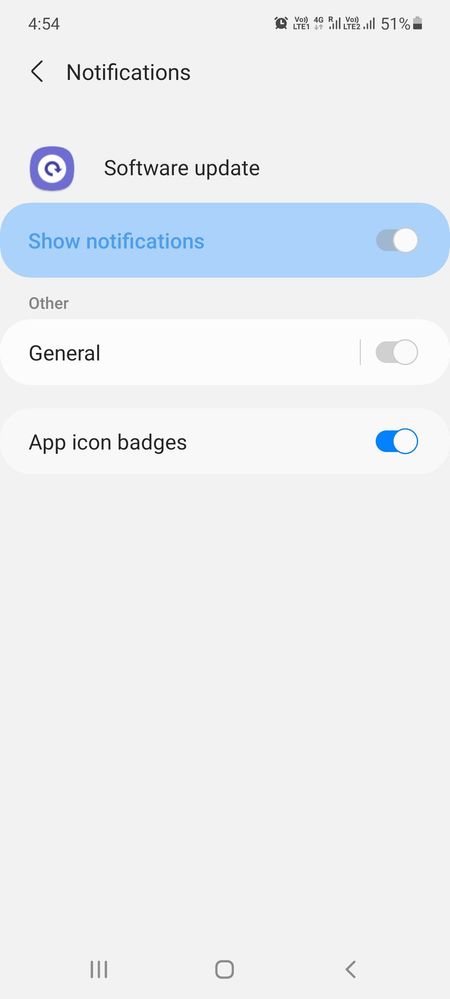
Please let us know how to disable software update notification - it's not allowed to change the option screenshot attached / how to uninstall software update application.
Don't you get doubt why your phone memory will be full,camera quality is not good, performance & battery will be slow after an year. All these because of these updates. Phone updates are required but why samsug forcing us to update the software? Don't you get this ? After all these you will buy new phone that's the concept behind the software update.
Cool buddy, you keep update. When you realize problems you will remember me. I am using only samsung mobiles from past 11 years. Don't you get doubt why they are giving option to disable software update notification.It's a cheap trick.
Just because you don't face anything doesn't mean its not there.
This is a deliberate thing samsung does too. After 2 or 3 years of update, every flagship loses its battery backup efficiency, simply draining too fast.
Why do you want to disable the notification?? You don't want to update your mobile??? If yes, simply go into software update settings and disable auto update over wifi
If we update the phone runs smoother because the previous bugs are ironed out in this issue. So updates are a must for any phone and for that matter even for PC also.
I've installed every single update in my Note10 and it still performs blazingly fast. You cannot disable the update service but it's in your hands whether to update your phone or not. Samsung cannot force that upon you.
I'm a software developer and it's totally understandable for me why samsung has not allowed the users to change it's notification. If you're into installing custom roms then you can check xda developers. Maybe there's a custom rom for note 8 which supports these features. If not then you'll have to buy a new phone. That's the only solution i can think of. Hope you'll find something on xda.
xda not directly working on NOTE 20, if I go to root & change samsung won't consider warranty. How many mobile we can buy,lol For your kind information have attached why I am looking for stop the updates. If you stop the update your battery won't drain soo quickly, your cam won't miss the quality , momeonry won't get full by os, mobile performance will be remain same even after 5 years if you block the updates.
Im sorry I confused your post with another one on the forum. Yeah on xda you can only find ways to uninstall the bloatware from samsung devices but cant do anything else with the service apps. If your main aim is not to install updates then that's upto you. Samsung wont automatically install it. So atleast that peace of mind you can have 😅
We would request you to register your concern in Samsung Members Application. So, that our concern team gets back to you as soon as possible.
Please follow this path to register your concern in Samsung Members Application (Open Samsung Members Application > Get help > Send Feedback > Error report/Ask questions).
Note. please attach the error log file within 15 minutes of the error occurred.

iamrohitkm
Expert Level 5
5 years ago
in
saty23
Active Level 2
5 years ago
in
Udayaprasath
Active Level 3
5 years ago
in
0 likes
JEFFINBASIL
Active Level 8
5 years ago
in
0 likes
JEFFINBASIL
Active Level 8
5 years ago
in
Bro do you have pending updates
0 likes
JEFFINBASIL
Active Level 8
5 years ago
in
0 likes
Udayaprasath
Active Level 3
5 years ago
in
0 likes
Udayaprasath
Active Level 3
5 years ago
in
0 likes
saty23
Active Level 2
5 years ago
in
https://www.google.com/amp/s/www.makeuseof.com/tag/phones-slow-usage-years/amp/
0 likes
AlphaTrion
Expert Level 1
5 years ago
in
This is a deliberate thing samsung does too. After 2 or 3 years of update, every flagship loses its battery backup efficiency, simply draining too fast.
dj9494
★★
5 years ago
in
If yes, simply go into software update settings and disable auto update over wifi
dj9494
★★
5 years ago
in
0 likes
dj9494
★★
5 years ago
in
0 likes
saty23
Active Level 2
5 years ago
in
0 likes
Evans130
Active Level 3
5 years ago
in
bssunilreddy
Active Level 5
5 years ago
in
0 likes
sameergupta
Active Level 6
5 years ago
in
0 likes
sameergupta
Active Level 6
5 years ago
in
If you're into installing custom roms then you can check xda developers. Maybe there's a custom rom for note 8 which supports these features. If not then you'll have to buy a new phone. That's the only solution i can think of. Hope you'll find something on xda.
saty23
Active Level 2
5 years ago
in
How many mobile we can buy,lol
For your kind information have attached why I am looking for stop the updates. If you stop the update your battery won't drain soo quickly, your cam won't miss the quality , momeonry won't get full by os, mobile performance will be remain same even after 5 years if you block the updates.
Finally thanks for your suggestion.
0 likes
sameergupta
Active Level 6
5 years ago
in
0 likes
Samsung_Support2
Expert Level 3
5 years ago
in
Dear Samsung Member,
Greetings from Samsung Customer Support!
We would request you to register your concern in Samsung Members Application. So, that our concern team gets back to you as soon as possible.
Please follow this path to register your concern in Samsung Members Application (Open Samsung Members Application > Get help > Send Feedback > Error report/Ask questions).
Note. please attach the error log file within 15 minutes of the error occurred.
Thank you for writing to Samsung.
Warm Regards,
Samsung Customer Support
0 likes
saty23
Active Level 2
5 years ago
in
0 likes