
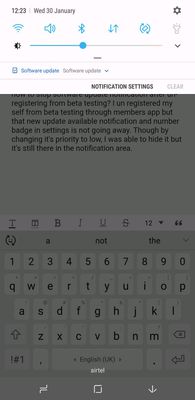
how to stop software update notification after un-registering from beta testing? I un registered my self from beta testing through members app but that new update available notification and number badge in settings is not going away. Though by changing it's priority to low, I was able to hide it but it's still there in the notification area. Have a look at the screenshot.
Jagratidas
Active Level 6
8 years ago
in
0 likes
admin_
Expert Level 5
8 years ago
in
settings>> software update >> download updates automatically/scheduled software updates(turn off as per your requirement)
Be sure to hit ♡ when you find an answer that works for you. For Further assistance, you can also connect us via Samsung Members web community by following mentioned url-https://community.samsungmembers.com/en_IN#/
0 likes