
Hi Good Morning,
I have problem with S Pen feature that I had not detached S pen still it shows in status bar that your S Pen is out of the box ...
It's almost many times I noticed ...
Is this a problem or a bug ?
How I solve this Problem from my end every time ...
Whenever I got this problem I disabled S Pen features from notification bar and then again enabled S pen feature from notification bar then it's all ok again when I detach and attach the S Pen the same error has been repeated kindly help for the same.
Waiting for your positive reply thank you...
Please call me if you don't understand anything from above writing
T & R's,
Vimal Doshi
Samsung Embassador INDIA
RAJKOT, GUJARAT, INDIA
+91 9227000007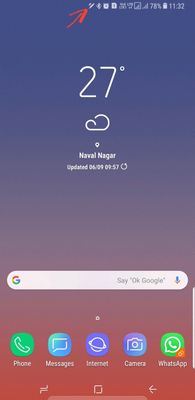
I have problem with S Pen feature that I had not detached S pen still it shows in status bar that your S Pen is out of the box ...
It's almost many times I noticed ...
Is this a problem or a bug ?
How I solve this Problem from my end every time ...
Whenever I got this problem I disabled S Pen features from notification bar and then again enabled S pen feature from notification bar then it's all ok again when I detach and attach the S Pen the same error has been repeated kindly help for the same.
Waiting for your positive reply thank you...
Please call me if you don't understand anything from above writing
T & R's,
Vimal Doshi
Samsung Embassador INDIA
RAJKOT, GUJARAT, INDIA
+91 9227000007
gakshat14
Active Level 6
8 years ago
in
0 likes
VDVimalDoshi
Active Level 6
8 years ago
in
0 likes
gakshat14
Active Level 6
8 years ago
in
0 likes
nalayakmusafir
★★
8 years ago
in
0 likes
VDVimalDoshi
Active Level 6
8 years ago
in
0 likes
admin_
Expert Level 5
8 years ago
in
- Navigate to apps >> Settings >> Apps >> Tap on three dots >> Reset app preferences.
- Please run your device in safe mode.
- Kindly go to settings >> General management >> Reset >> Reset settings.
- If still issue persists, the relevant department will serve you better, if you can provide logs/video within 15 minutes of issue occurrence by registering this feedback in Error Section (Samsung Members App -> Feedback -> Questions/Errors -> Create -> Error reports).
Be sure to hit ♡ when you find an answer that works for you. For further assistance, you can get in touch with us via Live Chat option by following- http://livechat.support.samsung.com/Customer_new/IN. You can also connect us via Samsung Members web community by following mentioned url-https://community.samsungmembers.com/en_IN#/
0 likes