
I cannot move out my files and images from the secure folder once we move to the secure folder frim the general gallery. Samsung is keeping our private data in their custody. Plz rectify this issue asap. I need to move out my files and images from the secure folder. After the latest update on app samsung vanished the option to do so.
Already i have sent mails to the samsung customer care they still mention that there is a option in secure folder to move out of secure folder. But it is false. No there is no option to do so.
Consider this as a major issue regarding our privacy. Address this issue asap.

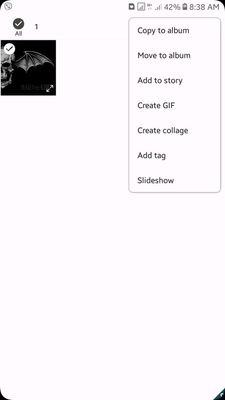
Already i have sent mails to the samsung customer care they still mention that there is a option in secure folder to move out of secure folder. But it is false. No there is no option to do so.
Consider this as a major issue regarding our privacy. Address this issue asap.
sanjumaheshwari143
Active Level 3
09-29-2018 03:12 AM
in
Sam23plus
Active Level 6
09-29-2018 03:18 AM
in
Kasun1317
Beginner Level 4
09-29-2018 03:27 AM
in
have you updated to the latest version. There is no option to find anything like move out of secure folder. can you guys send me some screenshots how to do so. ealrier it had that option but now vanished after new update
0 likes
admin_
Expert Level 5
10-3-2018 12:00 PM
in
Be sure to hit ♡ when you find an answer that works for you. For further assistance, you can get in touch with us via Live Chat option by following- http://livechat.support.samsung.com/Customer_new/IN. You can also connect us via Samsung Members web community by following mentioned url-https://community.samsungmembers.com/en_IN#/
0 likes