
After restarting the phone, Secure folder pops up into the menu even though it is off in the notification panel.
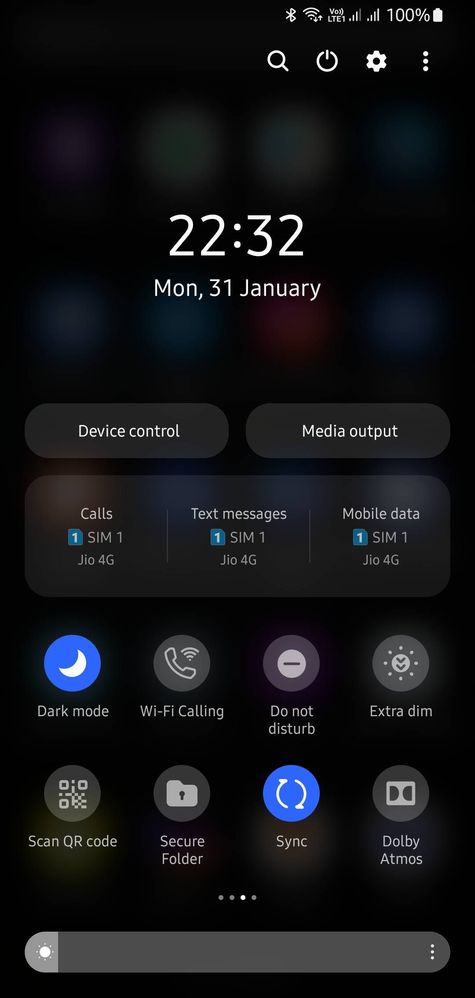
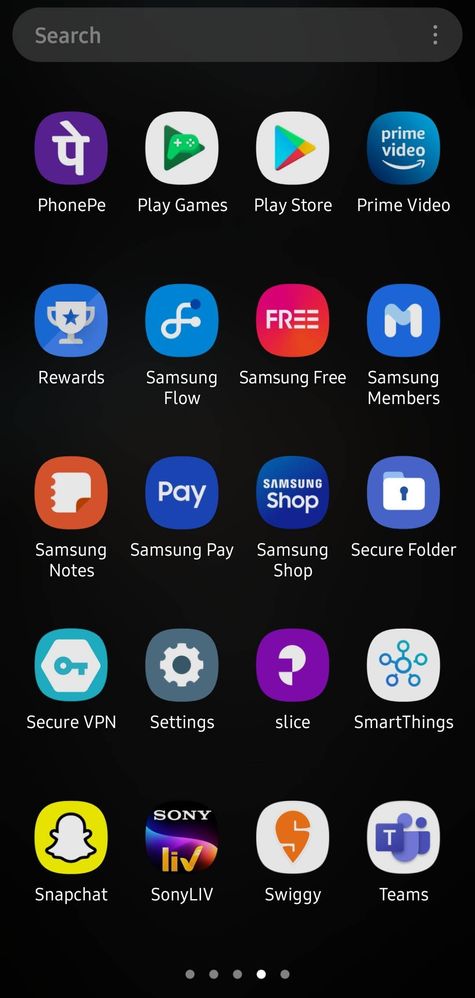
To remove secure folder from menu list, I have to enable and disable the secure folder toggle button again from the notification panel.
This is happening after I have updated my device to OneUi 4. It seems to be a bug and reported to Samsung.
Anonymous User
Beginner Level 1
02-1-2022 04:16 AM
in
0 likes
Anonymous User
Beginner Level 1
02-1-2022 04:19 AM
in
0 likes
chndn811
Active Level 10
02-1-2022 04:20 AM
in
Anonymous User
Beginner Level 1
02-1-2022 04:21 AM
in
Anonymous User
Beginner Level 1
02-1-2022 04:22 AM
in
0 likes
Anonymous User
Beginner Level 1
02-1-2022 04:22 AM
in
Anonymous User
Beginner Level 1
02-1-2022 04:22 AM
in
0 likes
ムBHINムV
Expert Level 2
02-1-2022 04:24 AM
in
Secure folder pops up severely without enabling from quick toggle
Everytime I have to enable and disable from quick toggle to remove secure folder from app drawer
Anonymous User
Beginner Level 1
02-1-2022 04:24 AM
in
0 likes
BrajeshKr
Active Level 3
02-8-2022 05:05 PM
in
chndn811
Active Level 10
02-8-2022 05:35 PM
in
0 likes
BrajeshKr
Active Level 3
02-8-2022 05:47 PM
in
0 likes
cs-member13
Expert Level 4
03-7-2022 07:00 AM
in
Dear Samsung Customer,
Greetings from Samsung Customer Support!
Thank you for sharing your concern. We acknowledge your query and apologize for the same. And please follow the easy troubleshooting steps which might help to solve the issue.
When you scan your fingerprints on the device, be aware of the following conditions that may affect the feature’s performance:
• The fingerprint recognition sensor recognizes fingerprints. Ensure that the fingerprint recognition sensor is not scratched or damaged by metal objects, such as coins, keys, and necklaces.
• The screen protector supplied with the device may cause the fingerprint recognition sensor to malfunction. Remove the screen protector to improve fingerprint sensitivity.
• Ensure that the fingerprint recognition area and your fingers are clean and dry.
• The device may not recognize fingerprints that are affected by wrinkles or scars.
• The device may not recognize fingerprints from small or thin fingers.
• If you bend your finger or use a fingertip, the device may not recognize your fingerprints. Make sure to cover the entire fingerprint recognition sensor with your finger.
• To improve recognition performance, register fingerprints of the hand used most often to perform tasks on the device.
• In dry environments, static electricity can build up in the device. Avoid using this feature in dry environments or before using the feature, discharge static electricity by touching a metal object.
Note: You should make sure to use the highest central parts of fingerprint or the most curved part of fingerprint when you register or scan fingerprint
In case the issue still occurs. Please register your concern in Samsung Members Application (Open Samsung Members Application > Get help > Send Feedback > Error report).
Thank you for writing to us.
Warm Regards,
Samsung Customer Support.
0 likes