
Original topic:
Update Schedule from Telus
(Post creation time:
2026/11/6 08:08 PM
)
32 Views
Related Content
Samsunga36 frame pacing
in Galaxy A 2026/11/6 11:13 PM
How Do I Know .......?
in Solutions & Tips 2026/11/6 07:41 PM
Custom Button Image makes Buttons Indistinguishable from Other Buttons
in Galaxy A 2026/11/2 06:26 PM
Hero by Night; Carpenter by Day
in Galaxy Gallery 2026/05/1 12:54 PM
Haisley
Moderator
2026/11/6 08:22 PM
in
Hello Ray1,
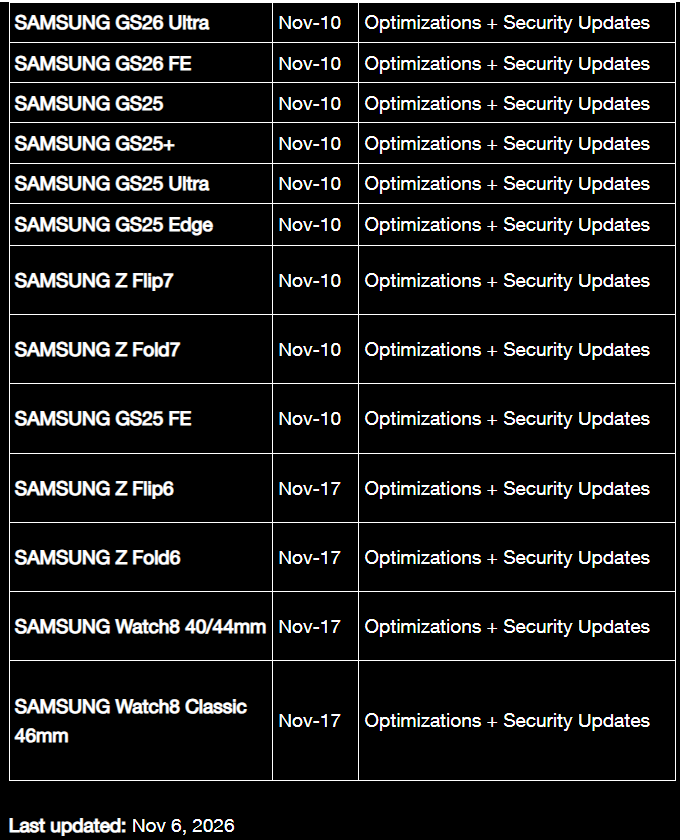
We understand how exciting it is to anticipate enhanced security patches, and performance optimizations for your Galaxy S26 series, Galaxy S25 series, foldable devices, and wearables.
We truly appreciate you taking the time to share this information and engaging with our community on upcoming software updates.
To ensure your device receives the official, stable release as soon as it becomes available, Samsung recommends that everyone regularly check their settings manually.
You can check for and install the latest official updates by following these paths:
To check for updates, go to Settings > Software update > Download and install on the phone, or open the Galaxy Wearable app > Watch settings > Watch software update > Download and install for the smartwatch.
0 likes
SgtStubby
Expert Level 1
2026/11/6 10:16 PM
in
I just checked and it was available for my S26 Ultra so I installed it just now. Thanks
Ray1
Expert Level 5
2026/11/6 10:55 PM
in
👍
0 likes