
A green label pops up on my note 20 with notifications like : screenshot disabled. This is interfering with reading screen. How to stop please.
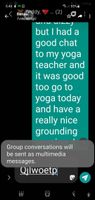
This is a screenshot of the notifications constantly appearing on my screen. Please help anybody. 🐻
A green label pops up on my note 20 with notifications like : screenshot disabled. This is interfering with reading screen. How to stop please.
SamsungLaura
Moderator
Friday, June 4th, 2021 06:29 AM
in
Hi @Tedron69, are you able to share a photo of the notification?
I have a few troubleshooting steps you can try.
Settings > Advanced Features > Screenshots and screen recorder > toggle 'Screenshot toolbar' on.
Go back to the page you were reading and check if you still receive the notification.
If you would like to keep screenshots toggled off, go back to Screenshot toolbar and toggle off.
0 likes
SamsungLaura
Moderator
Sunday, June 6th, 2021 11:10 PM
in
Thanks @Tedrhon, are you able to also try going into:
Settings > Advanced Features > S pen > Toggle ON 'Screen off memo'
Let me know how it goes!
0 likes
Tedron69
Active Level 1
Tuesday, June 8th, 2021 08:51 AM
in
No luck Laura, new screenshot below.
Any more suggestions welcomed. Thanks, Ted
.
0 likes
SamsungLaura
Moderator
Tuesday, June 8th, 2021 11:03 PM
in
Are you able to check your accessibility settings? To do this:
Settings > Accessibility > Advanced settings > Time to take action > toggle to Default.
0 likes