
Hi,
As a writer, to be able to write in hand and then later convert to text is essential for me. This is the only reason why I purchased the Samsung Tablet S8+ in the first place. I could write in hand, click the Handwriting-To-Text icon and then have text converted, one page at a time. It was perfect.
However, after an update of Samsung Notes the other day the icon for conversion is no longer there!!! I know I can have text converted while I write it but that is immensely disturbing for the creative process. Plus, the handwritten text disappears as soon as it is converted. The other option, to touch text and then have it converted only works for one line at a time, and that just takes too long.
I, and I assume many, many other writers and students, desperately need to get the access back to the previous way of converting, it is essential for my work as a (published) writer.
Please allow us as writers to choose which conversion method we prefer as soon as possible.
Thank you!
Selected Answer
TipsyTrex
Black Hole
2 years ago
in
0 likes
TipsyTrex
Black Hole
2 years ago
in
halinagold
Asteroid
2 years ago
in
Thanks for chiming in @TipsyTrex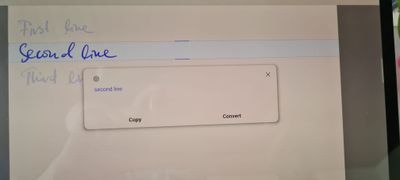
However, on my tablet that only works for one line at a time, not for the entire text on the screen.
Are you able to make it work for multiple lines?
0 likes
TipsyTrex
Black Hole
2 years ago
in
halinagold
Asteroid
2 years ago
in
THANK YOU @TipsyTrex! You just saved my (working) life!
0 likes