
Original topic:

One UI 7 disabled Taskbar in Settings and Goodlock?

(Post creation time:  

1 year ago

)

9377 Views

G

GoodTools

Cosmic Ray

last edited


1 year ago


in

 
Is this true that the taskbar no longer works with One UI 7?
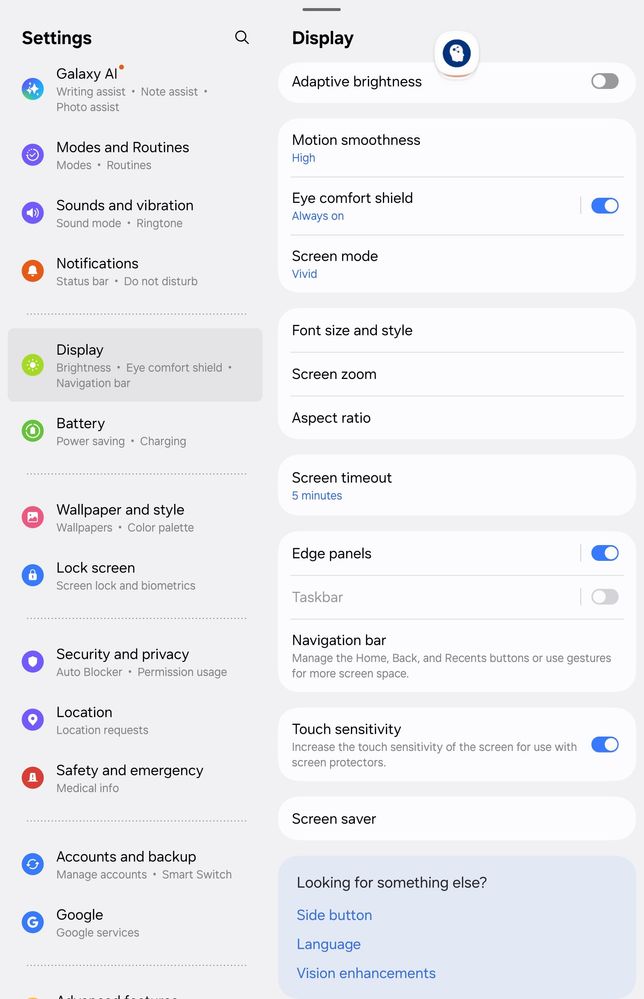
I see the option in settings and in Home Up in Goodlock but it is greyed out and cannot be activated.

Any help or comments are appreciated🙏


image


    •  

      Selected Answer

      G

      GoodTools

      Cosmic Ray

      1 year ago


      in

       
      Yeah, it is still greyed out. Cache wipe didn't seem to help. I just figured it out though. I always use nova launcher instead of one ui as my default launcher. I changed one ui to my default launcher and now the task bar works. Wish they would allow it while nova launcher is in use. Other one ui features work with nova launcher but as soon as I switch nova as my default, taskbar is greyed out again.

      This comment was created from this

      reply

      0 likes

    • M

      Mujibar

      Honored Contributor

      1 year ago


      in

       
      The option is active on my Tab S9. Try clearing cache for One UI Home. If you haven't cleared device cache, make sure you do that, as well.

      1) Turn off your device.

      [Your device may need to be connected to a powered USB device (ex: computer) before proceeding to the next step.]

      2) Press and hold the Volume Up button and the Side/Power button until you feel a vibration and the Samsung logo appears. Let go of the buttons.

      3) You will now be in Android recovery. Use the Volume buttons to highlight "Wipe cache partition."

      4) Press the Side/Power button to execute.

      5) Use the Volume buttons to highlight "Yes."

      6) Press the Side/Power button to execute.

      7) "Reboot system now" will already be highlighted. Press the Side/Power button to execute.

      0 likes

      G

      GoodTools

      Cosmic Ray

      1 year ago


      in

       
      Will that delete photos, files, clipboard items?

      0 likes

      M

      Mujibar

      Honored Contributor

      1 year ago


      in

       
      No, it only clears out temporary system files. All your data will remain intact.

      0 likes

      M

      meself

      Honored Contributor

      1 year ago


      in

       
      No it clears temp file's

      0 likes

    • N

      neilth

      Black Hole

      1 year ago


      in

       
      You have not said what device your screenshot is from. In the Display settings on my Z Fold5, the Taskbar setting is grayed out when the phone is folded. When unfolded, the setting is available to modify.
      M

      Mujibar

      Honored Contributor

      1 year ago


      in

       
      How did the cache clear work out? Is the taskbar toggle still grayed-out?

      0 likes

      G

      GoodTools

      Cosmic Ray

      1 year ago


      in

       
      Yeah, it is still greyed out. Cache wipe didn't seem to help. I just figured it out though. I always use nova launcher instead of one ui as my default launcher. I changed one ui to my default launcher and now the task bar works. Wish they would allow it while nova launcher is in use. Other one ui features work with nova launcher but as soon as I switch nova as my default, taskbar is greyed out again.
      M

      Mujibar

      Honored Contributor

      1 year ago


      in

       
      That makes sense, actually. The taskbar is integrated into One UI Home and won't work outside of that launcher. Sorry about that, but glad you got it figured out.

      0 likes