
Original topic:

How do I allow facebook to access google photos?

(Post creation time:  

2 years ago

)

12447 Views

F

Fisherguy58

Asteroid

last edited


2 years ago


in


My 9SE will not allow FB access to my google photos, how can I change this?
I've spent an hour googling it and so far nothing.  

    •  

      Selected Answer

      R

      realaud

      Honored Contributor

      2 years ago


      in

       
      I found a way. You can access FB through your web browser (switch to mobile site, but not the app). When you tap the picture icon, it will bring up your gallery, but thre is also a drop down in the 3 dot menu to select cloud media, and if you tap that you can select Google photos and then select the image you want. 1728100852464.jpg

      This comment was created from this

      reply

      0 likes

    • U

      user2sDkdLWOqU

      Cosmic Ray

      2 years ago


      in

       
      You go into Facebook settings and allow photos in the permissions.

      0 likes

      F

      Fisherguy58

      Asteroid

      2 years ago


      in


      Where?
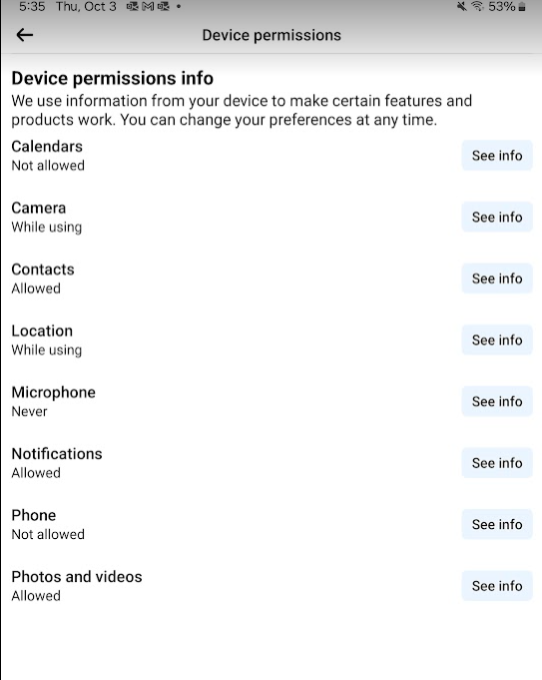
      Google Photos doesn't even show up there.
      tablet.png

      0 likes

      R

      realaud

      Honored Contributor

      2 years ago


      in

       
      Facebook has no control over the file location your device lets you access. They were not asking *how* to get photos on FB but, specifically, how to access Google photos to do so .
    • R

      realaud

      Honored Contributor

      2 years ago


      in

       
      I think the only way is to go into Google photos first and select the pic(s) you want and then share to FB. Samsung, apparently, only allows access to the gallery - can't even access any other cloud location. From a computer, however, you can use a photo from anywhere you can access through the file manager.

      0 likes

      R

      realaud

      Honored Contributor

      2 years ago


      in

       
      I found a way. You can access FB through your web browser (switch to mobile site, but not the app). When you tap the picture icon, it will bring up your gallery, but thre is also a drop down in the 3 dot menu to select cloud media, and if you tap that you can select Google photos and then select the image you want. 1728100852464.jpg
      F

      Fisherguy58

      Asteroid

      2 years ago


      in


      Hey, that works, thanks!  👍  👍

      0 likes

      R

      realaud

      Honored Contributor

      2 years ago


      in

       
      Can you mark the post as the solution? Thanks.

      0 likes