All community
Sign In/Register
/
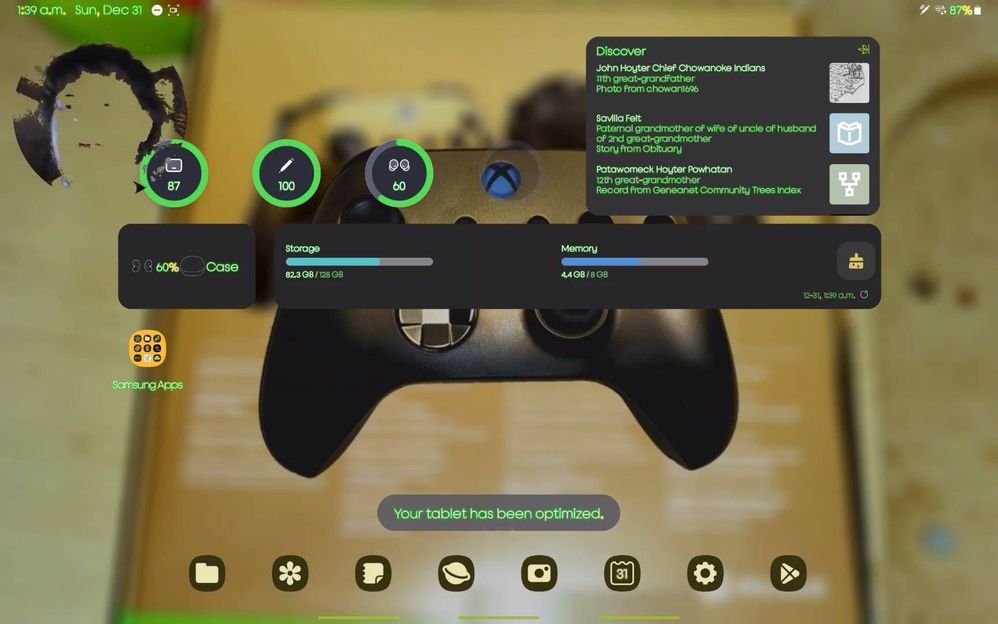
Facecam for screen recorder is messing up!
(Post creation time:
3 years ago
)
2963 Views
RichardBHolden
Comet
last edited
in
0 people had this problem.
Me too
3 likes
This post has been closed.
7 Comments
Selected Answer
bill-e
Cosmic Samsung Care Ambassador
Try Safe Mode. If it works in Safe Mode then it is one of your installed apps causing the issue.
Safe Mode
1. Pull down the top menu and press the Power icon so that the Power Off and Restart icons appear
2. Press and Hold the Power Off icon until the green Safe Mode icon appears
3. Tap the Safe Mode icon and the phone will reboot into Safe Mode
4. To exit Safe Mode, just reboot. (you may have to take it off airplane mode when it restarts)
This comment was created from this
0 likes
Boot to Safe Mode and try it, doesn't do that here.
Load 2 older replies
1 like

Selected Answer
bill-e
Cosmic Samsung Care Ambassador
3 years ago
in
Try Safe Mode. If it works in Safe Mode then it is one of your installed apps causing the issue.
Safe Mode
1. Pull down the top menu and press the Power icon so that the Power Off and Restart icons appear
2. Press and Hold the Power Off icon until the green Safe Mode icon appears
3. Tap the Safe Mode icon and the phone will reboot into Safe Mode
4. To exit Safe Mode, just reboot. (you may have to take it off airplane mode when it restarts)
0 likes
bill-e
Cosmic Samsung Care Ambassador
3 years ago
in
Boot to Safe Mode and try it, doesn't do that here.
0 likes
RichardBHolden
Comet
3 years ago
in
0 likes
RichardBHolden
Comet
3 years ago
in
0 likes
bill-e
Cosmic Samsung Care Ambassador
3 years ago
in
Try Safe Mode. If it works in Safe Mode then it is one of your installed apps causing the issue.
Safe Mode
1. Pull down the top menu and press the Power icon so that the Power Off and Restart icons appear
2. Press and Hold the Power Off icon until the green Safe Mode icon appears
3. Tap the Safe Mode icon and the phone will reboot into Safe Mode
4. To exit Safe Mode, just reboot. (you may have to take it off airplane mode when it restarts)