
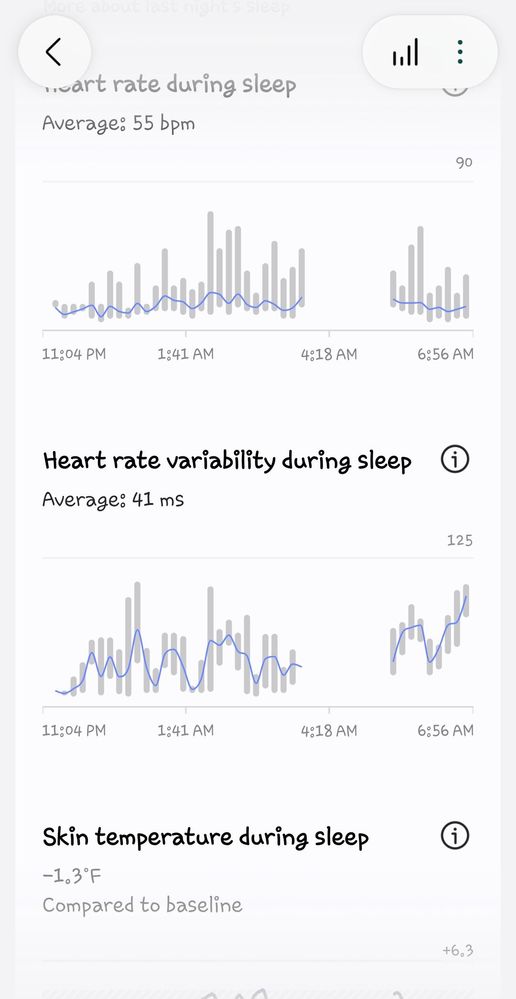
I am having constant issues with gaps in my sleep tracking with my Watch 9. I have tried resetting the watch, clearing cashe on Samsung Health, cleaning the sensors, etc. I see others are having issues but are there any plans to fix this. I am not positive but I think this may also be a drain on my Ultra 25 battery. This is a common display of a night of sleep, if it records anything.
RedOregon
Sun
09-3-2026 02:52 PM
in
RedOregon
Sun
09-3-2026 03:01 PM
in
migdalorguy
Constellation
09-15-2026 08:57 PM
in
where exactly is this mystery setting? It's not under settings/battery on my watch 9
0 likes
RedOregon
Sun
09-15-2026 08:59 PM
in
0 likes
jules0125
Asteroid
09-6-2026 11:59 AM
in
So far I have been very underwhelmed with the Watch 9.
NSI1220
Asteroid
09-6-2026 06:03 PM
in
Tried it all too. Nothing seems to stop the four lag between bedtime and sleep starting.
NSI1220
Asteroid
09-6-2026 06:05 PM
in
Same here on my new Galaxy Watch 9. I go to bed usually at 10 PM and it has never started my sleep between 10 PM and 10:30 since i am asleep no later than 10:30. It always says my sleep starts around 1 or 2AM. Tried everything to no avail. It shows the correct time I go to bed but says I didn't go to sleep for nearly 4 hours later. The Galaxy watch 8 I traded for this worked as it should.
rellek
Asteroid
09-24-2026 12:44 PM
in
Please fix this bug!
MikeySF
Asteroid
09-24-2026 07:08 PM
in
Here is the response I got from Support:
Thank you for your patience while our team reviewed the logs you provided.
Based on the analysis, it appears that the sleep measurement was interrupted due to movement during sleep. The Galaxy Watch determines sleep status using an algorithm that relies on accelerometer data. As a result, movements such as tossing and turning or arm movement during sleep may be interpreted as wakefulness, which can interrupt sleep tracking.
Our technical team has identified that sleep tracking may be overly sensitive to movement in certain situations and is aware of this behavior. Improvements are being considered for future updates.
We apologize for any inconvenience this may have caused and appreciate your understanding.
If you have any further concerns or questions, please let us know. We will be happy to assist you.
Kind regards,
Ruffa
Samsung Health Support Team
rellek
Asteroid
09-24-2026 07:37 PM
in
jules0125
Asteroid
09-24-2026 09:22 PM
in
NickBa
Asteroid
10-13-2026 10:06 AM
in
Same issue here. Bought my Samsung Watch 9 about six weeks ago The sleep recording seemed to work well for the first few weeks except for the occasional gap in the sleep data in the middle of the night which I put down to it losing good contact with my wrist. Then few days ago I noticed the lights on the sensors underside of the watch didnt seem to be on when I woke up in the night. The sleep data showed I wasnt asleep for hours that night when I know I was. This issue has continued. Makes me wonder whether the Watch is still monitoring heart rate (for arrythmia notification) when I'm asleep which is the primary reason I bought it. Not impressed.
NickBa
Asteroid
10-23-2026 08:06 PM
in
After some trial and error, I have done the following and now get almost perfect sleep data:
1. I switched off the AGEs Index (on your watch go to Samsung Health, Settings and then scroll down)
2. Initially, at night I started wearing the watch so the face was on the inside of my wrist. That really seemed to make a big difference. However, I dont like wearing my watch that way, so I then tried shaving off the hairs on the back of my wrist directly below where the sensors touch and that worked just as well !
Good Luck !
0 likes
TJ5211
Cosmic Ray
10-25-2026 06:05 AM
in
0 likes
jules0125
Asteroid
10-25-2026 12:55 PM
in
0 likes