
Original topic:
Step counting does not work on Samsung Watch Ultra 2
(Post creation time:
08-24-2026 05:47 PM
)
2275 Views
J
Joep03
Asteroid
On my Samsung Watch Ultra 2, the step counter barely works. After a fresh installation, step counting works normally. But after one or two days—or perhaps after a reboot—the watch stops counting steps.
Steps recorded by my phone are still shown on the watch face, but if I do not have my phone with me, the watch itself no longer records any steps after one or two days. It is driving me crazy—especially for a watch that costs no less than €750.
I have already tried all kinds of things, including:
Clearing the cache of several apps
Rebooting
Performing several factory resets
Trying different watch faces
Changing the step-count goal
Everything works perfectly on my other watches (Watch 4, Watch 7, and Ultra 2024).
d423
Cosmic Ray
08-24-2026 05:59 PM
in
Samsung_Moderator
Community Manager
08-24-2026 07:00 PM
in
Hi @Joep03,
Thanks for reaching out to the Samsung Community. That sounds really frustrating, especially after you've already gone through all of those troubleshooting steps.
To better assist you, I’ll need to know where the device was purchased. Is this a U.S. model device?
Please let me know, and I look forward to hearing back from you.
0 likes
userHBBdbWpyF2
Asteroid
08-24-2026 11:15 PM
in
Joep03
Asteroid
08-25-2026 05:22 AM
in
Directly bought from Samsung in U.S.
Many people facing this issue with Samsung Ulta 2, all around the world.
Samsung_Moderator
Community Manager
08-25-2026 07:29 PM
in
@Joep03, thank you for your response.
Since you have already completed the basic troubleshooting steps, have you made sure the watch is snug against your wrist? When was the last firmware update for either the phone or watch?
We look forward to hearing back from you.
0 likes
Joep03
Asteroid
08-25-2026 07:40 PM
in
Ofcourse the watch is snug againt my wrist. Latest firmware have been installed on my phone (S25+) and watch.
As far as I’ve been able to reproduce it, the problem occurs every time the watch restarts. The only solution then is a factory reset.
Samsung_Moderator
Community Manager
08-25-2026 08:15 PM
in
@Joep03, since factory reset only works until the device restarts the only other option would be to have the device set up for service. You can do so by calling 1-800-726-7864 or going to one of our authorized service centers.
**If a product was purchased in the United States but is currently located outside the United States and requires repair service, it is not covered under warranty unless the customer prepays return shipping to an authorized service center in the United States.
userHBBdbWpyF2
Asteroid
09-11-2026 05:36 PM
in
Joep03
Asteroid
09-11-2026 07:11 PM
in
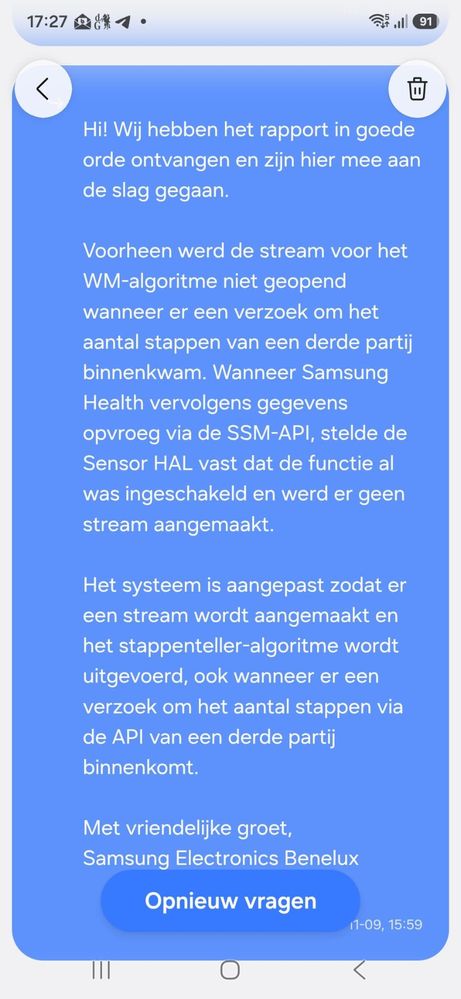
This moderator is totally wrong! I contacted Samsung EU and they confirmed to me today it's a software issue and will be fix in next merge request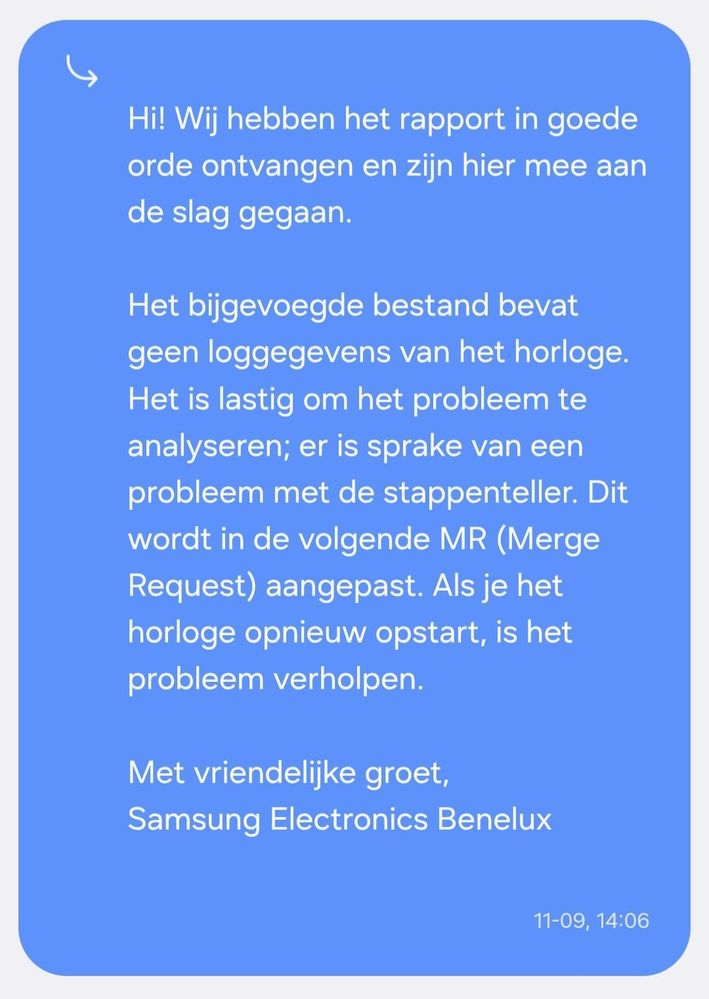
neganX12
Asteroid
10-5-2026 07:43 PM
in
Got any update on it?
I am still having the same frustrating issue and now on my 6th factory reset.
0 likes
Joep03
Asteroid
10-6-2026 07:07 AM
in
Nobody knows when Samsung will release the next software update. Normally, it happens once every quarter, which would mean the next update will be released sometime in mid-December. And that is completely unacceptable!
0 likes
userHBBdbWpyF2
Asteroid
09-11-2026 08:57 PM
in
0 likes
neganX12
Asteroid
09-15-2026 07:15 PM
in
Man, I thought I was alone. 😭
This has been the most frustrating issue I've had with Samaung ever! I bought the ultra2 pre order from Samsung Shop app, India.
Watch works perfectly well, as long as you don't reboot or restart it.
I tried everything exactly like you, went on reddit asking for help. Wrote a post there to see if anyone had the same.
https://www.reddit.com/r/galaxywatchultra/s/rkSmg6MKvs
I am glad its not an hardware issue.
The agents here in India advised me to visit Samsung service centre. I did go and they asked to do "Technical Checks" for 2 days and wanted me to drop it off. I said no and came back.
Can you write back to me or can we connect elsewhere? So you can let me know when there's a fix to this frustrating problem..?
0 likes
user4ROqj2gZYF
Constellation
09-16-2026 04:58 AM
in
Joep03
Asteroid
09-16-2026 07:12 PM
in
I am someone 😉
I posted screenshots from Samsung Benelux.