
(EDIT) I solved it, I uninstalled not the wearables app but the Galaxy Watch4 Manager itself from the apps. That seems to have worked.
(Original)So basically, I keep getting this notification that I have to allow access for Galaxy Watch4 Manager to read my notifications, but when I tap the notification, I get taken to my "Notification Access" in my settings, where Galaxy Watch4 Manager is not one of the options. I also tried going to the wearables app. Going into watch settings and notifications prompted me with the same thing as the notification, and I was unable to turn it on, for It brought me to the same place as the notification. Provided is the screenshot of the screen I keep getting. Can anyone help?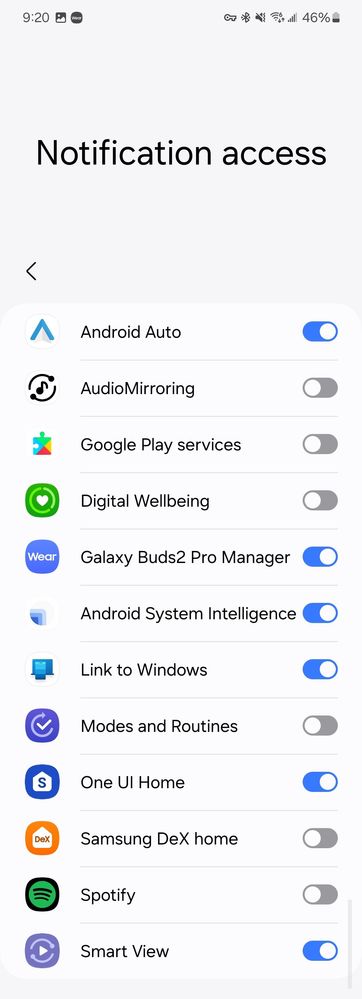
Selected Answer
LongHiker
Galactic Samsung Care Ambassador
3 years ago
in
0 likes
cwinkler
Comet
3 years ago
in
Not sure what phone or versions you're on. When I go into Settings on my S24U, then Notifications, then App notifications, I do have one for Galaxy Watch4 Manager. I finally found "Notification access" and it also shows Galaxy Watch4 Manager. On your phone, if you go into Settings - Apps - Galaxy Watch4 Manager - App info is Notifications allowed?
0 likes
CraftingAlex
Asteroid
3 years ago
in
0 likes
LongHiker
Galactic Samsung Care Ambassador
3 years ago
in
CraftingAlex
Asteroid
3 years ago
in
0 likes
realaud
Honored Contributor
3 years ago
in
You are looking at the wrong screen. Try this: To find the watch manager easily, go to the wear app, click on the 3 line menu on the top left, then click on the settings gear. Click on about Galaxy Wearable, and you will see the info page. Click on Galaxy Watch4 manager and you will see the app info screen.
make sure you click on the notification categories and that all of the categories are enabled.
0 likes
cwinkler
Comet
3 years ago
in
for me when I follow your instructions, my phone says "This app hasn't sent you any notifications", so there are no categories to enable. Not sure what the OP will get.
0 likes
realaud
Honored Contributor
3 years ago
in
when I went looking for the Watch4 Manager , previously, to see what version I had, that was the only way I could find it -- and I found it purely by accident.
0 likes
CraftingAlex
Asteroid
3 years ago
in
0 likes
jac1103
Constellation
3 years ago
in
Mine says "Restricted setting. For your security, this setting is currently unavailable."
0 likes
Wokeya_Farha
Constellation
2 years ago
in
I am having the same issue. I am using Galaxy A54 5G. I'm getting the same error messages, and the notification isn't working on my watch. What should I do. Can anyone help me.
0 likes
CraftingAlex
Asteroid
2 years ago
in
0 likes
realaud
Honored Contributor
2 years ago
in
Which watch do you have? The OP stated they fixed it by deleting the watch (#) manager. However, since the watch manager is necessary, it may have to be reinstalled (or it may reinstall itself). But, before you do that, go to your phone settings/apps, tap the dot menu and select special access. Scroll down to "notification access" and make sure that your watch manager is toggled on.
0 likes
Colleen98
Constellation
2 years ago
in
I started having this same issue today with my Galaxy watch 4 classic, and none of these prior options are working.
0 likes