
Original topic:
Apps gone missing
(Post creation time:
06-28-2026 11:38 PM
)
828 Views
A
Athena0803
Asteroid
Not sure if this is coincidence or not but around the time my Galaxy Watch 7 installed an update a few days ago, both Samsung Mail and Google Chat have gone missing. I used to get notifications from them when a new email came in or a new message was sent - a red dot appeared on the left side of screen. Now I can't find them in my list of apps on my watch or on the Wearable app on my phone. However both still work perfectly fine on my Samsung A54.
The notifications are very useful, how do I get them back?
Thanks in advance for any assistance!
0 likes
Selected Answer
Samsung_Moderator
Community Manager
06-30-2026 04:33 PM
in
Hi @Athena0803, thank you for reaching out to the Samsung Community. Missing notifications can be really frustrating especially with important apps like mail and messages. I would love to provide some assistance. Since this started after an update my first question will be, have you restarted both devices? Sometimes it's a simple fix with smaller bugs after updates.
If that didn't work, @LongHiker did give the correct steps and I do agree with them. Since you are still experiencing this I would suggest what you said with a Factory Reset.
I would back up your watch first, so no important information isn't lost.
Please let us know if this worked for you!
0 likes
LongHiker
Galactic Samsung Care Ambassador
06-29-2026 03:27 PM
in
@Athena0803 On your phone in the Wearable app:
1. Open watch settings
2. Click on Notifications
3. Click on App notifications
4. Scroll down and enable each of those apps.
0 likes
Athena0803
Asteroid
06-29-2026 04:33 PM
in
OK, I just found that they are already turned on. I will try 'allowing all' and then restart my watch.
0 likes
LongHiker
Galactic Samsung Care Ambassador
06-29-2026 04:51 PM
in
0 likes
Athena0803
Asteroid
06-30-2026 02:47 AM
in
Hi - still no luck.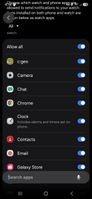
Not sure if you can see the screenshot I added but it shows that notifications are selected for Chat and mail. They were already selected, I didn't have to add them. The weird thing is that I can select notifications for those two apps but it doesn't look like those apps are on my watch. Again, this only happened recently and it may have been after the watch was updated but I can't be sure. I can't find anywhere on the watch or in the Wearable app how to add Email and Chat to my watch.
0 likes
LongHiker
Galactic Samsung Care Ambassador
06-30-2026 01:52 PM
in
@Athena0803 Those apps don't need to be on your watch to get the notifications. I get notifications for a lot of things that don't have apps on the watch.
0 likes
Athena0803
Asteroid
06-30-2026 02:09 PM
in
Well at a last resort I will see if I can 'reset to factory'.
0 likes
Samsung_Moderator
Community Manager
06-30-2026 04:33 PM
in
Hi @Athena0803, thank you for reaching out to the Samsung Community. Missing notifications can be really frustrating especially with important apps like mail and messages. I would love to provide some assistance. Since this started after an update my first question will be, have you restarted both devices? Sometimes it's a simple fix with smaller bugs after updates.
If that didn't work, @LongHiker did give the correct steps and I do agree with them. Since you are still experiencing this I would suggest what you said with a Factory Reset.
I would back up your watch first, so no important information isn't lost.
Please let us know if this worked for you!
Athena0803
Asteroid
06-30-2026 09:12 PM
in
Well that was interesting! I hadn't restarted my phone after last week's update because I assumed part of the update process included a restart. So.........I just restarted the phone and, yes, I now get email notifications on my watch. However, in the past I would just get the red dot indicating an email notification but this time the phone vibrated and went straight to the email - no red dot.
Is there a way of changing back to the red dot from the vibration? Not a big issue but I am curious to see where the setting would be. Regardless, so far so good! Thanks.