
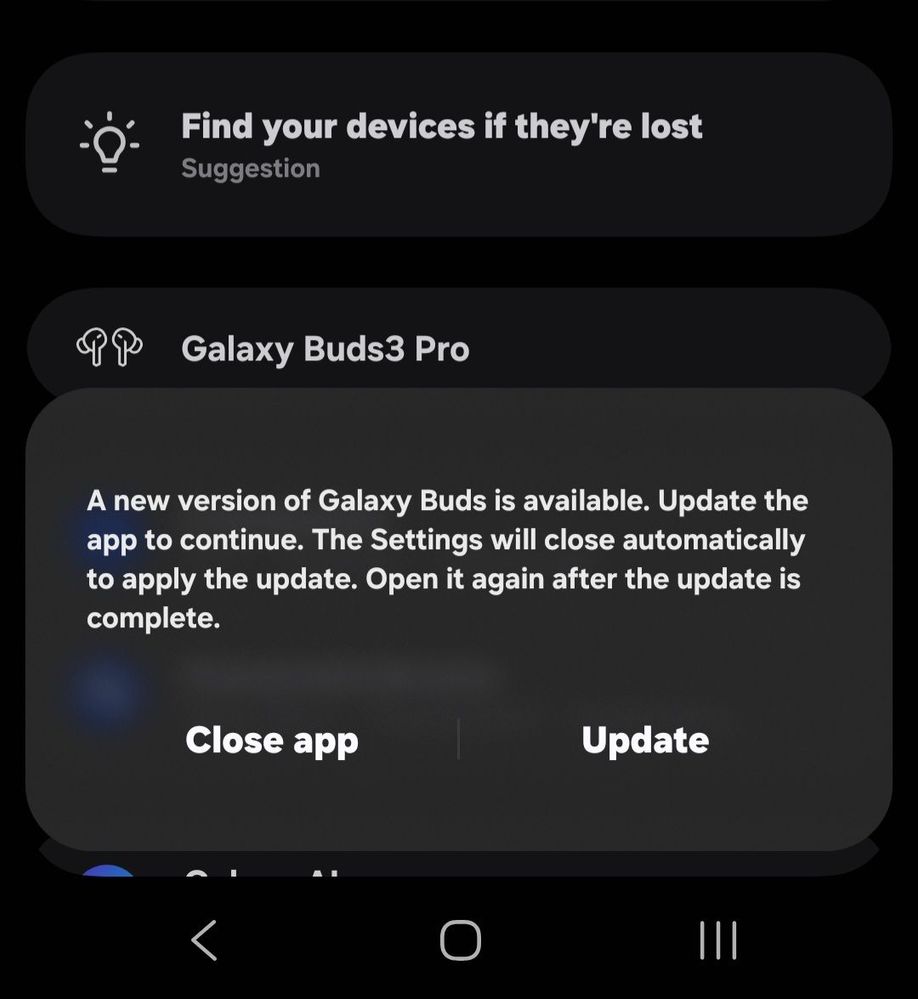
When I press the buds 3 pro option in my settings it says I need to update. When I press the update button nothing happens. I've tried factory resetting my buds and still the same issue. I can't access the buds setting at all. The only way I can change ambient mode or ANC is from the drop down.
Selected Answer
Samsung_Moderator
Community Manager
11-23-2025 06:22 PM
in
Thank you for reaching out, eeah. I can certainly understand your frustration with your Galaxy buds 3 pro not completing the update. I would recommend using the troubleshooting steps in this link: https://www.samsung.com/us/support/troubleshooting/TSG01200504/?msockid=1e319fd916b0646f26a4898e17236540
If you have tried all the troubleshooting steps provided and are still experiencing these symptoms, the next step would be a service repair.
For in-warranty repairs: Please feel free to reach out to us directly via one of the following options and include a link to this thread.
1. Facebook: https://www.facebook.com/samsungcareus
2. Twitter: http://www.x.com/samsungcareus
3. Live chat: https://www.samsung.com/us/support/contact-customer-services/
4. Or you can use the following link below to request service. https://www.samsung.com/us/support/service/
5. Private message: http://bit.ly/46YZNoi
For out of warranty repairs, please give this link a try to set up service for your buds: https://www.samsung.com/us/support/service/locations/ or you can reach out to our customer service team directly at 1-800-726-7864.
For international devices, please reach out to a support team in your area for further assistance: https://www.samsung.com/us/common/visitlocationsite.html
0 likes
user_ams007
Planetary Samsung Care Ambassador
11-20-2025 03:52 PM
in
https://apps.samsung.com/appquery/appDetail.as?appId=com.samsung.accessory.budsunitemgr&cId=000008529150
0 likes
LongHiker
Galactic Samsung Care Ambassador
11-20-2025 04:35 PM
in
@eeah Which phone are you using?
0 likes
eeah
Asteroid
11-20-2025 05:21 PM
in
0 likes
dja2k
Galaxy
11-22-2025 02:26 PM
in
0 likes
eeah
Asteroid
11-22-2025 02:45 PM
in
dja2k
Galaxy
11-22-2025 02:48 PM
in
0 likes
thedjura01
Constellation
11-23-2025 12:03 PM
in
This doesn't work, I have the same problem, any solution?
0 likes
Samsung_Moderator
Community Manager
11-23-2025 06:22 PM
in
Thank you for reaching out, eeah. I can certainly understand your frustration with your Galaxy buds 3 pro not completing the update. I would recommend using the troubleshooting steps in this link: https://www.samsung.com/us/support/troubleshooting/TSG01200504/?msockid=1e319fd916b0646f26a4898e17236540
If you have tried all the troubleshooting steps provided and are still experiencing these symptoms, the next step would be a service repair.
For in-warranty repairs: Please feel free to reach out to us directly via one of the following options and include a link to this thread.
1. Facebook: https://www.facebook.com/samsungcareus
2. Twitter: http://www.x.com/samsungcareus
3. Live chat: https://www.samsung.com/us/support/contact-customer-services/
4. Or you can use the following link below to request service. https://www.samsung.com/us/support/service/
5. Private message: http://bit.ly/46YZNoi
For out of warranty repairs, please give this link a try to set up service for your buds: https://www.samsung.com/us/support/service/locations/ or you can reach out to our customer service team directly at 1-800-726-7864.
For international devices, please reach out to a support team in your area for further assistance: https://www.samsung.com/us/common/visitlocationsite.html
0 likes