
It appears that the current functionality of the Edge Panel, specifically the long press action, is causing some inconvenience. The automatic activation of AI Select instead of the expected Edge Panel handle movement is a point of concern, particularly when the handle is positioned in a frequently accessed area. Disabling the Edge Panel entirely is not a viable solution for many users. The accidentally activation of Ai Select long press is a chronic issue for me.
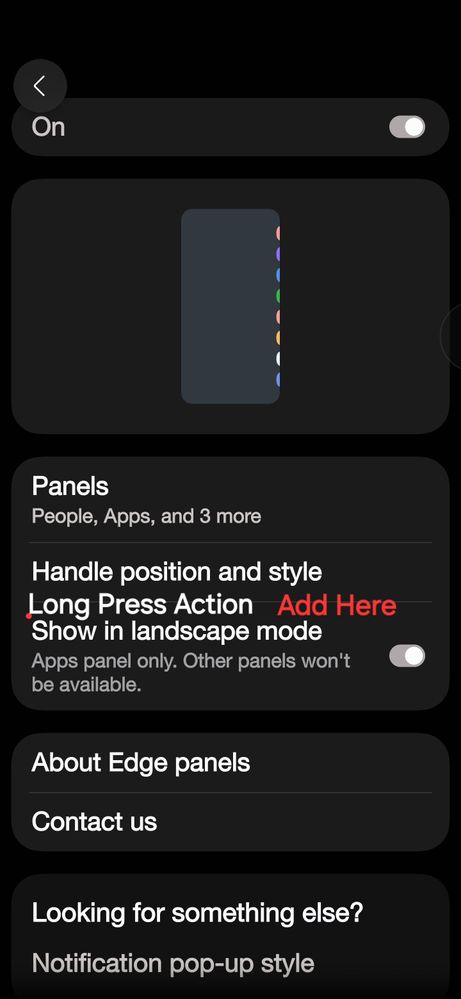
Therefore, I would like to respectfully request the consideration of two additional settings within the Edge Panel menu:
1. An option to disable the AI Select long press.
2. An option to re-enable the Edge Panel long press for handle movement.
Providing users with the ability to customize these long press actions would greatly enhance the user experience and allow for a more personalized and efficient interaction with our devices. Alternatively this setting could be added to the Edge Touch module as a more cost effective measure. Code for a module in lieu of all devices.
I have provided a mockup of what I think it should look like.
USBetaModerator3
Beta Moderator
4 months ago
in
Hello,
Thank you for taking the time to share your valuable feedback.
We appreciate your suggestions and will forward them to the relevant team for review and consideration in future updates.
Please note that all feedback through the Beta Program is reviewed and shared thoroughly with the relevant teams for consideration.
Your input is valuable and helps us enhance the overall One UI experience.
Thank you again for supporting the One UI Beta Program.
Regards,
One UI Beta Team
0 likes
Robin621k
Honored Contributor
3 months ago
in
0 likes
buckeye47
Nebula
4 months ago
in
AviShalom
Galaxy
4 months ago
in
Robin621k
Honored Contributor
4 months ago
in
CoreyDeane76
Comet
4 months ago
in
0 likes