
I already reported this but want to know if I was the only one experiencing this issue.
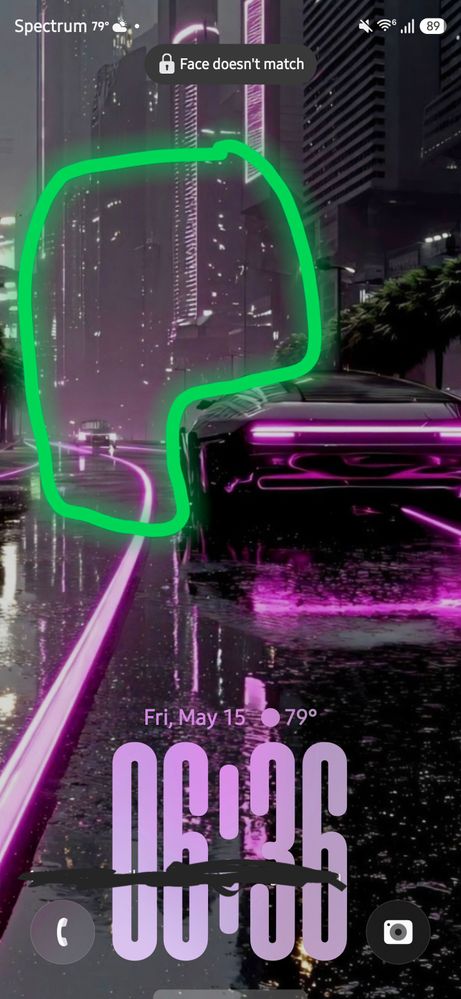
I have multiple wallpapers set each with the clock adapting to different subjects. But sometimes the clock is far from where it's supposed to be.
The clock is supposed to be in the highlighted area
Ajczerniak
Cosmic Ray
05-15-2026 11:23 PM
in
sergyone28
Cosmic Ray
05-16-2026 07:09 AM
in
0 likes
sergyone28
Cosmic Ray
05-16-2026 07:11 AM
in
0 likes
Mujibar
Honored Contributor
05-17-2026 02:09 AM
in
Look in settings > apps
0 likes
napatom
Constellation
05-16-2026 06:23 PM
in
0 likes
USBetaModerator3
Beta Moderator
05-18-2026 06:54 PM
in
Hello,
Thank you for sharing your feedback.
Some Good Lock modules and related customization features may not function normally during the Beta period due to compatibility updates required for the new One UI version. As mentioned by other users, some modules may affect lock screen customization behavior until updated versions become available.
If the issue continues even after disabling or uninstalling related Good Lock modules, please do not hesitate to submit an Error Report so the team can further analyze the behavior.
1. Open Samsung Members → One UI Beta Program → Beta Feedback
2. Select Error reports
3. Ensure “Send system log data” is enabled before submitting
For accurate analysis, please submit the report within 3 minutes of reproducing the issue and do not close the app (~5 minutes).
We appreciate your continued participation in the One UI Beta Program.
Best regards,
One UI Beta Team
0 likes