
title:
Second screen not working
(Post creation time:
Monday, November 20th, 2023 01:38 PM
)
58054 Views
Related Content
Second Screen Not Working
in Tablets Wednesday, July 16th, 2025 10:00 AM
Second Screen not working properly
in Support Monday, October 31st, 2022 06:22 AM
Second Screen not working S10 FE
in Tablets Thursday, September 11th, 2025 09:08 AM
Second screen stopped working
in Tablets Wednesday, April 1st, 2026 04:38 PM
Second screen not working S10 Ultra
in Tablets Monday, January 13th, 2025 09:59 AM
TeamGalaxyBianx
Moderator
Wednesday, November 22nd, 2023 02:20 AM
in
Hi psygorn! The app might just be having some bugs. Have you tried uninstalling then reinstalling it? 😊
0 likes
Camus666
Beginner Level 2
Monday, July 22nd, 2024 11:20 AM
in
I had this problem and solved it by turning off my VPN. Hope this helps.
0 likes
vikas-bandaru
Beginner Level 3
Friday, September 13th, 2024 05:12 PM
in
Thanks Kartik23! It worked for me.
I have been struggling with this issue on my S9 FE for a few days. In my case the issue was that Windows screen was shared but S Pen was not working.
Thanks for the trick.
0 likes
egymas
Beginner Level 4
Monday, February 10th, 2025 04:22 PM
in
Hi Justine!
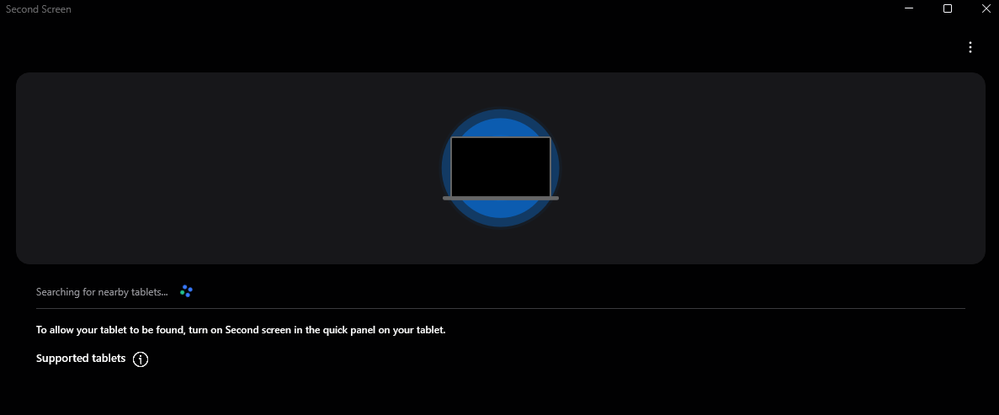
The "Connection mode: option no longer exists unfortunately.
I just installed the Second Screen app on both my Windows 10 and my Windows 11 machine.
When I tap the "Second screen" option from the Quick Settings menu on my Tab 9, it just shows a page with information about how to connect:
0 likes
chn-chn
Active Level 1
Saturday, December 9th, 2023 02:57 PM
in
When getting to the Second Screen page via the Quick Settings, it doesn't show any connection mode. I'm using Samsung S9 FE+ tablet.
psygorn
Active Level 7
Sunday, December 10th, 2023 08:08 AM
in
0 likes
chn-chn
Active Level 1
Monday, December 11th, 2023 05:51 AM
in
0 likes
spd2
Beginner Level 2
Monday, February 12th, 2024 07:53 PM
in
Hey found any solution?
0 likes
Chrisr0966
Beginner Level 2
Thursday, February 1st, 2024 05:14 AM
in
Having the same issue it started after UI6 upadate
0 likes
psygorn
Active Level 7
Thursday, February 1st, 2024 05:23 AM
in
0 likes
Morphometriqs
Beginner Level 2
Friday, June 7th, 2024 09:05 PM
in
Thanks, this was frustrating me. Disabling the VPN worked.
So I used my phone hotspot.
I wonder if Second Screen can work via data cable?
Morpho
0 likes
manufactured
Beginner Level 2
Saturday, February 3rd, 2024 02:29 PM
in
Just got my brand new s9 ultra today. Opened up second screen, then hit Win+K on Windows 11. Tablet is recognized, though upon connecting, nothing happens. :(
0 likes
psygorn
Active Level 7
Saturday, February 3rd, 2024 02:44 PM
in
0 likes
manufactured
Beginner Level 2
Sunday, February 4th, 2024 10:09 AM
in
No VPN.
0 likes
psygorn
Active Level 7
Sunday, February 4th, 2024 10:39 AM
in
0 likes
Members_MGrYUFl
Beginner Level 2
Tuesday, February 20th, 2024 04:00 AM
in
Any solution yet? I cant connect my tab s9 ultra to my Desktop PC, it connects but inmediately disconnects, no error message. But i can connect my tab with my asus laptop, both with Windows 11. I have tried disabling windows firewalls, installing the second screen windows app, win + K method, nothing worked.
psygorn
Active Level 7
Tuesday, February 20th, 2024 04:09 AM
in
0 likes
LeonorMarB
Beginner Level 4
Saturday, April 13th, 2024 11:59 PM
in
Me neither
0 likes
ecentinela
Beginner Level 2
Friday, February 23rd, 2024 10:07 PM
in
Same problem here. Just bought a new S9 Ultra and it does not connect with my windows 11. The app seems to connect, the windows 11 screen goes black with a zoom effect and then nothing happens on it and the second screen app is closed in the tablet.
That's weid, because this is one of the main uses I wanted in this tablet...
r_horo
Beginner Level 2
Sunday, February 25th, 2024 10:13 PM
in
Download the Second Screen app from Microsoft Store to be able to start using your Tab S9 Ultra as second screen again.
0 likes
lubo99
Beginner Level 2
Friday, March 1st, 2024 08:08 AM
in
guys this really ***... same issue here. vpn is not used. i cant donnect to sasmsung oled TV and also to samsung s9 ultra tablet. screen on tablet goes black for 2 seconds then goes back and on pc(dell latitude 5430 ) unable to connect...
0 likes
psygorn
Active Level 7
Friday, March 1st, 2024 08:25 AM
in
0 likes
Nuttbutt
Beginner Level 2
Monday, March 4th, 2024 02:46 AM
in
I too have givin up and i'm a very fidgety person. Tried every which way to connect the display on my tab s9 ultra with no results. The screen keeps going black connection.😅😂
0 likes