
title:

GCASH DETECT SECURITY CONCERN

(Post creation time:  

Sunday, June 30th, 2024 05:10 PM

)

7274 Views

M

Monsiii

Active Level 1

last edited


Sunday, June 30th, 2024 05:10 PM


in

 
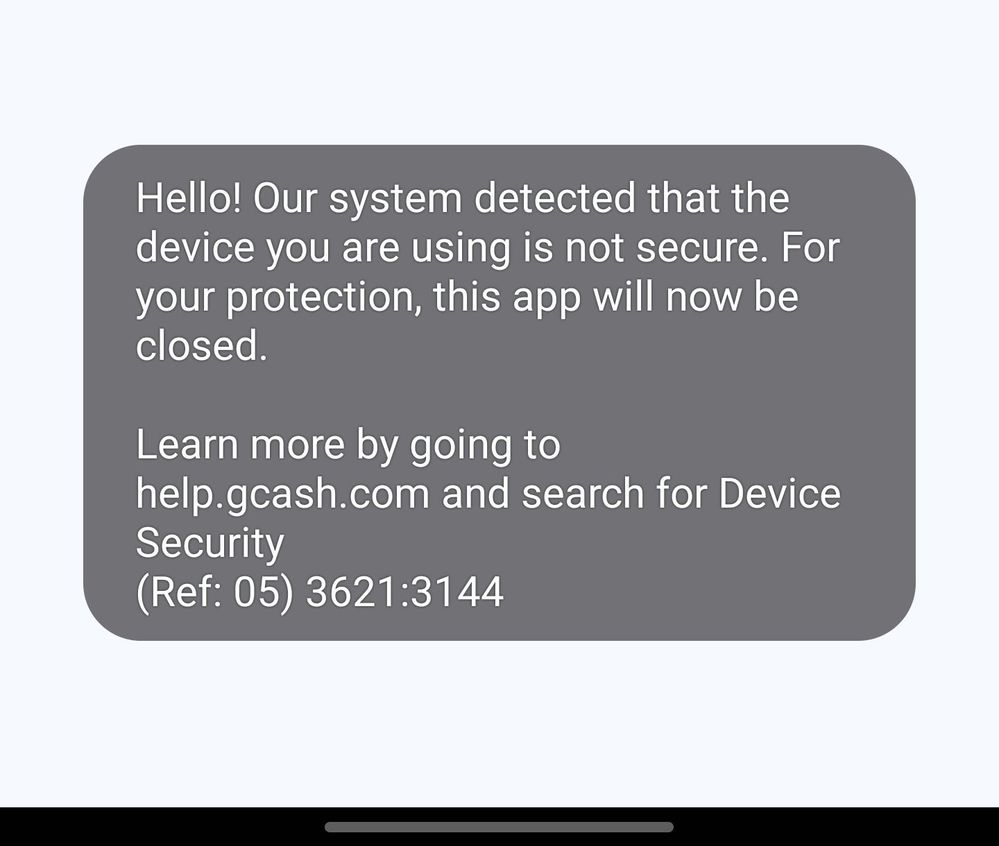
Hi all, i always encounter that may gcash auto close because it detects my device is not secured , but my dev mode is always off , i tried reinstall and install again and restart but also same, i also scanned my device and no threats detected. I wonder is there anyone can help may concern . Thank you
image


    • E

      EllisKai

      Expert Level 2

      Sunday, June 30th, 2024 09:04 PM


      in

       
      I found this on YouTube. https://youtu.be/YPVBgWAo90c?si=7RfXQZzA34vqkDpR

      He cleared GCash data,
      Enabled and then disabled developer options.
      After that, he was able to log in to GCash.

      0 likes

      M

      Monsiii

      Active Level 1

      Tuesday, July 2nd, 2024 09:55 AM


      in

       
      Tried this but same 🙃

      0 likes

    • B

      butete

      Expert Level 5

      Sunday, June 30th, 2024 10:20 PM


      in

       
      have you wiped cache partition on recovery mode?

      0 likes

    • D

      dulber

      Expert Level 1

      Monday, July 1st, 2024 02:44 AM


      in

       
      Are you using GCash within the secure folder? Some "secure" 😅😆 apps don't understand that.

      0 likes

      M

      Monsiii

      Active Level 1

      Tuesday, July 2nd, 2024 09:55 AM


      in

       
      No sir
    • P

      PUFFY_AmiYumi

      Expert Level 5

      Monday, July 1st, 2024 03:59 AM


      in

       
      Clear the apps cache and that's it
      I experience this on my S23+

      0 likes

      M

      Monsiii

      Active Level 1

      Tuesday, July 2nd, 2024 09:56 AM


      in

       
      Tried this but after several using it shows the error again 🥲

      0 likes

    • M

      MrNiceOne17

      Active Level 1

      Tuesday, July 2nd, 2024 09:52 AM


      in

       
      Hello, Monsiii. Aside from the answers of our amazing community mentioned here, May I ask you if you have an active floating app while you're using GCash?

      I asked you that because it IS possible that the floating screen/widget from 3rd party Apps is the culprit of this pop-up from GCash. It may come from FB Messenger chat heads and/or floating video call, the Android Bubbles feature from different Apps like Telegram, or a Picture in Picture mode on Youtube.

      I always have that pop-up when there's a sudden Messenger Chat Heads appear.

      Let me or the others know if this is the cause of it. Have a great day.
      J

      jjio

      Beginner Level 2

      Saturday, February 21st, 2026 08:21 AM


      in

       
      this helped, thankss

      0 likes

    • V

      viviangay

      Beginner Level 3

      Friday, August 16th, 2024 03:13 PM


      in

       
      Hi just want to ask if any one still have this issue and what resulotion you found out because i tried every steps sulotion i saw here but i still encounter same issue and i can't even put my number to relogin after i re-installed the app, thank you in advance for yoir answer.

      0 likes

      M

      Monsiii

      Active Level 1

      Friday, August 16th, 2024 03:23 PM


      in

       
      Somehow the workaroud is should have no bubble,e.g. messenger , so i turn it off first whenever i open gcash
    • A

      Amethys

      Beginner Level 2

      Wednesday, October 2nd, 2024 09:05 AM


      in

       
      I can't install gcash app on my samsung galaxy A50?

      0 likes

    • J

      jameslee13

      Active Level 1

      Saturday, January 4th, 2025 04:19 AM


      in


      Hi! It’s frustrating when GCash auto-closes, especially when your dev mode is off and no threats are detected. Here are some steps you can try: clear the app cache from your phone settings, ensure you’re using the latest GCash version, and check that all necessary permissions are enabled. If the issue persists, Click here to reach out to GCash support through the app or website for further assistance. Hope this helps!

      0 likes

    Related Content

    Gcash payment

    GCASH TO GALAXY STORE

    Gcash for samsung a71

    Payment via gcash

    GCash facial verification error