
title:

Floating bubbles notif

(Post creation time:  

Friday, March 17th, 2023 07:55 AM

)

1714 Views

E

ErnAqui12

Active Level 6

last edited


Friday, March 17th, 2023 07:55 AM


in

 
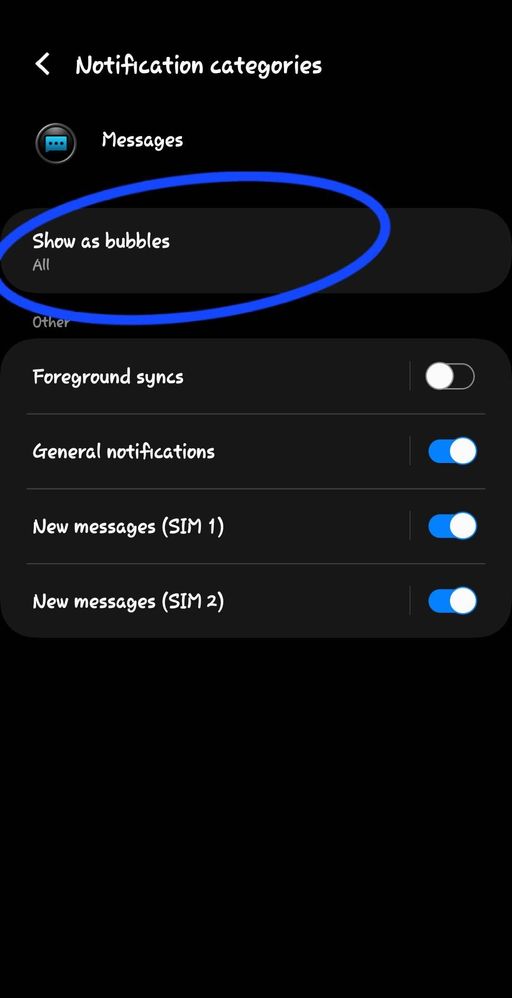
Guys, anything wrong with the floating bubbles notif? It just seemed that the "show as bubbles" option has disappeared, even s23 plus doesnt have this option anymore. I can still see it on my s23 ultra but if I factory reset it, i can guarantee that this one will vanish too. Any malware issue on its software guys?


image


    • T

      Friday, March 17th, 2023 08:03 AM


      in


      Hello ErnAqui12,

      We are sorry about your experience with your new Samsung Galaxy S23 Ultra having issues with the notification's floating bubbles option that is missing, and we apologize for the inconvenience it caused you.

      If you've tried to factory reset your device and, for a moment, you begin to worry that it may disappear again, then I will be bothered too. 

      In order to find out the root cause of the issues, please submit an error report through the Samsung Members app as follows:


      Step 1. Long press Samsung Members icon on Apps screen and tap Error reports.

      Step 2. Tap OK on agreement popup to send system log data.

      Step 3. Select Symptom category "Settings/System".

      Step 4. Describe the problem in details and SEND.


      How to submit an error report on Samsung Members app? | Samsung PH


      For more assistance and guidance, you may contact us via our online Samsung Customer Care support channels below.

      https://samsung-livechat.sprinklr.com/seao/ph/index.html 

       
      Or our Samsung Customer Care direct hotline numbers below.
       
      #GALAXY or #425299 [Mobile Phones & Tablets]
      Available 24/7
       
      1-800-10-7267864 [All Product, Toll Free, PLDT]
      1-800-8-7267864 [All Product, Toll Free, Globe]
      842 221 11 [All Product, Landline]
      Daily (8:00am to 8:00pm)


      0 likes

    • D

      dorefrain

      Active Level 7

      Friday, March 17th, 2023 12:52 PM


      in

       
      It may be the cause: FLOATING NOTIFICATION is turned off in the Advance Settings.Screenshot_20230317_204116_Settings.jpgScreenshot_20230317_204123_Settings.jpgScreenshot_20230317_204104_Settings.jpg

      0 likes

    • D

      dorefrain

      Active Level 7

      Friday, March 17th, 2023 12:57 PM


      in

       
      Try this one.
      Go to Settings>>Notifications>>Advance Settings>>Floating Notifications>>BubblesScreenshot_20230317_204116_Settings.jpgScreenshot_20230317_204138_Settings.jpgScreenshot_20230317_204217_Settings.jpg

      0 likes

    • E

      ErnAqui12

      Active Level 6

      Friday, March 17th, 2023 01:13 PM


      in

       
      I know i know. That's what I did in the first place and haven't seen the option. But now, for some reason, it is right there. So nothing to worry about anymore 😊
    • D

      dennisdls

      Active Level 6

      Friday, March 17th, 2023 04:12 PM


      in

       
      Its also not showing on my S23 Ultra even though floating notifications are on. Is it only for dual sim?

      0 likes

      D

      dennisdls

      Active Level 6

      Saturday, March 18th, 2023 12:04 PM


      in

       
      Are you using google messages?

      0 likes

      E

      ErnAqui12

      Active Level 6

      Saturday, March 18th, 2023 04:26 PM


      in

       
      Im using samsung messages app, i dont like google
      D

      dennisdls

      Active Level 6

      Saturday, March 18th, 2023 04:53 PM


      in

       
      Ok thanks po

      0 likes

    Related Content

    Bubbles Notification

    Bubbles notification

    Chat Bubbles

    bubbles update

    Bubbles Notification