
title:

‼️ CAMERA ACCESS ‼️

(Post creation time:  

Tuesday, April 11th, 2023 01:13 PM

)

511 Views

D

danesaints

Active Level 9

last edited


Tuesday, April 11th, 2023 01:35 PM


in

 
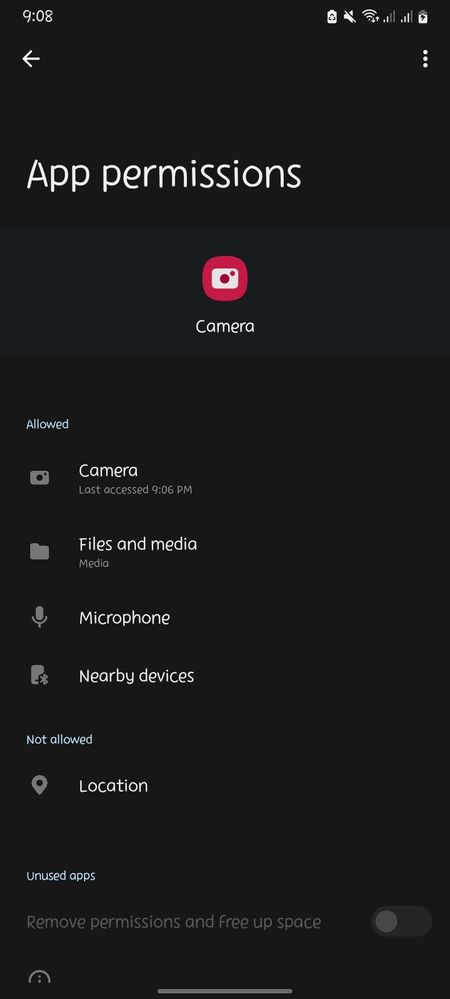
bigla na lang lumitaw na ginagamit ko camera ko habang nag scroll ako sa ig. tinignan ko sa cam settings sa app kung kelan yung last access ko sa camera ko. at yang ang lumitaw. hindi ko inopen camera nung oras na yan. possible ba na may ibang nakaka access sa camera ko? possible ba na nakikita nila ako yung kausap/vc ko at naririnig ba kung sakali? ano pwede gawin? SANA MASAGOT. THANK YOU
image


    • D

      dranreb26

      Active Level 4

      Tuesday, April 11th, 2023 01:21 PM


      in

       
      Mam try nyo po i restart yung phone and i open after 3 to 5 mins

      0 likes

    • T

      Wednesday, April 12th, 2023 07:04 AM


      in


      Hello danesaints,

      At Samsung, our number one priority is offering the best and most secure mobile experience to our users, and we’re constantly optimizing the security of our products and services.
       
      Mobile devices play such an important role in our lives that it’s only natural that we want to hold onto them longer. That’s why, thanks to the latest technological advancements, we’re committing to securing Galaxy devices for even longer, so that everything that should be protected stays protected.
       
      I feel it, and understand it. But, we assure you that we value the privacy and security of each Samsung Galaxy users with the best experience.
       
      When using a webcam, the camera app must have different permissions than the phone system. Most permissions should only be applied the first time. Some permissions can be disabled without affecting the normal operation of the camera.
       
      Disabling these permissions will not influence the functions of the camera but will influence the usage of phones. Camera allows you to take photos with the Instagram camera or share photos from your phone's library. Camera lets you take photos and videos within the Instagram app.
       
      It's not possible to access your camera app unless you give the specific app permission to use it. And the app will not be able to record or view your video chat conversations due to security and privacy policies.
       
      If you feel that the camera app is being used without your knowledge and permission, you may submit an error report through the Samsung Members app as follows:


      Step 1. Long press Samsung Members icon on Apps screen and tap Error reports.

      Step 2. Tap OK on agreement popup to send system log data.

      Step 3. Select Symptom category "Camera" and "Application".

      Step 4. Describe the problem in details and SEND.


      How to submit an error report on Samsung Members app? | Samsung PH


      For more assistance and guidance, you may contact us via our online Samsung Customer Care support channels below.

      https://samsung-livechat.sprinklr.com/seao/ph/index.html 


      Or our Samsung Customer Care direct hotline numbers below.
       
      #GALAXY or #425299 [Mobile Phones & Tablets]
      Available 24/7
       
      1-800-10-7267864 [All Product, Toll Free, PLDT]
      1-800-8-7267864 [All Product, Toll Free, Globe]
      842 221 11 [All Product, Landline]
      Daily (8:00am to 8:00pm)


      Stay safe and have a nice day ahead! Thanks for contacting Samsung.

      0 likes

    • T

      TeamGalaxyDD

      Moderator

      Wednesday, April 12th, 2023 09:02 AM


      in


      Hey danesaints,

      I understand your concern! The last accessed feature tracks what time the app was used, and that includes use by other apps which you have given Camera permissions to. You may have used an app - a messenger, a shopping app, social media - that triggered your Camera app.

      You can also look at your Gallery and see if there are any photos that may have been taken during that time. 

      I don't think this is anything to be concerned by, unless you installed 3rd-party apps through an APK file or visited an unsecured website on your device browser. 

      If you feel like your privacy has been breached, however, I suggest that you back up your data, run a factory reset on your phone, and reset the passwords to your online accounts, just to be safe. 


      0 likes

    • C

      celes015

      Beginner Level 2

      Sunday, November 26th, 2023 08:07 AM


      in

       
      How to fix warning camera failed

      0 likes

      D

      danesaints

      Active Level 9

      Sunday, November 26th, 2023 08:37 AM


      in

       
      ni restart ko lang phone ko 😊

      0 likes

    • C

      celes015

      Beginner Level 2

      Sunday, November 26th, 2023 08:48 AM


      in

       
      Ayaw pa din po

      0 likes

    • C

      celes015

      Beginner Level 2

      Sunday, November 26th, 2023 08:49 AM


      in

       
      S21 + ng restart na ako ng storage din ako

      0 likes

    Related Content

    ‼️

    ‼️

    Camera Access Toggle Missing

    Camera Access - Missing

    BREAKING NEW ‼️