
Hello Everyone,
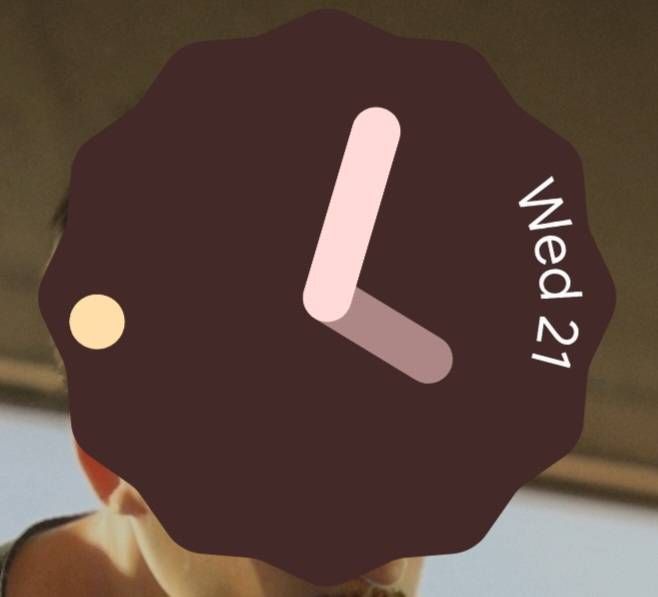
Original Look
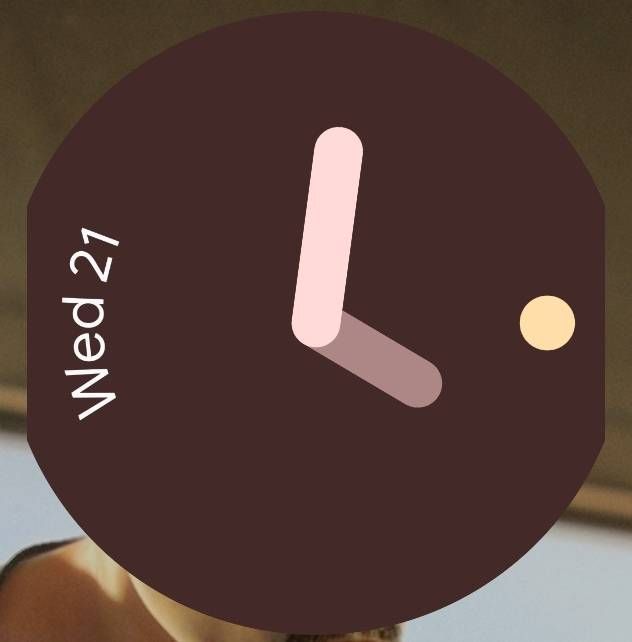
The Issue -
I'm not sure if all Samsung devices are experiencing this issue, but the clock widget keeps on changing its form. The only way to fix it is by removing the widget and add it on the home screen "again".
It's a hassle thing to do. I love the scallop widget look but the issue is ruining it. Would anyone know the fix? Thanks in advance.
"See attached photo"
Regards,
TeamGalaxyRene
Moderator
Wednesday, December 21st, 2022 09:21 AM
in
Hello jprock,
Sorry to hear that, about your experience with the recent updates on your Samsung Galaxy A52s having issues with Widget Clock and we apologize for the inconvenience it caused you.
Before you try out the recommendations below, be sure to check if your device's software and related apps are updated to the latest version. To update your mobile device's software, follow these steps:
Step 1. Go to Settings > Software update.
Step 2. Tap on Download and install.
Step 3. Follow the on-screen instructions.
Step 4. Restart your device.
If the issue persists, you may submit an error report through Samsung Members app as follows:
Step 1. Long press Samsung Members icon on Apps screen and tap Error reports.
Step 2. Tap OK on agreement popup to send system log data.
Step 3. Select Symptom category "Settings/System".
Step 4. Describe the problem in details and SEND.
How to submit an error report on Samsung Members app? | Samsung PH
For more assistance, you may contact us on our online Samsung support channels below.
https://samsung-livechat.sprinklr.com/seao/ph/index.html
0 likes