Can you try the Smart SIM card on the SIM 1 slot? If it doesn't work, then that SIM card might be faulty. Replace the SIM card. If it works, then the SIM 2 slot of your phone is damaged. Bring it to a Samsung Service Center to have it checked. Also, can you try that SIM card on another device?
Before you try out the recommendations below, be sure to check ifyour device's software and related apps are updated to the latest version. To update your mobile device's software, follow these steps:
Step 1.Go toSettings> Software update.
Step 2.Tap on Download and install.
Step 3.Follow the on-screen instructions.
Step 4.Restart your device.
Check and inspect the SIM.
Check 1.Restart your phone and see if that fixes your problem as it often resolves many minor glitches.
Method 1.Press and hold the 'Volume Down' and 'Power' buttons at the same time for at least 7 seconds. Your device should restart after this.
Method 2. Using two fingers, swipe down from the top of the screen to open the Quick settings panel. Tap the 'Power' icon, and then tap 'Restart'. Tap 'Restart' again to confirm.
Check 2. Inspect the SIM card
Turn off your phone by pressing the Power buttonand take out the SIM card from the SIM card tray. Check for any visible signs of damage like scratches or stains. Clean the SIM card and tray with a clean, dry cloth. Reinsert the SIM card, making sure it is properly installed in the tray.
Once everything is secured back into place, turn your phone on again and see if the error is gone.
Check 3. Reset network settings
This usually happens after modifying your phone settings and manually switching menu options. Please note that resetting network settings will also reset Wi-Fi, Bluetooth, and other network settings so make sure you take note of this information beforehand.
Step 1. Open Settings and tap General management.
Step 2. Tap Reset.
Step 3. Tap Reset network settings.
Step 4. Check the information on the screen and tap Reset settings.
Step 5. Tap Reset.
Check 4. Test if the SIM is still working
Insert the SIM card into another phone and see if it gets detected. If the SIM card is also not detected by another phone, then the SIM card is already damaged. We recommended contacting your service provider for assistance and replacing your SIM card with a new one.
However, if it works with other devices, the problem could be with your phone. In this case, please request service by locating the Samsung Authorized Service Center nearest you.
It seems like your Smart SIM card isn't being detected even after restarting. Here's what you can do:
Check SIM Slot: Ensure that the SIM card is inserted correctly into the SIM slot of your device. Sometimes improper insertion can cause detection issues.
Clean SIM Card and Slot: Dust or dirt might be obstructing the connection. Gently clean both the SIM card and the SIM slot with a soft cloth or a cotton swab. Furthermore it is also important to check sim registration.
Try Another Device: Insert the SIM card into another compatible device to see if it's detected there. This will help determine if the issue lies with the SIM card or the device.
Contact Smart Support: If none of the above steps work, it's best to contact Smart customer support. They can provide specific troubleshooting steps or arrange a replacement SIM card if necessary.
i recently purchased my new samsung galaxy a06 from globe shop online in philippines and inserted my sim in it but not detected i tried eveything but not detected anyone help?

butete
Expert Level 5
Wednesday, April 19th, 2023 02:41 PM
in
0 likes
Vanehsa
Active Level 4
Thursday, April 20th, 2023 11:55 AM
in
0 likes
Khaled75
Expert Level 5
Wednesday, April 19th, 2023 03:48 PM
in
0 likes
TeamGalaxyRene
Moderator
Thursday, April 20th, 2023 03:19 AM
in
Hello Vanehsa,
Thank you for contacting us about why your SIM card is not detected on your Samsung Galaxy phone.
I feel it and understand it. We rely on the Samsung Galaxy phone that we use every day for the most important things, so when something goes wrong, we care.
Check 1. Restart your phone and see if that fixes your problem as it often resolves many minor glitches.
Check 2. Inspect the SIM card
Turn off your phone by pressing the Power button and take out the SIM card from the SIM card tray. Check for any visible signs of damage like scratches or stains. Clean the SIM card and tray with a clean, dry cloth. Reinsert the SIM card, making sure it is properly installed in the tray.
Once everything is secured back into place, turn your phone on again and see if the error is gone.
Check 3. Reset network settings
This usually happens after modifying your phone settings and manually switching menu options. Please note that resetting network settings will also reset Wi-Fi, Bluetooth, and other network settings so make sure you take note of this information beforehand.
Step 1. Open Settings and tap General management.
Step 2. Tap Reset.
Step 3. Tap Reset network settings.
Step 4. Check the information on the screen and tap Reset settings.
Step 5. Tap Reset.
Check 4. Test if the SIM is still working
Insert the SIM card into another phone and see if it gets detected. If the SIM card is also not detected by another phone, then the SIM card is already damaged. We recommended contacting your service provider for assistance and replacing your SIM card with a new one.
How to fix 'No SIM Card Detected' error on Galaxy phone (samsung.com)
However, if it works with other devices, the problem could be with your phone. In this case, please request service by locating the Samsung Authorized Service Center nearest you.
https://www.samsung.com/ph/support/service-center/
or book an appointment with the Samsung Members app as follows:
Support > Book an appointment to set one.
Should you need further assistance and guidance, you may contact us via our online Samsung Customer Care support channels below.
https://samsung-livechat.sprinklr.com/seao/ph/index.html
0 likes
Vanehsa
Active Level 4
Thursday, April 20th, 2023 11:56 AM
in
0 likes
alfredojefferson
Beginner Level 2
Wednesday, May 1st, 2024 08:14 AM
in
0 likes
ansaneelam12
Beginner Level 2
Thursday, November 20th, 2025 09:15 PM
in
i recently purchased my new samsung galaxy a06 from globe shop online in philippines and inserted my sim in it but not detected i tried eveything but not detected anyone help?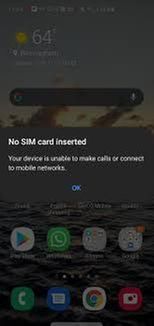
0 likes
samanpakromera
Beginner Level 2
Monday, December 22nd, 2025 07:52 PM
in
what about photo analysis error during registration because my low quality camera phone of samsung?
0 likes