
I was looking for game app folder under MyFiles>Internal Storage>Android but data and obb folders are empty.
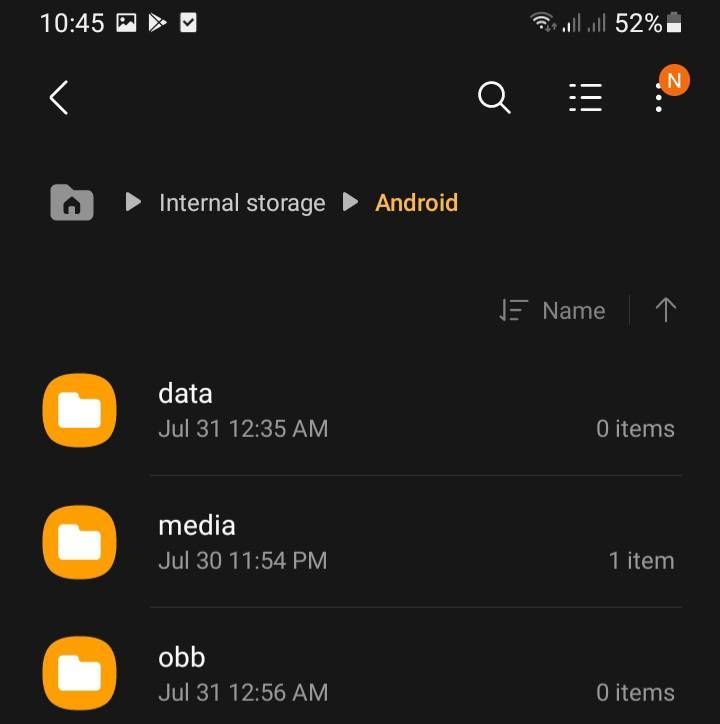
data and obb folders shown empty
I needed access to the data folder because the game is stuck at loading screen and support says to redownload the game (w/c is almost 4GB of data).
Thankfully, i discovered a way to fix it before by just deleting the config files and reinitialize by opening the game again (w/c uses only 15MB of data) that lead us back to my post.
I'm using A12 and phone not rooted. I've tried google files and ez file explorer but same with samsung myfiles, it shows empty.
Selected Answer
Carlo18
Active Level 6
Saturday, July 31st, 2021 10:45 AM
in
Carlo18
Active Level 6
Saturday, July 31st, 2021 10:46 AM
in
ʙᴜᴄᴋєᴛ
Active Level 1
Saturday, July 31st, 2021 12:44 PM
in
SamsungRightCare
Community Manager
Sunday, August 1st, 2021 01:33 AM
in
Hi! I'm Sam, your friendly Samsung Customer Service guy. Welcome to Samsung Members Community! Explore your new hub for all things Samsung and beyond. Earn the coolest badges and enjoy awesome perks from us by connecting with Samsung experts, super-fans, and other Community members for tips on features and how to get the most out of your Samsung product. Should you need technical assistance, don't hesitate to reach us via our TOLL-FREE mobile number #GALAXY (#425299) or via our TOLL-FREE LANDLINE: PLDT Toll-free: 1-800-10-726-7864 Globe Toll-Free: 1-800-8-726-7864 Standard Landline : (02)8-422-2111 Daily (8:00 AM to 8:00 PM).
How's your recent Galaxy experience? Were you able to find a solution to your concern? Don't hesitate to give us a call via the toll-free hotlines above for any technical inquiries! 😊
Be sure to click " ✓ Accept as Solution" when you find an answer that works for you.
ʙᴜᴄᴋєᴛ
Active Level 1
Sunday, August 1st, 2021 03:57 AM
in