
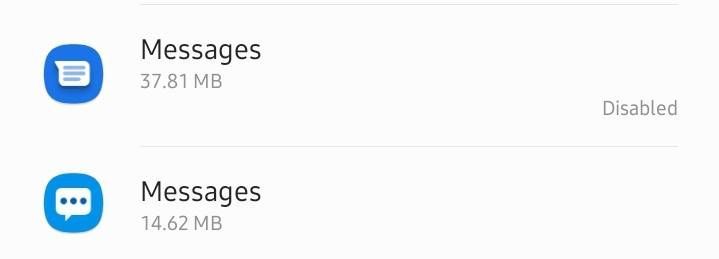
Hello, as you can see, there is two (2) messaging app that i have been downloaded. I disabled the one on the top because i know that this is not from samsung but came from google messaging app, so it's feel so uncomfortable for me so i downloaded another messaging app from Galaxy Store and this is what i am using as default app now. I want to set this app on a 2nd row on the photo to be my default and remove the one app on the top for being default app on my Samsung Galaxy A22 LTE (4G).
Can you guys please help me?
Selected Answer
franks1
Active Level 4
Sunday, December 19th, 2021 01:37 AM
in
Both apps have their own useful capabilities. They both have Chat features (Rich Communication), and users can chat with each other whether they're both on each app or not! They only differ in UI.
I change my default whenever I need it. They're both nice for me!
butete
Expert Level 5
Sunday, December 19th, 2021 01:07 AM
in
If you find my comment as a solution to your question. Please click the triple dot and choose "Accept Solution" as a sign. Thanks!
xtiaonly
Active Level 1
Sunday, December 19th, 2021 01:09 AM
in
roman7nita
Active Level 1
Thursday, May 2nd, 2024 10:56 AM
in
En que parte encuentro ese icono color naranja con blanco?
0 likes
TeamGalaxyRene
Moderator
Sunday, December 19th, 2021 03:34 AM
in
Hey there! Welcome to Samsung Members Community! Explore your new hub for all things Samsung and beyond. Earn the coolest badges and enjoy awesome perks from us by connecting with Samsung experts, super-fans, and other Community members for tips on features and how to get the most out of your Samsung product. Should you need technical assistance, don't hesitate to reach us via our TOLL-FREE mobile number #GALAXY (#425299) or via our TOLL-FREE LANDLINE: PLDT Toll-free: 1-800-10-726-7864 Globe Toll-Free: 1-800-8-726-7864 Standard Landline : (02)8-422-2111 Daily (8:00 AM to 8:00 PM).
We're more than glad that you have resolved your concern with a little help of your fellow members here. 😊 Thank you for your unwavering support for Samsung! Keep safe and happy holidays! 😀
0 likes