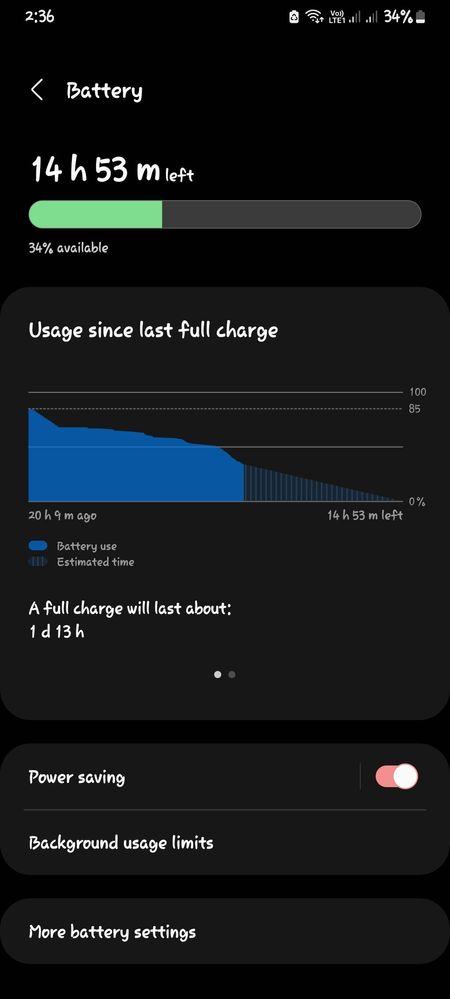
Hello, iyong "full charge will last about" is just an estimate. Palaging nagchachange yan kasi it depends on how you use the device. Pwede ring less than a day yung mag appear diyan pero you'll still get a nice screen on time. If gusto mo makita if okay nga ang battery life mo, check your screen on time, not the battery estimate.
Sa Flagships kasi, there's 2 toggles eh, Fast Charging and Super Fast Charging. Hindi ko lang sure if same case for the other devices. Pero pag 25W kasi, Super Fast yun. Yung 25W orignal charger ba gamit niya pero fast charging lang lumalabas?
Thank you for reaching out to us here, we are here to help and Samsung care.
Don't worry as we will sort out what's behind your Samsung Galaxy device's depletion issue even after you have replaced it with a new one.
You device, Samsung Galaxy A33 5G is powered by a5,000mAh battery - the same capacity as the one inside the Galaxy A53 and Galaxy A32, among other phones. The phone has been updated with a new chipset, and it now supports faster charging at 25W.
Definition of battery charging and battery discharge.
Battery Charging - thecircuitry used to recharge the batteries in a portable product such as a mobile phone, plays an important part in determining the battery longevity and the practicalities of using the product on a daily basis.
Battery discharge could be understood to be a phenomenon in which the battery gets depleted of its charge. Greater the current drawn by the load, faster the battery discharges.
Possible Reasons:
1.) New Charger is not compatible with your Samsung Galaxy device.
2.) Apps are running in the background
Possible Solutions:
1.) It is recommended that you use only Samsung genuine or approved chargers that have been specifically designed for use in Samsung products. The use of incompatible chargers, cables and adapters may not be safe to use and could cause damage to the device or could cause external damage.
2.) Close all apps running in the background. Put unused apps to sleep.
3.) Uninstall or disable unused apps.
4.) Put your device in Airplane mode while charging.
For more Battery Tips, please click the link below.
Sa old chrger ko na 15wats..ngchchrge lng kasi ako hanggang 85% which is nakalagay sa usage is 1day and 9 hours. Sa bgong charger ko nmn same din ng 85% 1 day and 9 hours.. Bandand madling araw po nagulat ako ngng 1 day and 14hours na sya.. Sa bgong chrger nmn mas tumagal sya malobat

Selected Answer
jamesrred
Expert Level 1
Tuesday, August 16th, 2022 07:55 AM
in
0 likes
jamesrred
Expert Level 1
Tuesday, August 16th, 2022 08:39 AM
in
0 likes
Rolf26
Active Level 6
Tuesday, August 16th, 2022 09:03 AM
in
0 likes
jamesrred
Expert Level 1
Tuesday, August 16th, 2022 09:28 AM
in
0 likes
Selected Answer
jamesrred
Expert Level 1
Tuesday, August 16th, 2022 08:39 AM
in
0 likes
SamsungRightCare
Community Manager
Tuesday, August 16th, 2022 07:26 AM
in
Hello Rolf26,
Thank you for reaching out to us here, we are here to help and Samsung care.
Don't worry as we will sort out what's behind your Samsung Galaxy device's depletion issue even after you have replaced it with a new one.
You device, Samsung Galaxy A33 5G is powered by a 5,000mAh battery - the same capacity as the one inside the Galaxy A53 and Galaxy A32, among other phones. The phone has been updated with a new chipset, and it now supports faster charging at 25W.
Definition of battery charging and battery discharge.
Battery Charging - the circuitry used to recharge the batteries in a portable product such as a mobile phone, plays an important part in determining the battery longevity and the practicalities of using the product on a daily basis.
Battery discharge could be understood to be a phenomenon in which the battery gets depleted of its charge. Greater the current drawn by the load, faster the battery discharges.
Possible Reasons:
1.) New Charger is not compatible with your Samsung Galaxy device.
2.) Apps are running in the background
Possible Solutions:
1.) It is recommended that you use only Samsung genuine or approved chargers that have been specifically designed for use in Samsung products. The use of incompatible chargers, cables and adapters may not be safe to use and could cause damage to the device or could cause external damage.
2.) Close all apps running in the background. Put unused apps to sleep.
3.) Uninstall or disable unused apps.
4.) Put your device in Airplane mode while charging.
For more Battery Tips, please click the link below.
Charging Tips | Galaxy Battery | Samsung Philippines
https://www.samsung.com/ph/support/galaxy-battery/charging-tip/
Hope this content helpful and your problem gets solved.
0 likes
Rolf26
Active Level 6
Tuesday, August 16th, 2022 07:34 AM
in
Sa bgong charger ko nmn same din ng 85% 1 day and 9 hours..
Bandand madling araw po nagulat ako ngng 1 day and 14hours na sya..
Sa bgong chrger nmn mas tumagal sya malobat
SamsungRightCare
Community Manager
Tuesday, August 16th, 2022 07:44 AM
in
That's good news because your battery life is extended for another 5 hours or so.
In order to be up-to-date with the latest updates, security features, and enhancements, you may check the latest Software updates as follows:
Settings > About Phone > Software Update > Download option, if available, > Install > Then, follow on-screen messages.
Thanks for giving us feedback and input here. We are Samsung Community.
0 likes
Rolf26
Active Level 6
Tuesday, August 16th, 2022 08:36 AM
in
0 likes
NoeAguirre
Active Level 7
Wednesday, August 17th, 2022 05:36 AM
in
0 likes