title:

Hide keyboard button position

(Post creation time:  

Wednesday, February 14th, 2024 03:28 PM

)

6355 Views

Z

Zulijat

Active Level 1

last edited


Wednesday, February 14th, 2024 03:28 PM


in

 
Recently changed from navigation bar buttons to swipe gestures. How do I change the hide keyboard button position from right side to left side?

image

Thx
    • G

      GunasamssYT

      Expert Level 5

      Wednesday, February 14th, 2024 03:30 PM


      in

       
      Hi, Need to change your button order from right to left. First go to navigation bar settings and change it to buttons and change the buttons order than set back to swipe gestures. If you found this usefull don't forget to give the solution accepted, thanks!1707924614502.jpg1707924710542.jpg

      0 likes

      G

      GunasamssYT

      Expert Level 5

      Wednesday, February 14th, 2024 03:42 PM


      in

       
      Have you tried restarting your phone 🤔

      0 likes

      Z

      Zulijat

      Active Level 1

      Wednesday, February 14th, 2024 03:51 PM


      in

       
      Restarted and retried this but still the same
      G

      GunasamssYT

      Expert Level 5

      Wednesday, February 14th, 2024 03:54 PM


      in

       
      Sorry I couldn't help ya. Maybe other members have some, and we'll have to wait and see 👍

      0 likes

    • N

      Wednesday, February 14th, 2024 03:32 PM


      in

       
      select Buttons option and tap the bottom one for button order.

      the Back button position should reflect for the keyboard Back button as well.

      the re-select the swipe gesture. 1707924684966_1707924684958_0.jpg

      0 likes

      N

      Wednesday, February 14th, 2024 03:57 PM


      in

       
      do u mind navigating to the remote management at the Support section in this app and ask for the help? the Samsung customer service is very helpful u know. hv a try

      0 likes

      Z

      Zulijat

      Active Level 1

      Wednesday, February 14th, 2024 03:57 PM


      in

       
      Oh yes tried to turn this off and on again the hide keyboard button and still the same

      0 likes

      Z

      Zulijat

      Active Level 1

      Wednesday, February 14th, 2024 03:58 PM


      in

       
      Okay sure. Thx

      0 likes

    • F

      FawzCopter

      Active Level 3

      Thursday, March 28th, 2024 06:53 PM


      in

       
      Is it solve?

      0 likes

      Z

      Zulijat

      Active Level 1

      Friday, March 29th, 2024 05:22 AM


      in

       
      No1711689738685.jpg

      0 likes

      F

      FawzCopter

      Active Level 3

      Friday, March 29th, 2024 05:27 AM


      in

       
      Sad. I'm using S23 Ultra. It was on the left side on One UI 6.0. After update to One UI 6.1, it change to right side. 🥲
    • H

      Heos276

      Beginner Level 3

      Friday, March 29th, 2024 08:17 AM


      in


      Facing the same issue. This is very frustrating to use. I dont understand why this cant be user configurable i even tried looking into the NavStar app but to no avail.

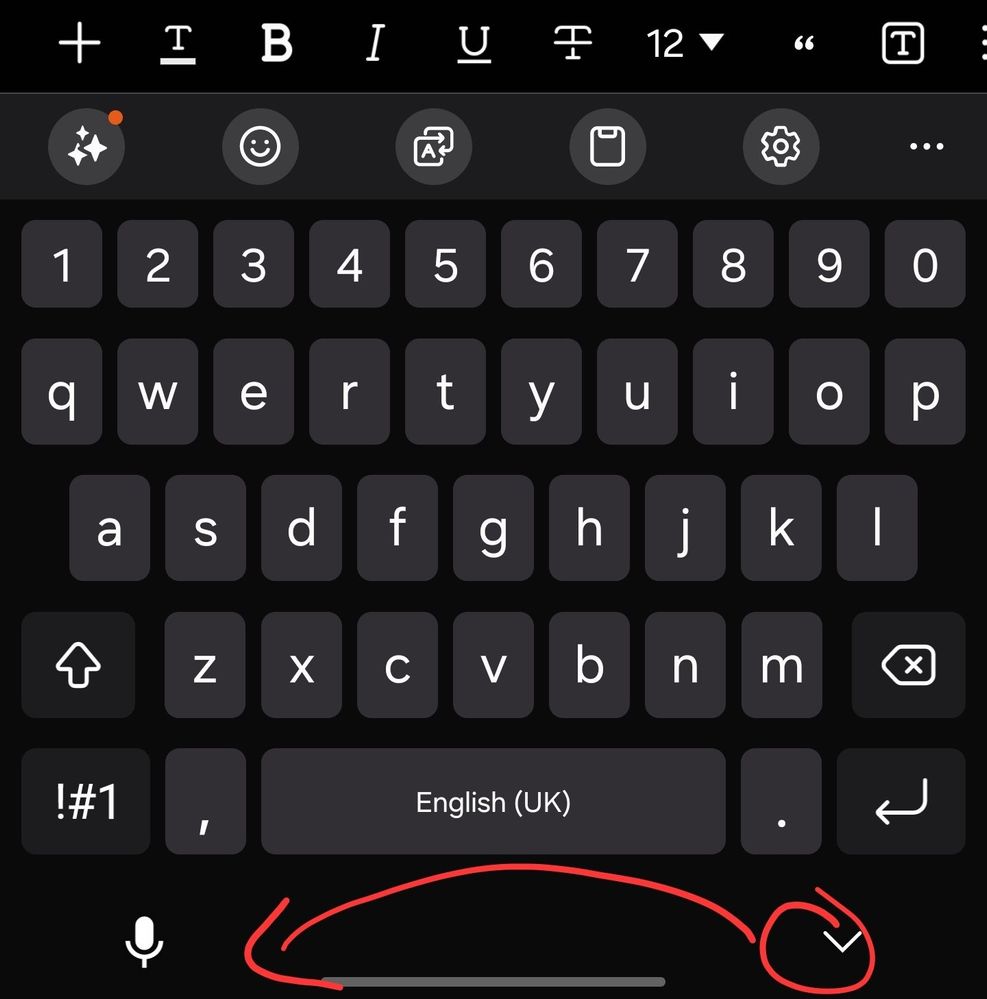
       

      Is there any solution out there ? 

      0 likes

      Z

      Zulijat

      Active Level 1

      Friday, March 29th, 2024 10:14 AM


      in

       
      So far no solution. I just keep as it is although its quite troublesome for me.
    • S

      soonleehum

      Beginner Level 3

      Friday, April 5th, 2024 12:10 PM


      in

       
      Can someone tell samsung to change it back as in one ui 6
      F

      FawzCopter

      Active Level 3

      Friday, May 24th, 2024 12:46 PM


      in

       
      True. I'm using Sony's phone, which is kind of Stock Android. It's also on the left. I don't know why Samsung wants to change this.

      0 likes

    Related Content

    wps push button

    changeable character layout on the physical keyboard

    Power and Bixby Button

    Recent button