Hi 👋, Think currently your device storage is full. You've so many unused apps in your device and you don't need to uninstall them. So this feature is kind a solution for you 😃
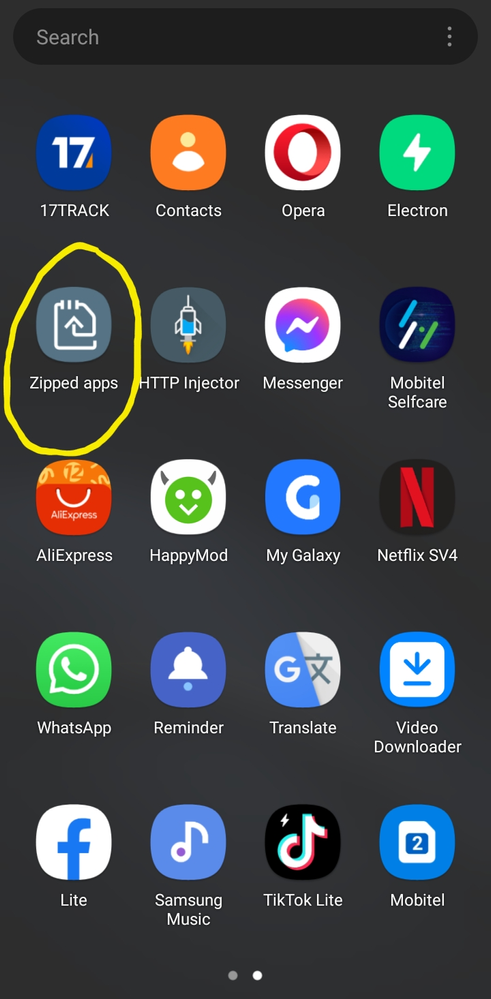
And open that (zipped apps) application, select unused apps, after you can zip apps and finally if you need any zipped app then you can unzip one by one or all the apps in one time 😉
If my comment is helpful for you accept my comment as a solution 🙂
Zip apps to optimize storage. Background Services for Unused Apps. User will not receive any notification from zipped apps. zipped apps can be restored with user data by unzipping from zipped folder or zipped apps list.
Automatic cleaning of phone storage to optimize device storage and performance.
1.S Clean: Create available space on your phone by automatically periodic deleting useless data. No user data will be deleted. Identifying background processes/Services responsible for CPU hogging& excess memory usage
The data below will be automatically deleted according to the schedule you set. Unnecessary files Cache files Log files Unnecessary folders
2. Duplicate Remover: Auto recognize & prompt removal of unnecessary duplicate content. Current days duplicate images are not included for removal to avoid unnecessary scanning of files every time picture is clicked or saved.
3. S Zip Zip apps to optimize storage. Background Services for Unused Apps. User will not receive any notification from zipped apps. zipped apps can be restored with user data by unzipping from zipped folder or zipped apps list.
4. Move to SD card
Redirects the social messenger application's media content from device Internal Storage to External SD card for coming out of device storage scarcity without hampering user experience.
If you found my comment useful, kindly click on the 3 dots and select "Accept Solution" Thank you so much 😊
Zipping is the act of packaging a set of files into a single file or archive that is called a zip file. Usually, the files in a zip file are compressed so that they take up less space in storage or take less time to send to someone. There are several popular tools that can be used for zipping files:
It is sameas zipping files in windows . This helps you to keep you extra storage . When you dont use apps you can zip them. In some smartphones . When you clear space you have a option "zip rarelh used apps" .
If this is helpful. Please make if as a solution i reallh appreciate it .thank you 👍👍👍👍👍👍👍👍

Selected Answer
Sakila_Pamudith
Expert Level 5
04-11-2022 12:24 PM
in
Think currently your device storage is full. You've so many unused apps in your device and you don't need to uninstall them. So this feature is kind a solution for you 😃
And open that (zipped apps) application, select unused apps, after you can zip apps and finally if you need any zipped app then you can unzip one by one or all the apps in one time 😉
If my comment is helpful for you accept my comment as a solution 🙂
Selected Answer
ShenalDe
★
04-11-2022 01:04 PM
in
Automatic cleaning of phone storage to optimize device storage and performance.
1.S Clean:
Create available space on your phone by automatically periodic deleting useless data. No user data will be deleted.
Identifying background processes/Services responsible for CPU hogging& excess memory usage
The data below will be automatically deleted according to the schedule you set.
Unnecessary files
Cache files
Log files
Unnecessary folders
2. Duplicate Remover:
Auto recognize & prompt removal of unnecessary duplicate content. Current days duplicate images are not included for removal to avoid unnecessary scanning of files every time picture is clicked or saved.
3. S Zip
Zip apps to optimize storage. Background Services for Unused Apps. User will not receive any notification from zipped apps. zipped apps can be restored with user data by unzipping from zipped folder or zipped apps list.
4. Move to SD card
Redirects the social messenger application's media content from device Internal Storage to External SD card for coming out of device storage scarcity without hampering user experience.
If you found my comment useful, kindly click on the 3 dots and select "Accept Solution"
Thank you so much 😊
GAJAN_Rajasek
Expert Level 5
04-11-2022 12:52 PM
in
Ranod_Lakshitha
★
04-11-2022 04:49 PM
in
If my comment is helpful to you, kindly click on the 3 dots and select "Accept Solution"
Thank you 😊
kavinuanusara
Active Level 7
04-11-2022 06:30 PM
in
It is sameas zipping files in windows . This helps you to keep you extra storage . When you dont use apps you can zip them. In some smartphones . When you clear space you have a option "zip rarelh used apps" .
If this is helpful. Please make if as a solution i reallh appreciate it .thank you 👍 👍 👍 👍 👍 👍 👍 👍
rìnna
Beginner Level 2
04-13-2024 07:34 PM
in
0 likes