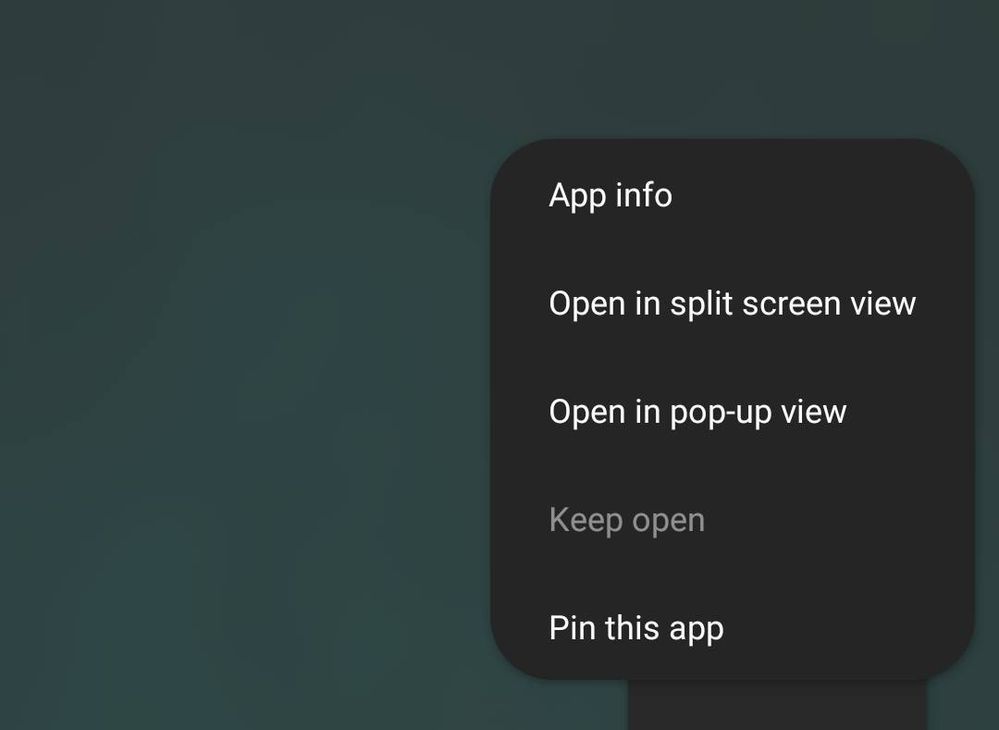
My keep open app feature is grayed out by the system and i tried to fix it different ways. But it now worked can you please someone give me advise how to fix it??
There's no official answer to this problem 😕. Wiping cache partition, resetting app preferences may not work.
*Below solutions are grab from the Internet and I'm not responsible for them.
Solution 1: Go to Apps > Configure apps > Battery optimization > All apps. Find the apps you are seeing this problem with and disable them. If you want to make sure that an app keeps running in the background, you can “lock” the app. Open the app. Then launch the Recent apps page. Tap the app icon and select “keep open for quick launching.” Once done, you can remove it by tapping on the lock icon at the bottom right of the app on the Recent apps page. There is a limitation that how many apps you can keep running in the background.
Solution 2: Setting > Biometrics and security > Other security settings > Pin window. These features to avoid app close. Just the same as the quick launch.
Solution 3: You had already used to keep open for some app. Stop keep open for that app and then you can keep open for another.
hey guys, ive had this problem and tried to search my apps including Office (microsoft's) app and found nothing, until now.
so i opened a certain excel file on Office app, turned out the file is opened in another Office app window/tab (when you open recent apps on your phone, there'll be two Office tabs, one for the Office home page, the other one for the said file). and it turned out that i chose "keep open" on the Office file tab, not the Office homepage tab (which is the one that showed up when i opened the app earlier looking for what app is kept open), and somehow my phone killed/closed the said tab after i choose close all recent tabs even though it was kept open.
On my mobile "keep open" does work but only for one app. On my tab with lower specs the option is named "lock app" and works with multiple apps.
Both devices are samsung and have similar function but the new device can't lock more than one app.
The worse thing is that after the UI 4.1 update, "keep open" disables itself in about 24 hours.I use WhatsApp on keep open to immediately recieve messages but this update caused WhatsApp to stop.
I didn't see anyone report a similar issue so I asked.Also, battery optimisation settings seem to have just disappeared
I recently bought a S21 FE and have the same issue, I can only keep open one app, but I need more.
Every time I turn off the screen my app gets killed or put in standby when I not check "keep open", f.e. when I don't do it for WhatsApp, i get messages few minutes later when the screen is turned off.

nipoo
★
03-14-2021 01:48 AM
in
*Below solutions are grab from the Internet and I'm not responsible for them.
Solution 1: Go to Apps > Configure apps > Battery optimization > All apps. Find the apps you are seeing this problem with and disable them. If you want to make sure that an app keeps running in the background, you can “lock” the app. Open the app. Then launch the Recent apps page. Tap the app icon and select “keep open for quick launching.” Once done, you can remove it by tapping on the lock icon at the bottom right of the app on the Recent apps page. There is a limitation that how many apps you can keep running in the background.
Solution 2: Setting > Biometrics and security > Other security settings > Pin window. These features to avoid app close. Just the same as the quick launch.
Solution 3: You had already used to keep open for some app. Stop keep open for that app and then you can keep open for another.
navod
Active Level 3
03-14-2021 03:24 AM
in
I saw this also in some website. but 1st solution is not working. 2nd one is a alternative feature for keep open. but it's not aqurate as a keep open
LSD321
Beginner Level 2
10-15-2021 08:10 AM
in
How do you find the app set to keep Open when no apps are kept open or you cant find
0 likes
Shubam12
Active Level 1
03-22-2024 05:53 AM
in
try removing it from sleepinγor deep sleeping apps
0 likes
MaxFactor
Beginner Level 2
10-5-2021 09:40 PM
in
Most probably you already had another app kept open in background, and you can have only one at time...
0 likes
zumabbar
Active Level 1
12-22-2021 03:11 AM
in
hey guys, ive had this problem and tried to search my apps including Office (microsoft's) app and found nothing, until now.
so i opened a certain excel file on Office app, turned out the file is opened in another Office app window/tab (when you open recent apps on your phone, there'll be two Office tabs, one for the Office home page, the other one for the said file). and it turned out that i chose "keep open" on the Office file tab, not the Office homepage tab (which is the one that showed up when i opened the app earlier looking for what app is kept open), and somehow my phone killed/closed the said tab after i choose close all recent tabs even though it was kept open.
i hope this may help.
0 likes
Members_2pL5GsX
Beginner Level 2
04-7-2022 03:45 PM
in
On my mobile "keep open" does work but only for one app. On my tab with lower specs the option is named "lock app" and works with multiple apps.
Both devices are samsung and have similar function but the new device can't lock more than one app.
The worse thing is that after the UI 4.1 update, "keep open" disables itself in about 24 hours.I use WhatsApp on keep open to immediately recieve messages but this update caused WhatsApp to stop.
I didn't see anyone report a similar issue so I asked.Also, battery optimisation settings seem to have just disappeared
Darkestnoir
Beginner Level 2
08-2-2022 12:54 PM
in
I recently bought a S21 FE and have the same issue, I can only keep open one app, but I need more.
Every time I turn off the screen my app gets killed or put in standby when I not check "keep open", f.e. when I don't do it for WhatsApp, i get messages few minutes later when the screen is turned off.
Same issue with other apps, I already tried to disable all battery saving stuff mentioned here: https://dontkillmyapp.com/samsung
My friend told me that this feature worked fine on release of his S10, but now it's broken for him too.
My old LineageOS device had none of this issues...
OneUI 4.1, Android 12, Google security patch 07.22
0 likes
r20042004
Beginner Level 2
10-26-2023 01:34 PM
in
There is an app
1.Open all applications contained in the device
2.Close all applications
0 likes