
title:

DO NOT UPDATE ONE UI8 UNLESS...

(Post creation time:  

1 year ago

)

1774 Views

A

AskuBusku

Active Level 5

last edited


1 year ago


in

 
Guys as you all already know, samsung has started to roll out the one ui 8. I havealready updated and didn't notice any unusual things until today morning. 
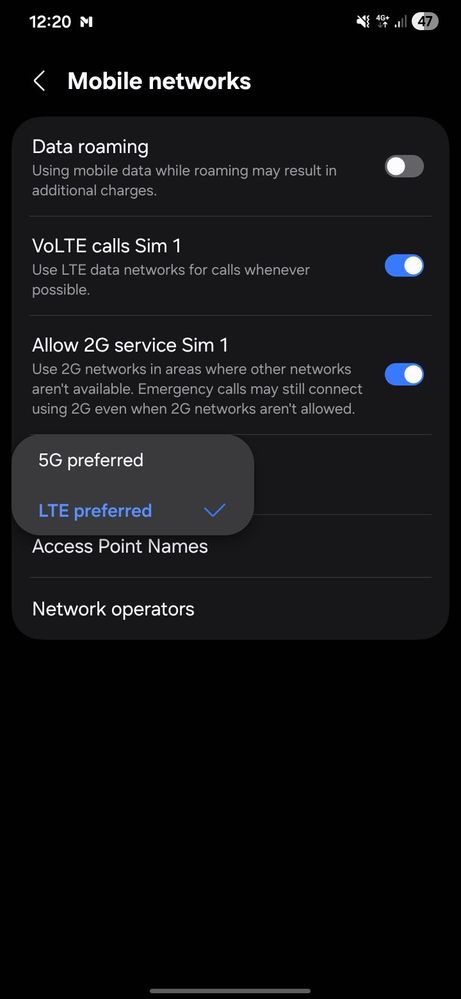
Guys previously samsung had an option to select network modes like , 3g, 4g, or auto Mode. Which was really helpful when we are going to rural or village areas where the network issues happen frequently. After the one ui8 samsung removed the option to change 3g. Its very disappointing to me because im playing pubg with 3g only mode. Because some of the areas in srilanka only have 3g network. 

If you're a gamer or living in unstable netwroked areas, please wait till they fix this. I don't think they are going to bring back this feature again. What are you guys thinking or ur opinions on this?

image


    • J

      Janith842

      Expert Level 5

      1 year ago


      in

       
      You have 3G Preferred right

      0 likes

      J

      Janith842

      Expert Level 5

      1 year ago


      in

       
      Yes it is a must. But when we consider UAE there must be very few and low 3G networks compared to Sri Lanka. So that could be a reason that they have removed it. On the SLK version its there. Just check through another S24 Ultra user with UAE version whether this option is there Bro. I think after considering regions they have removed it to specific regions.
      A

      AskuBusku

      Active Level 5

      1 year ago


      in

       
      Yeah. Thanks for the clarification brother. 🙏
      J

      Janith842

      Expert Level 5

      1 year ago


      in

       
      Okay Bro. Your welcome 😊
    • J

      JustMay

      Active Level 7

      1 year ago


      in

       
      I mean LTE preferred means they just try to look for LTE (4G) but if it couldn't find 4G, it will just switch to 3G.
      It is NOT LTE only
      It is LTE PREFERRED
      J

      JustMay

      Active Level 7

      1 year ago


      in

       
      You're right, I checked myself forcing my phone to connect 3G while I set it to 5G preferred and it didn't work.
      Anyway there is a workaround if you wud like to.
      Download Shortcut Maker > Activities > Search for "phone info" > Try this shortcut

      Scroll down and click on the path I mentioned on ss,
      Set it to LTE/WCDMA for 4G/3G auto
      Or WCDMA only for 3G only

      Create a shortcut using the shortcut maker app for phone info if you regularly wanna change that. 1759032825873.jpg
      A

      AskuBusku

      Active Level 5

      1 year ago


      in

       
      Thanks bud. I'm gonna try it

      0 likes

      J

      JustMay

      Active Level 7

      1 year ago


      in

       
      Sure lmk how it goes

      0 likes